MCP Connectors by Databox


Launched on September 7th, 2026

Launched on July 27th, 2026

Launched on June 30th, 2026

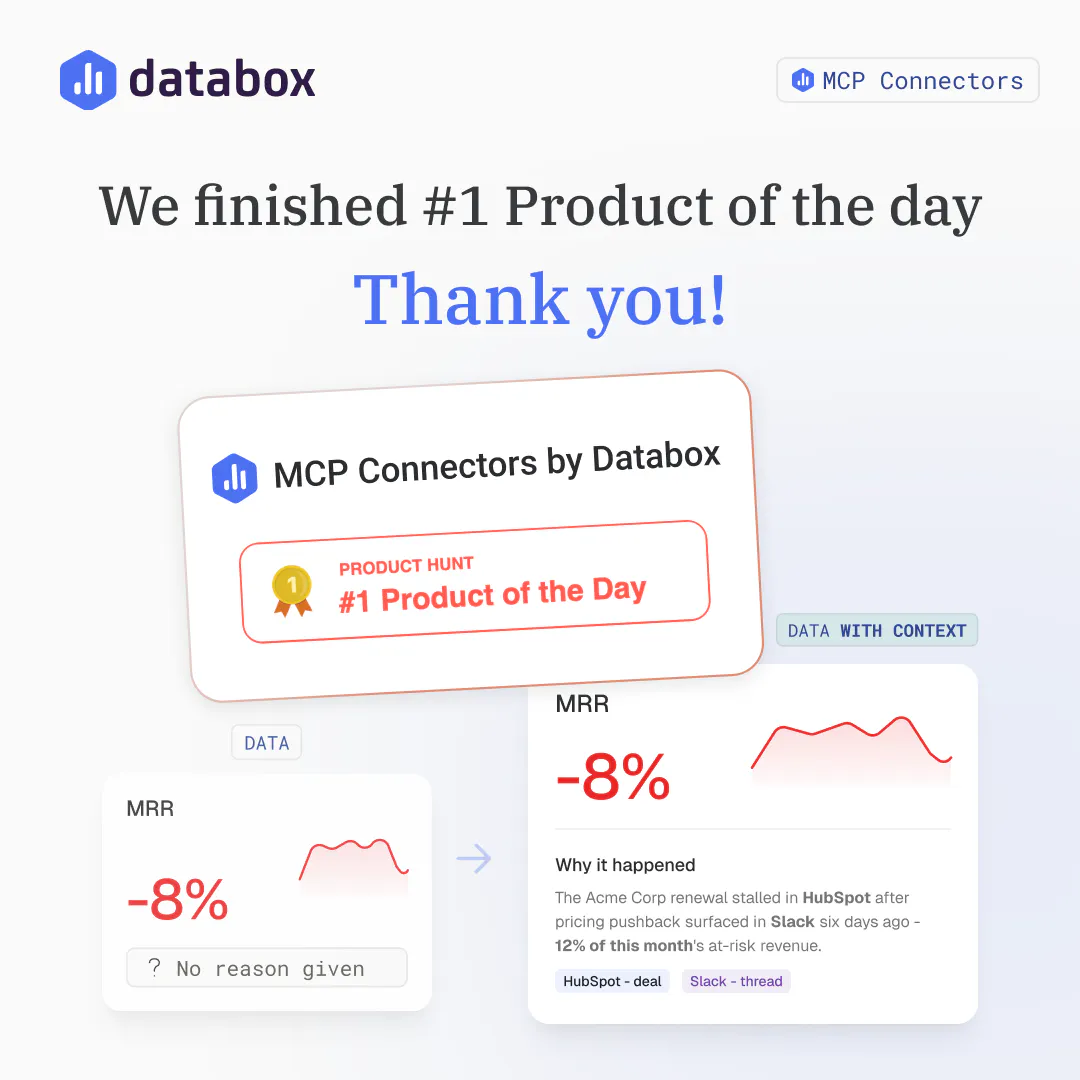
Yesterday (September 28th), we launched MCP Connectors by Databox, and you pushed it all the way to #1 Product of the Day. It's our first #1, and we couldn't have done it without you.

Huge thanks to the Databox team and to everyone here who upvoted, commented, asked the hard questions, and connected their first tool. You helped us confirm something we'd suspected for a while: knowing that a number moved isn't enough. People want to know why.
A few things we heard loud and clear:
Genie, our AI Analyst, can already tell you what changed in your numbers. It's never been able to tell you why, because the why almost never lives in Databox.
Revenue drops 8%, and the real reason is a stalled deal in HubSpot, a pricing objection buried in a Slack thread, or a support ticket nobody flagged. Right now, finding that out means leaving your dashboard, opening three other tools, and piecing it together yourself. Every time.
Next week, we're launching MCP Connectors. Connect your CRM, Slack, support desk, or any MCP server, and your AI Analyst gets that same context, right inside the conversation. Ask why a number moved, and it points to the actual deal or thread behind it, not just the number.
https://www.producthunt.com/prod...
Last week I asked here where you go to find out why a number moved. The answers were almost all the same: the CRM, Slack, the support desk, Linear, a doc somewhere. Anywhere except the dashboard.
That's what we launched today.
With MCP Connectors, you connect the tools your team already uses, and Genie, our AI Analyst, uses them to answer your questions. Ask why signups dropped 18%, and it checks Linear, finds the signup form that shipped Tuesday and breaks on Safari, and ties it to the drop. You get the number and the reason in one answer.
Aggregating metrics across scattered development stacks, backend databases, and marketing pipelines usually requires building custom internal dashboards or writing complex script loops. Databox solves this infrastructure friction by serving as a unified analytics layer with robust API ingestion capabilities. The recent addition of developer focused AI utilities like their MCP server allows creators to query live operational data directly from their development environments or LLM tools, transforming passive charts into an interactive command interface.
The platform handles standard API connections cleanly, but processing highly unconventional or custom structured raw JSON objects sometimes requires unnecessary data formatting loops before ingestion. Additionally, the data refresh latency constraints on the entry level infrastructure tiers can slow down immediate real time verification of newly deployed event handlers. Lowering the refresh interval restrictions for sandboxed testing setups would significantly improve the developer onboarding experience.
I evaluated heavy enterprise business intelligence tools like Tableau or PowerBI alongside lightweight custom setups using Grafana connected directly to raw database instances. Enterprise platforms demand massive data engineering overhead and complex setup pipelines, while basic open source visualization tools lack native out of the box connectors for standard marketing and payment metrics. I chose Databox because it bridges raw backend data tracking with high level metric visibility efficiently.
People often describe reporting as one of the biggest headaches as growth leaders, and while most platforms' native reporting is lacking, it's not really about the reports. It's actually about what we use reports for; it's what we do with that information, and Databox's most recent updates are a game-changer. You can chat with your data inside Databox and get accurate insights instantly.
I can't think of anything. The recent updates are phenomenal.
With Databox you can trust that the data is accurate, which LLMs still can't seem to get right, and there is no other tool that has this level of sophistication when it comes to data visualization. Other dashboard tools are cumbersome to work with and require a lot of labor hours to set up.
Hi Tracy, thank you so much for this!
You're right that reports aren't the goal. What matters is what you do with the numbers. That's exactly why we built the AI Analyst: ask a question and get an answer you can act on, without digging through dashboards.
Glad the MCP clicked for you too. Being able to bring accurate Databox data into Claude or any other AI tool is a big part of where we're headed.
If you have ideas for what we should build next, I'd love to hear them. Thanks again for the support!
We've been using Databox as the reporting layer for our agentic RevOps work, and the MCP server has been a big unlock, it lets Claude pull live metrics directly instead of us screenshotting dashboards. Combined with the skills we've built on top, it's made our reporting workflows feel a lot more automated and agentic. Excited to see where Databox takes the AI direction.
Right now the MCP server is read-only for pulling data out, but there's no way to generate or build Databox reports and databoards directly from Claude through the MCP. Being able to create reports programmatically via MCP, not just query metrics, would make the agentic workflow complete.
We considered just using HubSpot with Claude Cowork or Claude Code directly, but Databox gave us a cleaner cross-client reporting layer to build on top of, plus an easy way to plug AI agents into that data.
Thanks for this, Keith, really glad to hear Databox is holding up as the reporting layer for agentic RevOps, and that combining it with the skills you've built has made things feel automated end to end.
You're right on the gap: today the MCP server is built for ingesting and querying data, not for creating dashboards or reports. That's a natural next step for making the agentic loop complete, and it's a useful signal for us on where to take MCP next.
Appreciate you laying out the HubSpot/Claude Cowork comparison too, good to know what made Databox the better fit as the reporting layer.
Hi Product Hunt! 👋
I'm Pete from Databox. Today we're launching MCP connectors for Genie, our AI Analyst.
Genie analyzes your live metrics and tells you what changed. But a metric alone rarely explains what's going on.
Trial signups dip, and the reason is a pricing change your team shipped two weeks ago. Traffic jumps, and behind it is an influencer mentioning you on reddit that none of your analytics can track. The numbers alone can't tell you why something happened.
The deal context in your CRM, the tickets in your support desk, the tasks in your project tool and the Slack messages where your team discussed that unexpected Reddit mention. That's the explanation, and it's spread across the tools where work and conversations happen.
That context is what separates a generic report from a useful one. Any AI can look at a chart and tell you a number fell 12%. Knowing that two big deals slipped because you didn't anticipate a more extensive legal review, support tickets spiked after a feature release, and the reasons your ad strategy changed mid-month is what makes a report useful and actionable. Until now, getting that kind of answer meant someone gathering the context by hand, every time.
MCP connectors give Genie that context. Connect your tools, and Genie pulls from them during analysis, so its answers reflect what's actually happening in your business.
In addition to automating reporting, you can also use Databox's new MCP connectors to execute actions in other tools, based on your analysis. Want to shut down an ad campaign once it stops performing? No problem. Just write a skill in Databox that instructs your ad platform to shut down a campaign once frequency hits 5 and conversion rate drops below 1%. Want to update content on a website page after it stops getting search traffic? Easy. Want to create a task for your sales team if they have too many deals open without a next step? Even easier.
How it works:
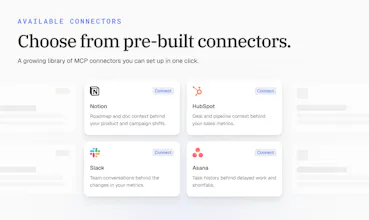
One-click connectors: HubSpot, Slack, Notion, Linear, Mixpanel, Semrush, Klaviyo, Ahrefs, and more, with 10+ available at launch
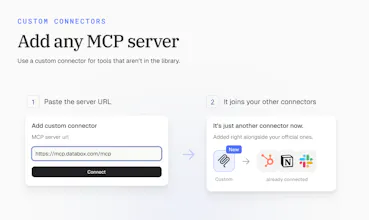
Custom connectors: add any MCP server by URL, with OAuth, API key, or bearer token support
Permissions you control: set every tool to always allow, needs approval, or blocked, so Genie only acts where you've said it can
Skills & Routines: Write skills that pull data from specific integrations and context from specific MCP servers, automate actions based on the analysis. Run it completely autonomously using Routines.
MCP connectors are live today: https://databox.com/
If there's a tool you want Genie connected to, tell us below.
Thanks for checking it out 🙏
@pc4media The one-click connectors with HubSpot, Slack, Notion, and Linear sound really useful. Having all that context in one analysis could save a lot of manual work.
@pc4media Many congratulations Ziga, Peter, Davorin and team on another great launch! 😊
How I met the makers?
I met the makers through a hunter friend in March. This is our seventh launch together in the past seven months.
What is the new launch about?
Databox is an agentic analytics platform that brings together your business performance data and gives your AI Analyst, Genie, the context behind every metric.
With MCP Connectors, it can pull information from tools like HubSpot, Slack, Notion, Linear, Mixpanel, Semrush, and Klaviyo, so when a number changes, you do not just see what happened, but also why it happened. You can even automate actions based on the insights through Skills and Routines.
Why I endorse it?
I endorse this launch because it solves a very real problem: dashboards often tell you that a metric moved, but the actual explanation lives in your CRM, support desk, project tools, or team conversations.
@Databox connects those dots automatically, saves teams from manual reporting, and makes AI-generated insights more grounded, actionable, and useful.
The team’s consistent shipping cadence and focus on practical AI workflows make this a standout launch. ❤️
@curiouskitty Great question. Here's how we approached it.
What shipped first. We started from two signals. The first was which tools our customers already connect to Databox as data sources, since that's where the metrics come from. The second was where the "why" behind those metrics usually lives: team chat, docs, project tools, email, and calendars. A connector made the first list only if it could explain a real metric change. For example, it should show the actual ad creative behind a CPC shift or the deal notes behind a revenue drop, not just repeat numbers we already have.
Our bar for good enough:
Vendor-built and vendor-hosted. Every official connector uses the vendor's own remote MCP server. We don't maintain community forks.
Standard, reliable auth. Almost all use OAuth, so connecting takes one click and a sign-in. Servers that need self-hosting or a custom deployment stay out of the official list.
Tools that add context. We rated each server on whether its tools actually help explain a number. Some servers only return the same numbers we already ingest, with no access to the content behind them. We ranked those lower even when the tool is popular.
Granular tools. Every tool is listed separately, and permissions work tool by tool with one main setting per connector. That only works if the server's tools are split sensibly.
Everything else goes through custom connectors. The MCP ecosystem is moving too fast for any official list to keep up. Custom connectors take any server URL with OAuth, API key, or bearer token auth. They go through the same schema parsing and the same per-tool permissions, so the long tail works on day one. Tools that people keep adding as custom connectors are strong candidates for the official list.
Routines and skills are nice on their own, they give the power to anyone using them. But pairing them with MCPs inside Genie, AI Analyst? Sweet :) Having MCPs to provide more context for a report (e.g. a CRM note) so I can better understand why the numbers changed is super helpful.
Now all three parts come together into one system that can help me get better results and insights. Can't wait to also get the agents in the mix, I've heard they're coming soon.
@mateja_verlic_bruncic Thanks, Mateja! That's the part we're most excited about too. Skills tell Genie, our AI Analyst, how to do the work. Routines make sure it happens on schedule. Connectors bring in the context behind the numbers, like that CRM note, and let it act on what it finds. Put together, a weekly report doesn't just show what changed. It explains why and can help you do something about it.
Agents are next, and they build on all three. Stay tuned.
@shivam_kushwaha16 Both, and that's how it should be. We don't think you should trust an answer you can't check.
That's why the AI Analyst shows its work. When it explains why a number moved, it points to the actual deal, ticket, or conversation behind it, so you can open the source and see for yourself. The difference is you're checking an answer instead of building one from scratch across five tools.
Trust comes from being right a few times in a row. Showing the source makes that easy to judge.
@zigapotocnik Exactly this is what makes ai useful for data work the ability to check the source instead of just trusting the answer
Do you have mechanisms for provenance checking facts/numbers via some kind of multi-agent checks or "citing"? How do you make sure that there are no hallucinated results?
(i assumed that this might be the problem you have, but depending on structure of your soft ig you might even avoid this entirely with retrieval-based approach over generated (AI just needed to find and point to smth in the data instead of "read and then rewrite in the return response")
Congrats on the launch!!
@alp_adur Thanks, Latif, and great question. You're right that the retrieval side does most of the work here.
The numbers aren't generated. When Genie, our AI Analyst, answers a metric question, it queries your actual Databox data sources connected or uses correct MCP tool calls and works from what comes back. It doesn't recall or estimate numbers. Connectors work the same way. The context behind a number comes from live tool calls to your connected tools, so the AI Analyst is pointing at a real deal, ticket, or thread. It isn't writing its own version of what probably happened.
It also points you to the source it used, so you can open it and check. We don't claim hallucinations are impossible. No one building on LLMs honestly can. But grounding every answer in retrieved data and showing where it came from is how we keep it tight, and how you can catch it when something's off.
Jakob, on the approval default: how does that work for a Routine running on a schedule, when nobody's in the chat to say OK? I run a few agents unattended on a Mac Mini and that's the case I'd worry about. A routine waiting on approval and a routine that found nothing to do look much the same from the outside, unless one of them says so.
Hey@dalemooney, a routine never waits for an OK. It only gets the MCP tools you've set to "always approve". Anything on "ask" or "not allowed" isn't passed to Genie at all, so it doesn't even know that tool exists and works with what it has. Routines are also instructed that nobody's watching: finish the job on your own, or end the run by saying why you couldn't get it 100% done. So "stuck" and "nothing to do" never look the same.
@grega_cej Hiding the tool rather than making it wait is neat, there's nothing to get stuck on. When a routine does end early, does its note say which held back tool it would have needed? That's the bit I'd want so I know what to switch on.
Hey PH, I am Jakob, one of the engineers who worked on MCP connectors.
The idea is simple: Genie already knows your number, and now it can check the tools where the whole story behind them lives, eg. your CRM, Slack, or ad account. It can also act there on your behalf, like updating a deal or posting a message.
Since that means AI touching real tools, we put a lot of care into permissions. Every single action can be set to always allow, needs approval, or blocked. Anything that can change something asks you first by default, and Genie waits for your OK before running it.
And if any tool you use isn't in our predefined catalog, you can still connect it yourself. Many apps now offer MCP connection link, so you just paste that in and Genie picks up that functionality. Because that link could point anywhere, we check it carefully before connecting.
Happy to answer any technical questions :) Which tool is the first you would trust Genie to use?


Databox
Thanks for the detailed review, Ulykbek. Glad the MCP server is helping you query live data straight from your dev environment, that's exactly the workflow we built it for.
On the JSON formatting friction: fair feedback, unconventional payloads shouldn't need manual cleanup before ingestion. We're looking at ways to handle that more natively.
On refresh intervals: sync frequency does scale with plan tier, and some of that comes down to rate limits on the data provider's side, not just us. That said, we hear you on real-time verification during testing, and it's worth us looking at how sandboxed/dev setups are handled specifically.
Thanks again for the detailed feedback, it helps us prioritize the right things.