Launching today

ngrok AI Gateway
One private gateway for every AI model
649 followers
One private gateway for every AI model
649 followers
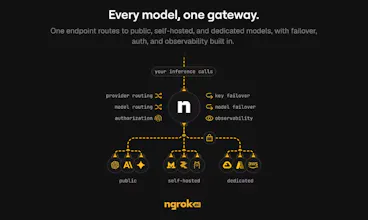
ngrok AI Gateway provides one hosted gateway for every model: public providers, custom endpoints, and the models you run yourself. Use one key and one URL to route across OpenAI, Anthropic, and self-hosted models with observability, access control, and fallbacks built in. Your private models connect through ngrok’s network, so they sit beside hosted providers without being exposed to the public internet.






Payment Required
Launch Team / Built With


Ngrok
Hey Product Hunt 👋
I'm Niji, a product manager at ngrok. Today we're launching ngrok.ai, ngrok's AI Gateway.
For years, ngrok has helped developers connect their applications and services in minutes instead of days.
As I started building with AI, I ran into similar infrastructure problems at the application layer.
An application might start with OpenAI, then Claude for another use case. As newer, faster, or more affordable models became available, I would create more accounts and update my code just to try them. Eventually, more specialized needs would lead me to run fine-tuned or task-specific models on my laptop, private GPUs, or internal cloud infrastructure.
Before long, I was managing multiple gateways and SDKs, sharing provider keys across configuration files and vaults, checking usage in several dashboards, maintaining complicated fallback logic, and accidentally exposing models that were supposed to remain private.
If any of this sounds familiar, it is why we built ngrok.ai. It gives you one hosted gateway for managing models across providers, private infrastructure, and your own hardware.
One URL for every model
Getting started is simple. Point your SDK at https://gateway.ngrok.ai with your ngrok.ai access key, and begin routing requests to public providers, custom endpoints, and models you run yourself.
It works with all popular SDKs like OpenAI, Anthropic, and Vercel AI, so you can easily swap models and providers without rebuilding your entire application.
Aside from being a hosted AI Gateway, we enable you to:
Connect self-hosted models privately
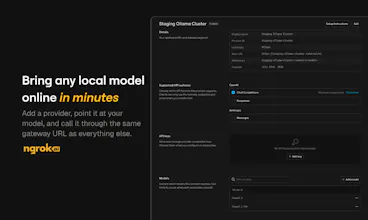
Route to a model running on your laptop, local GPU, or private network without complex networking, opening inbound ports or dealing with IPs.
Build fallbacks into the gateway
Define a list of models and when a model or key fails, we will make another attempt or route the request to a healthy alternative.
Use credits to make requests
Leverage ngrok.ai to make requests against OpenAI, Anthropic, z.ai and more without having to create your own accounts with each provider.
Use your existing provider keys
Don't want to use our accounts? No worries, you can bring your own OpenAI, Anthropic, or custom provider keys that you already.
Control access by application or developer
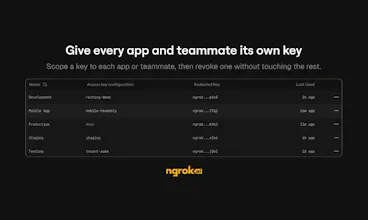
Create separate access keys and decide which providers and models each one is allowed to call, and which keys each model should use, whether ours or yours.
See usage across your entire model stack
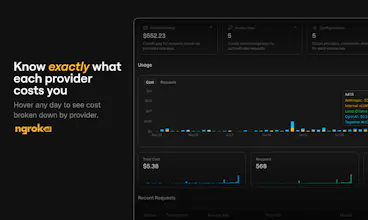
Track tokens, latency, errors, models, providers, and estimated cost in one place instead of piecing together several provider dashboards.
Manage everything through the dashboard or API
Set up gateways, keys, providers, access rules, and routing from your own tooling using our API or directly in the ngrok.ai dashboard.
Who we're building this for
ngrok.ai is for developers and platform teams that want the freedom to use the right model for each job without worrying about how to scale and maintain an ai gateway themselves and or taking on another infrastructure project every time their model strategy changes.
We're especially interested in hearing:
How are you routing between models today?
Are you running any models on your own infrastructure?
Which gateway features would make your AI stack easier to manage?
We'll be here throughout the launch to answer questions and hear what you think. Thanks for checking it out.
@nijikokun How do you see teams deciding when to route a request to a hosted model versus a self-hosted one, especially as cost, privacy, and latency tradeoffs change?
Ngrok
@swati_paliwal That’s a great question. From what I’ve seen, teams first decide whether self-hosting makes sense for the use case at all. That usually depends on how critical the model is to the product, whether it performs efficiently enough, whether the cost makes sense and whether the team can operate it and maintain its quality. From there, they set routing policies based on the request, such as sending sensitive, use-case specific or latency-sensitive workloads to self-hosted models and use hosted models for better quality, broader needs, or capacity needs.
Tabstack by Mozilla
@ngrok is so back.
If you've ever needed to share a local app or demo something live, there's one thing that strikes about this product. Developers love it. I mean millions of developers - look at this wall of love - including people at @GitHub, @OpenAI, @Vercel, and much, much more.
@cassidoo put it simply: "ngrok saves me so much time during development. What a tool."
pumped to see them back [on Product Hunt]. S/O ?makers, already looking for your future launches.
Vamah.ai
@cassidoo @fmerian ngrok has been core in my dev setup for a very long time to test real world app scenarios during development. one gateway for every hosted model sounds interesting.
Tabstack by Mozilla
@gokuljd lfg! if you get a chance to give ngrok.ai a spin, make sure to add your review here: producthunt.com/products/ngrok-ai-gateway/reviews/new
ngrok AI Gateway
@gokuljd Thanks so much for using ngrok over the long haul! If there's anything you'd like to see fixed or have us add (aside from this AI Gateway, of course!), I'd love to hear about it.
the fallback is the feature i would think hardest about, because for anything that produces text a fallback is a silent quality change.
if a code call falls back you find out, something breaks or the tests go red. if a customer facing reply falls back to a weaker model, nothing breaks. the reply still reads fine, it is just slightly worse, and you find out from a complaint two days later while looking at the wrong model in your logs. the gateway is the only component that knows which model actually answered, so i would want that on the response itself rather than only in a dashboard.
the other one is retries. a fallback triggered by a timeout is not the same as one triggered by an error, because on a timeout the first call may well have completed on the provider side. harmless for a plain completion, not harmless once a tool call is attached to it, which is most agent traffic now. does the gateway treat timeouts as retryable by default, and is there a way to mark a request as do not retry?
ngrok AI Gateway
@jernej_jan_kocica This is really great feedback.
For your first point—I've always found that responses from the APIs of public providers like OpenAI and Anthropic contain some kind of `model` key that you could build logic around in your apps. It'll get flagged in the dashboard, just like you asked for, but you could build some error handling/logs around what happens when that fallback model is the one that responds. We'll dig into this one some more and see if we can add some headers at the gateway your app could also consume.
On your second question, timeouts only trigger retries if you've specified fallback models though the `model` key. If there isn't one, you just get an error, which is kind of akin to marking it as do not retry. This does feel like something we should look into implementing as a very clear attribute of any provider setup.
@joel_hans2 both of those are good answers, thanks for actually digging in.
one refinement on the do not retry attribute: i would put it on the request rather than on the provider setup. whether a call is safe to retry depends on what the call does, not on where it goes. the same model at the same provider will serve an idempotent summarise in one code path and a tool calling turn in another, and if the flag lives on the provider config you end up duplicating the whole provider just to express that difference. a header on the request costs nothing and lets the caller say it, and the caller is the only one who knows.
the model header on the response is the one i would ship first though. it is the difference between debugging what you configured and debugging what actually happened.
What strikes me most is the self-hosted piece. I've run models on my own infrastructure before and connecting them through it's network instead of exposing a public endpoint solves a real security headache I've dealt with firsthand. That alone makes this worth testing on my end.
ngrok AI Gateway
@itohan_blessing_eigbadon Thanks for the comment! We have people interested in exactly what you're saying, production apps needing private connectivity to self-hosted inference, but we're also seeing a newer trend of people wanting that same simple infra for connecting their coding agents to self-hosted models, which is pretty dope. It's kinda the panacea if you care about software that's open, flexible, and "ownable."
We created a guide for Cursor, OpenCode, Pi, and Zed: https://ngrok.com/docs/ai-gateway/guides/use-with-coding-agents
Would love thoughts on what else we should cover!
ngrok AI Gateway
@itohan_blessing_eigbadon
a big factor that drove us (ngrok) to decide to build an AI Gateway is that we thought that by provided a hosted offering paired with our already widely adopted and battle tested tunnels/endpoints, we could give folks an easy way to securely connect any compute resources they have hosting local models, whether that's a bunch of small machines running on your desk like the mac mini, or other cloud based hosted compute environments. we're still hard at work making the existing features better / easier to use, and and adding new ones each week :)
I keep wondering about pricing at scale. One gateway is great in theory but does routing overhead add noticeable latency once you're pushing serious volume through it?
ngrok AI Gateway
@sana_silhah
we're looking into getting our performance benchmarks added alongside other publicly published ones, but from running those suites ourselves, the latency and time to first token / token throughput of our gateway is nearly tied with going directly to upstream providers (ex: anthropic). we try as much as possible to minimize added latency and processing overhead.
The option to connect self-hosted models without exposing them to the public internet caught my attention. Have you seen more teams using their own models recently, or are most customers still relying mainly on hosted providers?
Ngrok
@sagar_deore good question, honestly a mix of both. However, I have definitely seen a rise in hosted models more as of late with all of the local advancements that are happening. At the least there is always interest in experimentation as new models come out.
ngrok AI Gateway
@sagar_deore
we've definitely seen an interest in local models for a variety of reasons. some folks are looking for cost savings when they don't need the bleeding edge performance of frontier models, others have different concerns such as control over the lifecycle of sensitive data. our goal is to make a single unified place to let users easily access whatever kind of inference they need to, and take as much friction and pain out of the experience of working with LLMs as possible.
Serand
How easy is it to switch traffic between providers if one model has highest latency or goes offline?
Tabstack by Mozilla
good q. @ngrok AI Gateway is designed for automatic failover. if one provider/model fails, times out, returns an HTTP error, or has a connection issue, the gateway automatically tries the next candidate instead of requiring your app to switch providers itself.
read the docs for more details on how it works: ngrok.com/docs/ai-gateway/how-it-works
hope it clarifies!
ngrok AI Gateway
@anthony_adams_ Thanks for the question! Well, I think it's pretty darn easy. @fmerian got the gist of it, but here's a bit more specificity. In your app (I'll use a JS example), you already specify a model, but now you can add a models key to list the order in which you'd like to fall back to other providers and models.
In this case, the AI Gateway will try Fable 5 first, then retry the same request with Luna if Fable isn't working (kinda like right now, with Anthropic's API on the struggle bus). Here's the doc: https://ngrok.com/docs/ai-gateway/guides/configure-fallback-models
You can also fail over between providers or models if your key stop working, like if you run out of precious, precious credit with one: https://ngrok.com/docs/ai-gateway/guides/key-selection-failover
ngrok AI Gateway
@anthony_adams_
we've got options to per model timeouts to limit how long you wait for one of them to respond before moving on to the next one, options to configure fallback behaviour with models and/or keys if you're bringing your own keys.
on our roadmap is a way to let users define their own model groups or pick an automatic group of models by category. for example:
- the most responsive models
- models with the highest fidelity output
- models good for a specific task such as programming / research / etc.
if you've got a particular pain that's not being solved or a feature that you'd like to see added, we'd love the feedback.