I joined Tabstack four weeks ago. The fastest way I know to understand a product is to build something real with it not tutorials, not toy examples, but an actual app that uses the API under real conditions and breaks in interesting ways.
So I built Rival. Open-source competitive intelligence dashboard that tracks competitor pricing, changelogs, careers, docs, and GitHub signals, diffs what changes, and generates intelligence briefs automatically.
Tabstack by Mozilla
There's one piece of code that gets rebuilt at almost every company: the layer that turns a web page into data you can actually use. Fetch, parse, clean, pipe it through an LLM, force it into the shape you wanted. Nobody wants to own it, and it breaks the second a page changes.
That's the thing we deleted.
With Structured Extraction you define the schema, pass a URL, and get JSON back that matches. The reasoning happens inside the call, so there's no parsing code and no second LLM step bolted on after. `extract` pulls the fields you define. `generate` adds instructions on top when you want a reasoned answer, not just raw values.
It's built inside Mozilla, which matters here: the pages we fetch and the data you send are never sold or used to train models.
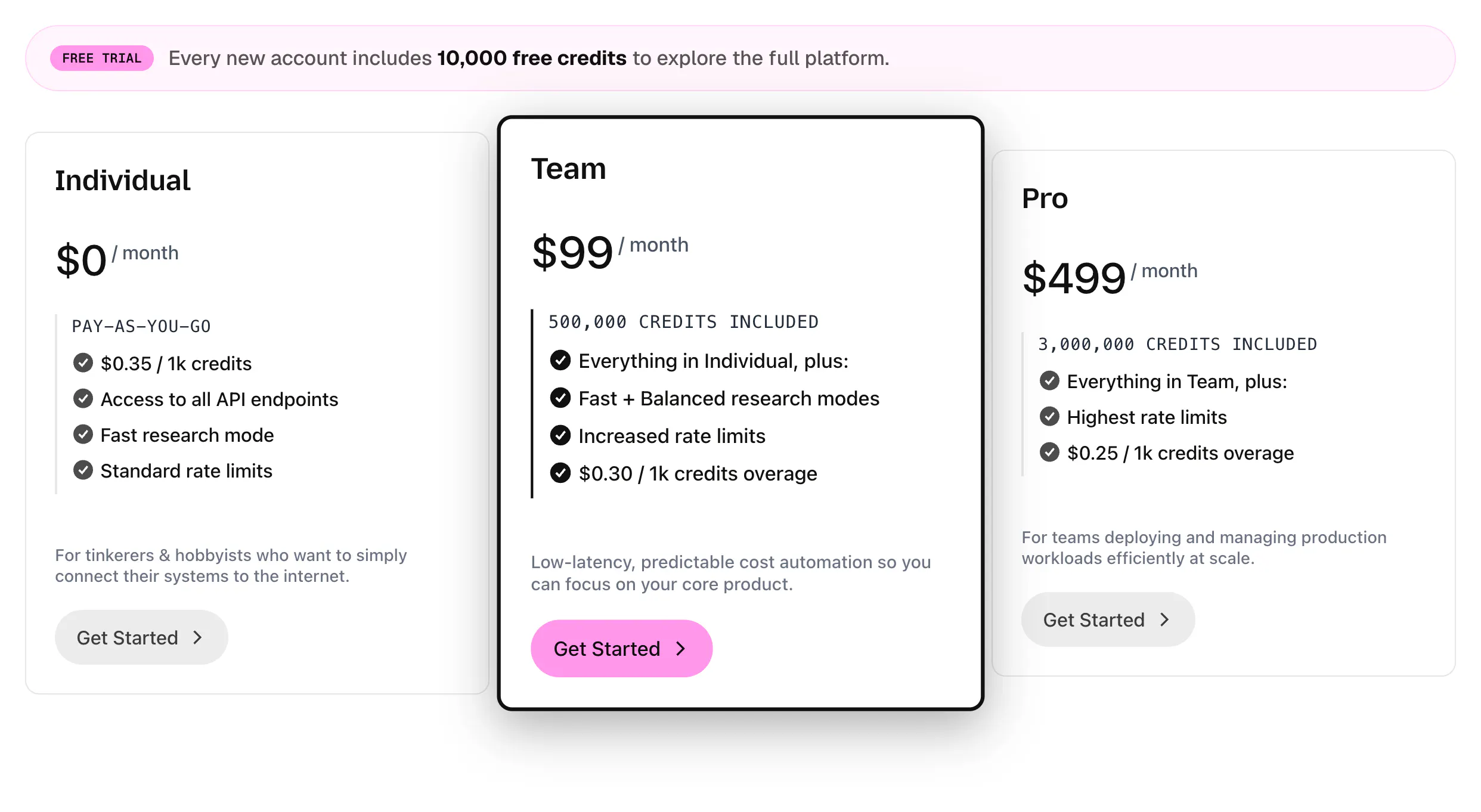
Get started for free with 10,000 credits →
I'd love to know what you're stuck extracting right now: the messy site, the SPA that fights you, the schema that never holds. Drop your extraction struggle below.
Tabstack by Mozilla
Looking forward to seeing what you're building with @Tabstack by Mozilla!
ZapDigits
This is amazing. I wanna build something around this. The browser automation part seems like a game changer. One question: I see there is 10k credits on the free trial . Is there a time limit?
Tabstack by Mozilla
ZapDigits
@tessak22 Amazing, will be working on it coming days. let's keep in touch.
Tabstack by Mozilla
@tessak22 @malithmcrdev looking forward to it!
Tabstack by Mozilla
@malithmcrdev absolutely! Let me know what you end up building, I'd love to hear about it.
Tabstack by Mozilla
@malithmcrdev thanks for the continuous support, Malith! let's spread the word on LinkedIn, repost this
The structured output part is what stood out to me. Getting data is usually easy, keeping it reliable when websites change is the hard part. How often schemas need to be adjusted in real world use?
Tabstack by Mozilla
@busra_seker1 exactly. Reliability is where Tabstack shines in that regard.
No-scraper structured extraction solves a real pain. The challenge has always been handling dynamic content and lazy-load patterns reliably at scale. Running a full browser context per request is expensive, but lighter HTML parsing doesn't catch enough on modern SPAs. How do you handle JS-heavy pages? Do you spin up a real browser for every extraction or have a tiered approach to keep costs down?
Tabstack by Mozilla
@anand_thakkar1 This is exactly the tradeoff we built around: no, it's not a real browser on every request. Extract and generate give you three effort levels, and you pick the tier:
min: plain HTTP fetch, no JS. Lowest cost and latency, for static or server-rendered pages.
standard (default): balanced handling that covers most pages without full browser rendering.
max: full browser render that executes JS and handles lazy-loaded content. For known heavy SPAs.
So a real browser is the heaviest tier, used for the pages that need it rather than the default for every call. Responses are cached too, so repeat requests for the same page don't re-fetch (unless you use nocache).
Honest tradeoff: the lighter tiers are faster and cheaper but can miss content on the most dynamic pages, which is exactly when you reach for max.
DIY UX Test
The "no scraper to maintain" pitch lands for anyone who's watched selectors break every time a site reships its markup. Does Tabstack lean on the rendered DOM or a model to infer structure — and how does it hold up on pages that lazy-load behind scroll?
Tabstack by Mozilla
@oleksii_sekundant Tabstack uses the rendered DOM plus a model, not selectors. For JS-heavy pages it renders the page in a real headless browser, then a model maps the rendered content to the JSON schema you define. The part that solves your selector pain: extraction is schema-driven, not selector-driven. You describe the meaning of the data you want, not a DOM path, so when a site reships its markup there is no selector to break. The model re-infers structure from the new render against the same schema.
On lazy-load behind scroll: the rendered path handles it. After navigation it waits for the network to go idle and for JS to render, then scrolls the page in passes (with short pauses) to trigger lazy-loaded content before it reads the DOM. So data that only appears as you scroll down gets pulled in.
The honest boundary: that scroll pass is bounded, so it covers typical lazy-load-on-scroll, not endless infinite feeds. For unbounded scrolling, or "scroll, then click or interact, then read" flows, the automate endpoint drives a real browser and can scroll as a deliberate step, then return structured output.
Warmup Inbox
Do you plan to implement some user agent rotation?
For now, all requests are signed with the same user agent: Mozilla-Tabstack/1.0 (+https://tabstack.ai)
Tabstack by Mozilla
@fabian_maume Good catch, and the single agent string is intentional. Every request identifies as Mozilla-Tabstack/1.0 with a contact URL on purpose, so site operators can see exactly who is accessing them and reach us directly. Identifiable, predictable access is the posture we want right now. If there's a specific case where the single UA is blocking a legitimate extraction for you, tell us more about it, that's genuinely useful for how we prioritize.