

iPhotron v6.6.6 — A local-first photo library with People, face clusters, maps, and multilingual UI

OliverZhaohaibin/iPhotron-LocalPhotoAlbumManager: A macOS Photos–style photo manager for Windows — folder-native, non-destructive, with HEIC/MOV Live Photo, map view, and GPU-accelerated browsing.
We’re excited to share the latest release of iPhotron, a desktop photo library app focused on local-first browsing, organization, People discovery, albums, maps, and metadata workflows.
This release brings together several major improvements across recent versions: automatic People face clustering, multi-person groups, richer location workflows, improved map runtime behavior, large-library performance work, and a new internationalized UI with English, German, and Simplified Chinese support.
What’s new
👥 People, Face Clusters & Groups
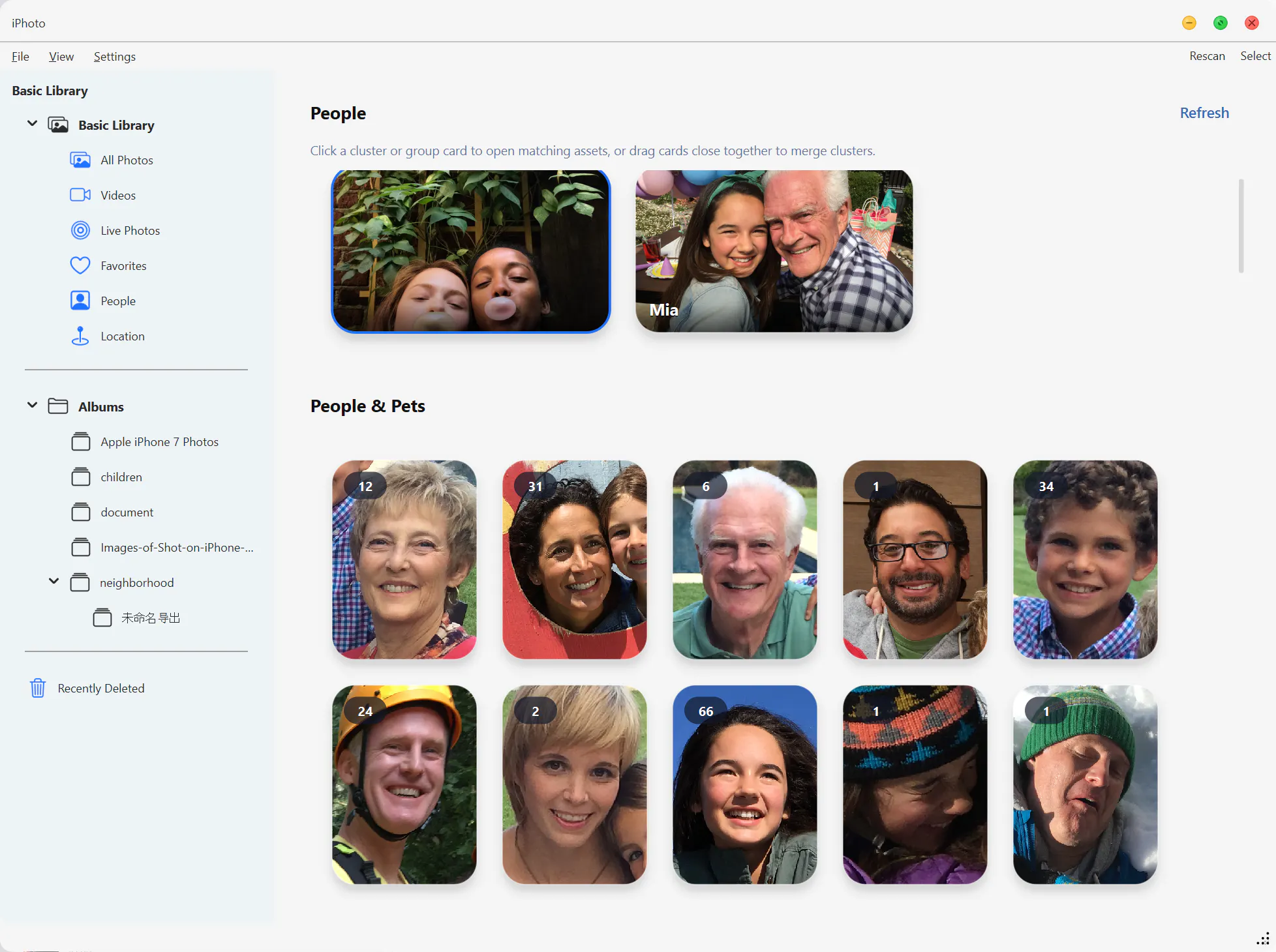
iPhotron can now scan your photo library for faces, generate face thumbnails, build embeddings, and cluster them into persistent People cards.
You can name people, merge duplicate clusters, hide or unhide people, choose covers, reorder cards, and create People groups for photos where multiple selected people appear together.
People state is designed to survive rescans and reclustering, so names, covers, ordering, hidden flags, and group decisions are preserved as your library evolves.
🗺️ Maps & Location Workflows
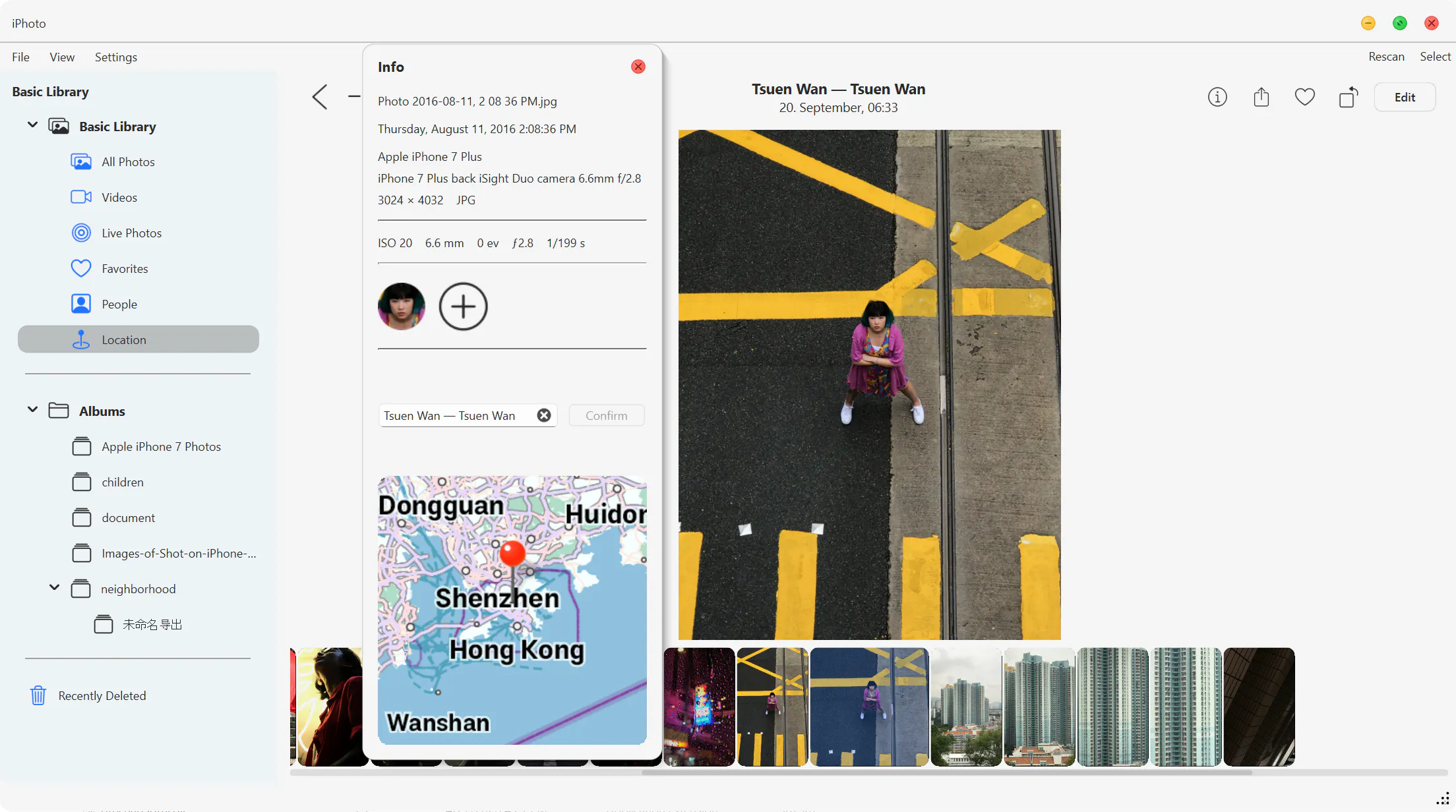
Geotagged photos can now show map context directly inside the floating info panel.
The app also includes improved location assignment workflows, background coordinate update tasks, better map source handling, OsmAnd search support, and stronger runtime behavior for map widgets.
On Linux, maps support has been expanded with helper-backed OBF rendering and native OsmAnd widget runtime support when the required shared libraries are available.
🌐 Multilingual UI
iPhotron now includes a runtime internationalization system with support for:
English
German
Simplified Chinese
The UI can refresh when the language changes, and major surfaces have been migrated to translated text, including menus, status messages, the info panel, People dashboard, album navigation, gallery menus, player controls, edit sidebar controls, and map preview entry points.
Locale-aware formatters were also added for dates, numbers, decimals, and file sizes.
🖼️ Large Library Performance
Recent releases include several improvements for larger libraries:
More responsive thumbnail loading
Better scan batching and recovery
Improved gallery refresh behavior
Preserved selection state across refreshes
More stable pagination and collection browsing
Better scan progress visibility while switching albums
📍 More Reliable Location Assignment
Assign Location now saves the selected place to the local global_index.db even when ExifTool is missing or the original file metadata writeback fails.
Users still get clear warnings when GPS writeback cannot complete, but the local app state remains intact.
🧩 Albums, Pinned Items & Menus
iPhotron now includes persistent pinned-item services for albums, people, and groups.
Album dashboards, sidebars, cover actions, rename/delete flows, context menus, and app-themed popup guardrails have also been improved for a more consistent desktop experience.
⚙️ Packaging, Runtime & Reliability
This release also includes expanded packaging work for Windows and Linux runtimes, better packaged face-scan diagnostics, People cover caching, thumbnail cache services, map runtime tests, and broader regression coverage across People, albums, scanning, location assignment, maps, playback, and gallery workflows.
Why we built this
Many photo apps either push everything into the cloud or make local library management feel secondary.
iPhotron is built around a different idea: your photo library should remain fast, inspectable, and useful on your own machine, while still giving you modern organization features like People clustering, groups, maps, albums, metadata editing, and multilingual UI support.
Who it’s for
iPhotron is for people who want a desktop-first photo manager with:
Local library browsing
People and face organization
Album and group workflows
Map and location metadata tools
Large-library performance
Cross-platform packaging work
A UI that can support multiple languages
We’d love your feedback, especially around People workflows, map/location tools, and multilingual UI polish.
Thanks for checking it out! 🚀
Replies