
Chatwoot is a modern AI-powered, customer support platform that brings all customer conversations into one place. Manage live chat, email, WhatsApp, social channels, and voice from a shared inbox. Built for growing teams with automation, reporting, AI assistance, and full control over your data.
This is the 5th launch from Chatwoot. View more
Voice Calls in Chatwoot
Launched this week
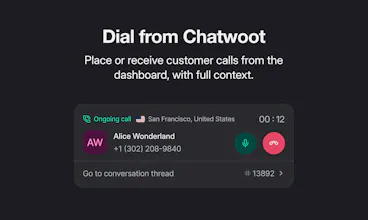
Chatwoot Voice has everything your support team needs to handle customer calls without leaving the inbox: browser-based calling, inbound and outbound phone support, Twilio Voice integration, WhatsApp calling support, call recordings, transcripts, AI summaries, call history, and customer context in one conversation thread.



Free Options
Launch Team / Built With


Chatwoot
Hey Product Hunt,
Over the last few years, we have focused on making Chatwoot a solid product for text-based customer conversations across live chat, email, WhatsApp, social channels, help center, automation, and AI. Once those workflows became mature, it made sense to bring voice into the same experience.
Today, we are introducing voice calls in Chatwoot.
You can receive and make calls from the browser, see customer context before picking up, and keep recordings, transcripts, summaries, and call history in the same conversation thread. It works with Twilio Voice, and we’re also working on WhatsApp calling.
This is part of a broader direction for Chatwoot: Chat, email, WhatsApp, voice, AI, and customer context should all live together.
We’d love your feedback, especially from teams that still rely on phone support or are trying to bring voice into a modern support workflow.
Happy to answer questions here.
The voice layer inside the same conversation thread is the part I’d test first for support ops, especially with recordings, transcripts, and AI summaries attached to the existing customer context. For launch/community support, the edge case is a call that starts in WhatsApp and then needs a teammate to follow up by email. Does Chatwoot keep that handoff in one thread with the call summary visible to the next agent?
Chatwoot
@hazy0 Yes. The previous notes and conversation history are visible to the next agent. The call sits in the same thread as the rest of the conversation, so it is not isolated.
That answers the main handoff concern. Keeping the call in the same thread is the right default; the next edge case I’d check is whether the transcript/summary can be hidden from non-support teammates when a conversation gets reassigned.
Retime
very cool. is this supported in self-hosted instances too? can I add my own VOIP server?
Chatwoot
@hadifarnoud Yes, this is supported on self-hosted instances as well.
At the moment, we support Twilio Voice and WhatsApp calling. We’ll look into supporting more VoIP options in the future based on demand.
adding voice on top of a chat first support stack is exciting because it forces a question about session continuity. when a customer calls after starting in chat, does the voice agent inherit the full transcript context or start fresh, and how do you avoid the customer having to repeat the problem? curious how you've structured that handoff.
Marketfox
Hey @thenameisarian , if the conversation from previous chat is open (basically not resolved), the call is added to the same existing conversation itself. If there are multiple open conversations from the same customer, we choose the recent one to add the incoming voice call to. This gives you the full context of previous communication. (On a side-note, we also have a feature where you can toggle the settings to lock all incoming messages/calls from one customer to one single conversation thread).
Calls inside the same support inbox makes so much sense. The worst support tax is context living in five different places.
Marketfox
@sarveshsea True that!