
 •
•24d ago
I started giving my AI agent a “don’t change” list before UI work
I noticed something annoying with AI-assisted frontend work.
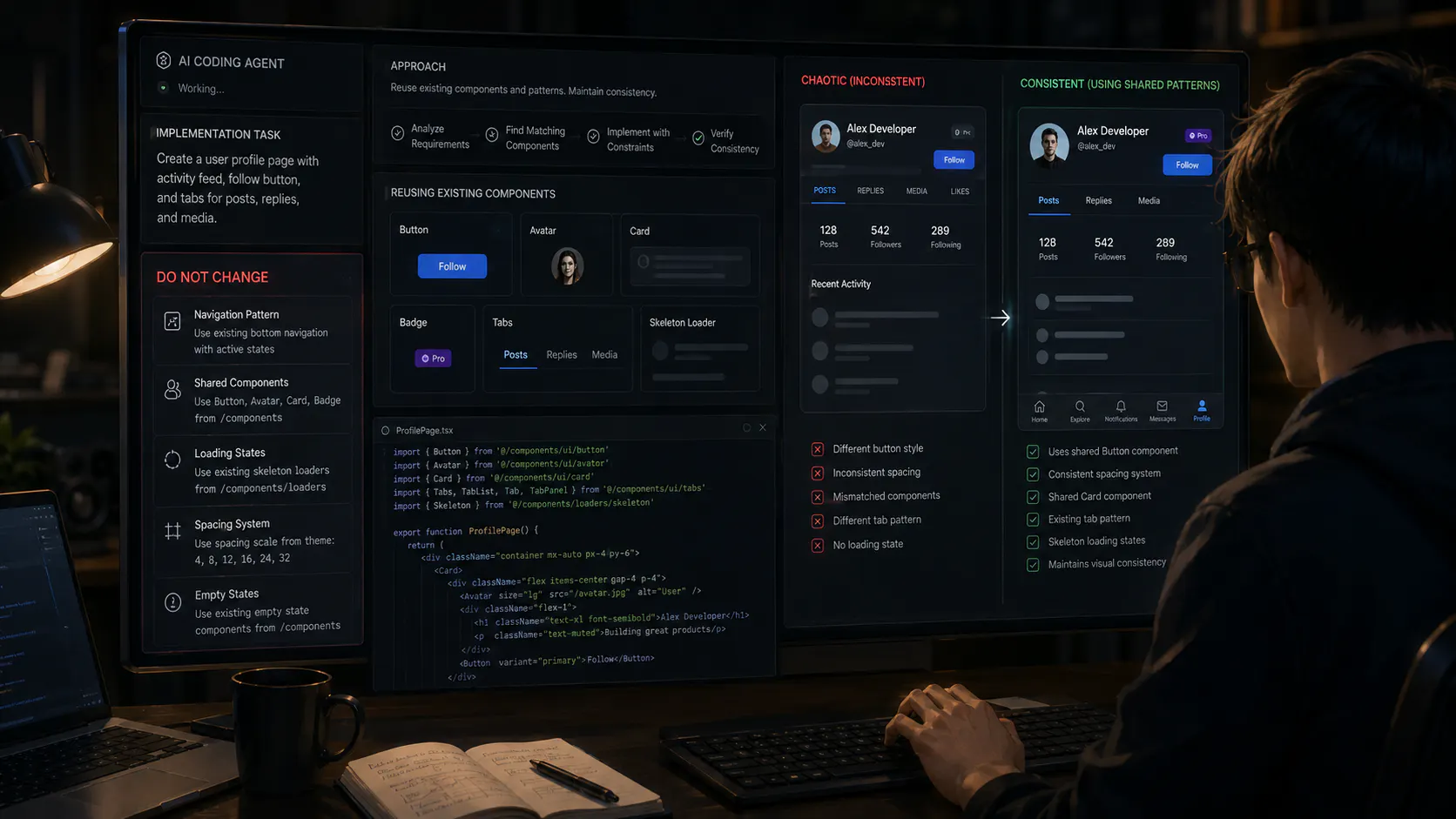
The agent could implement the requested feature correctly...
 •
•1yr ago
AMA w/ CEO of Bolt - from $0 to $20M and how we almost didn't make it
Live Feb 28th, 9am PT - drop your questions!
Hi everyone,
CEO of Bolt here! Super excited to open up about our journey and offer any learnings and stories I can to help other makers on their journey. Within a span of 2 months we've grown to $20M in revenue and were recently featured in NYT as paving the way for vibe coding.
 •
•14d ago
Does your AI reviewer ever tell you it does not know?
I asked an AI assistant to review a repo before shipping it.
It came back with a clean report, a confident tone, and a long list of passes. Then I checked one of the lines it cited.
The line said something else. The mistake itself didn't bother me that much. What bothered me was that there was no shape in the output for "I don't know."
Everything was either a problem or a pass. And the passes were doing a lot of unearned work.
 •
•14d ago
The 40 apps nobody opened are still in our bundle
We built 111 one click apps for Arteza and 9 of them cover most of the runs. I've posted that number before. What I didn't expect is how hard the next step is.
Deleting one takes an afternoon. You check what imports it, whether a paying user has it bookmarked, whether pulling it breaks a shared component three live apps also call. Writing it took twenty minutes. Removing it takes four hours.
So they stay. Every one is something a new user scrolls past and something I have to keep working through model upgrades. Generation is cheap and deletion is full price, and nobody warns you about that half. Has anyone found a way to make cutting as fast as shipping?
 •
•1yr ago
Vibe coding process - do we jump in or plan it out?
I'm super curious how everyone starts to vibe code? In the beginning I would simply jump into @bolt.new or @Cursor and just do a prompt and continue refining with the AI. I quickly realized this created a lot of issues as I didn't think about the structure, tech stack, and how I wanted the features to interact with each other and how the way I was building things would impact the user experience. I now do the following:
Write down a simple problem statement: "what am I trying to solve?"
Write down a simple solution statement: "what does the thing I'm building do (to solve the problem)"
Share the above with @ChatGPT by OpenAI and word vomit my thoughts, ideas, how I want the user to interact with my app, etc and ASK ChatGPT to turn everything I said and want into an easy to understand directive and instructions for an Engineer.
I then take the Engineer instructions and give it to a new chat in ChatGPT and ask it to turn those instructions into a prompt for an AI engineer and to break up the project into sections so that each time we focus on a section the app is shippable and keeps things easy to work on.
I take the output and paste it into my notes. I then give it to Cursor.
Once in Cursor, I create a new project folder and got at it!
Curious what everyone else does and if you've experience any things to avoid or must do
 •
•1yr ago
Everything I Learned Building My Landing Page and Web Application on Bolt.new
Hey p/bolt-new community,
I recently started building Couples Hub (https://coupleshub.io/) a React-based application and Next.js based landing page using Bolt.new. Couples Hub is a product of my hobby brand "MD Meets Techie" which I've run for the past four years, creating digital products specifically for couples. Given my technical background, diving into Bolt.new was kind of a fun experiment (esp given how drab and boring my day job is). I noted several challenges along the way and I thought I'll share a few tips on what I've learned thus far.
•1yr ago
Would you hire a VibeCoder to work on your product?
I've been pretty impressed at the amount of products people (including myself) have been able to create which got me curious... do vibe coders or AI-primary builders have a place in a company or team?
My thinking is the more technically adept would work on the core-focus while vibecoders can assist with other tasks that shouldn't be the main devs focus...like a potential feature add, minor changes, or even exploring different ways of modifying the existing product.
I'm curious what you all think, would you hire a vibe coder?
 •
•2mo ago
I hired a real engineer to review my vibecoded app, and watched her face while she read it
Paid someone to do a code review last week, first actual engineer to ever see what I'd built. Watched her scroll for a solid two minutes without saying anything. Then: "okay, so, this works, but why does this file talk to three different places to do one thing?"
I didn't have an answer. I'd asked the AI for a feature, it worked, I moved on, asked for the next feature, it worked, moved on again. Never once looked at whether feature three quietly duplicated logic from feature one. The app functioned perfectly the whole time. It just also had, apparently, three slightly different versions of the same idea living in different corners of the codebase.
What got me wasn't that it was bad, she was actually kind about it, said this is completely normal for anything built fast. What got me was realizing I'd been measuring progress purely by "does it work when I click it," and that measurement had been quietly lying to me the entire time.
I don't think the answer is doing it slower from scratch. I think it's that at some point, someone who actually reads code needs to look at the whole thing, not feature by feature.
 •
•10mo ago
Founders: whats the moment your MVP stopped being enough?
I keep seeing the same pattern across early-stage teams:
the MVP works until it really doesn t.
For many founders, the hardest part isn t getting something online
it s everything that comes after:
infra that cracks under real users
code that no dev wants to touch
rewriting the whole stack
AI-built projects no one can maintain
the moment you realize your prototype isn t a product
 •
•3mo ago
The "five-minute AI task" that wasted 40 minutes of my life
I used to plan my lunch breaks around AI tasks. Pick the one task that's easy enough to just hand off, start it, go eat.
Came back more than once to find the agent had stopped two minutes in over some dumb question. Not even a permissions thing, it just sat there waiting for me to say "go ahead". Didn't even know it was stuck until I checked.