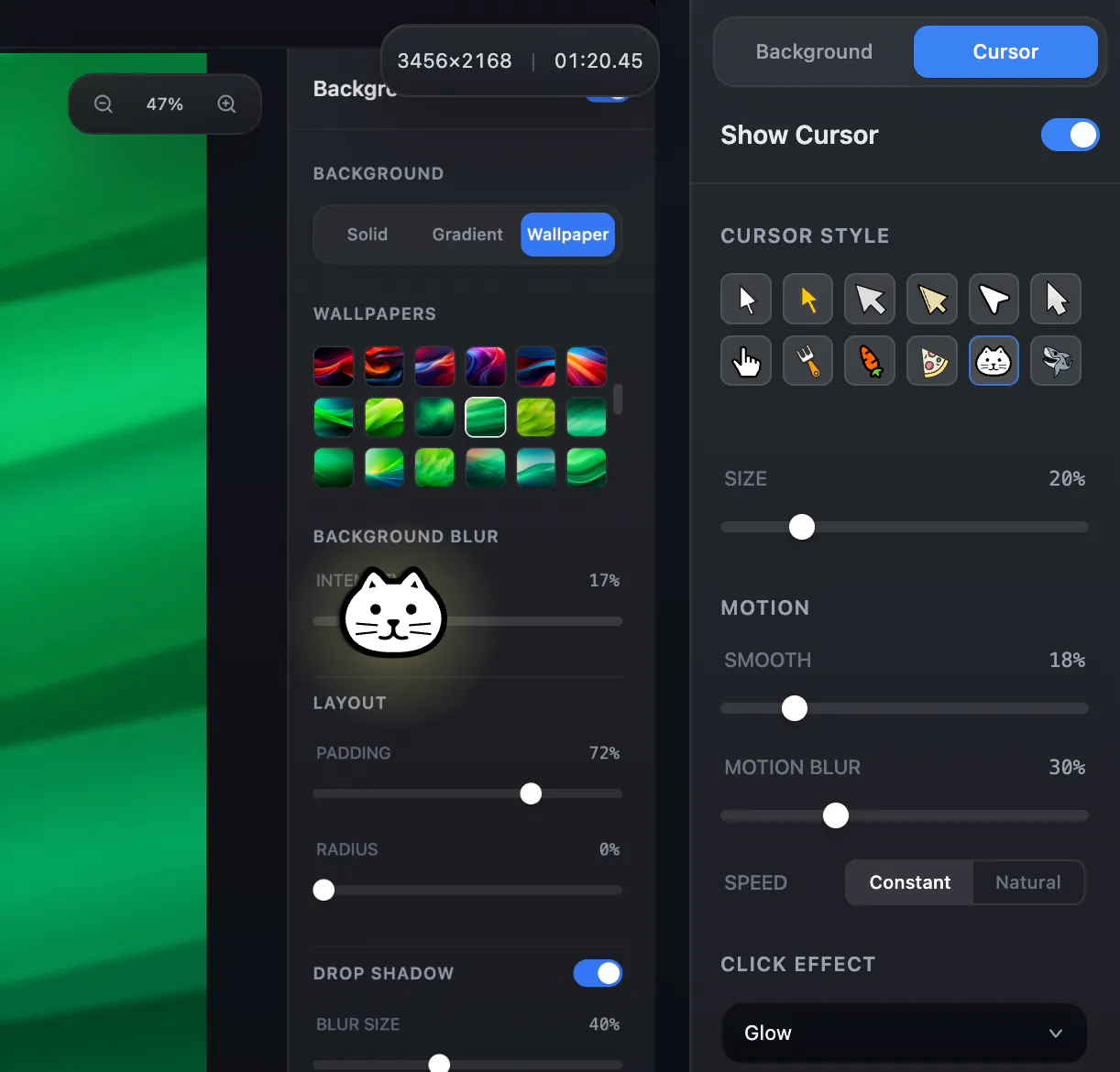
Hey everyone One small detail I always found frustrating when recording demos was the cursor. It s either: - too small to see - jittery and distracting - or just... boring So I added a custom cursor feature to Snapr.
Now you can: Use different cursor styles and adjust size Smooth out cursor movement (no more jitter) Add motion blur trails Add click effects for better clarity The goal wasn t to make it flashy but to make recordings easier to follow. Especially for tutorials, product demos, and presentations. Would love to hear your thoughts: What makes a good cursor in recordings for you?
Stop switching apps to capture your screen.
Snapr combines screenshots, recording, annotation, and video editing in one app for macOS & Windows.
• Fast, handy annotation tools built in
• Scroll capture for long pages
• 60fps 4K recording with system audio + mic
• Record iPhone/iPad from Mac
• Style captures with backgrounds, shadows for polished output
• Export presets: 4K, 1080p, 720p, GIF
• Clean desktop mode
Pay once, use forever. Free version available - no watermarks, no time limits.
This week, I focused on making screen recordings easier to explain and annotate especially for tutorials, bug reports, walkthroughs, and product demos.