trending
β€’

2d ago

NotchDodo can now keep your Mac awake until your download finishes

Hey makers

Small update from NotchDodo, and it came from a very common annoyance: you start a big download or a long script, walk away, and come back to a sleeping Mac and a job that stopped halfway.

β€’

25d ago

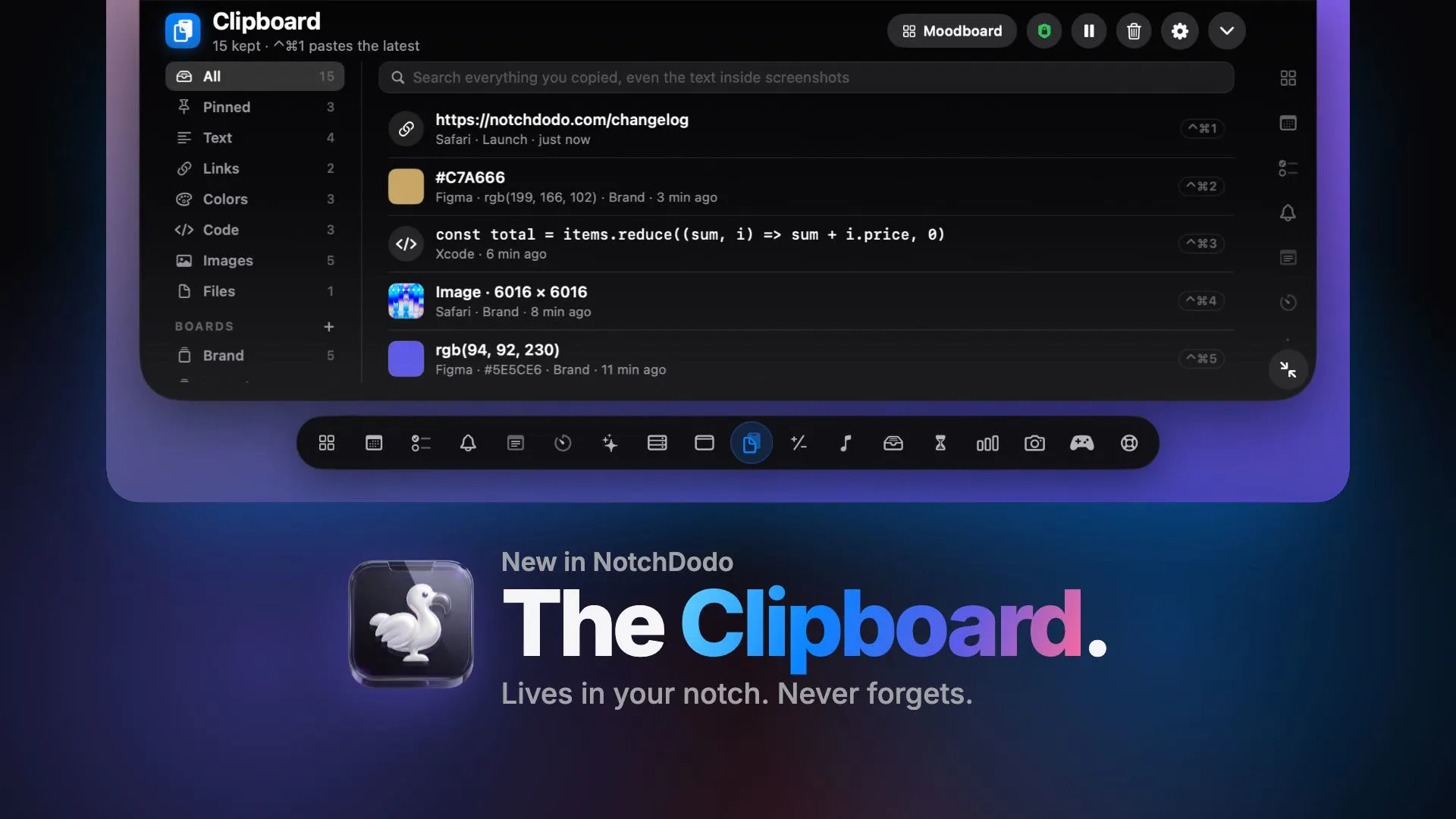
πŸ“‹ Your MacBook notch now has a full fledged Clipboard Manager

Copy something, copy something else, and the first thing is gone. In the new update, the Clipboard in your notch is a full clipboard manager. It sorts what you copy, finds it again, and pastes it with one shortcut.

β€’

23d ago

NotchDodo now keeps your Mac awake while AI agents work 🦾

Hey makers

NotchDodo now keeps your Mac awake while your AI agent works, then puts it to sleep once the job is done and you're away.

β€’

27d ago

πŸ”” Approve Claude Code, join meetings and quit runaway apps from your notch

Most Mac alerts slide in from the corner, fight for attention and disappear before you can act. In the new update, the notch grows into a small banner right under your camera with a button you can press right there.

What drops down:

  • Claude Code needs your approval Go to Claude

  • Meeting in a few minutes Join (Meet, Zoom, Teams)

  • An app is eating your CPU or memory Quit or Ignore

  • Focus session done Start break or Keep going

  • Timer finished Restart

  • Battery at 10% Battery Settings

  • Download finished Open, or drag the file straight from the notch

  • Screenshot taken Copy, or drag it into Slack or a mail

β€’

1mo ago

NotchDodo now shows fan speed, CPU temp and the app hogging your Mac 🌑️

Hey makers,

Ever had your fans kick in and no idea why? Today's update answers that from the notch.

β€’

1mo ago

Hypership turned our feature requests into 5 releases in a week

We've been using Hypership as the public request board for NotchDodo (https://notchdodo.com), a Mac app that turns the MacBook notch into a dashboard.

The loop is simple: someone posts a request, people upvote it, we build it, and the card flips to Shipped with the version it landed in.

β€’

2mo ago

NotchDodo - NotchDodo turns your notch into a full-blown dashboard.

NotchDodo turns your Mac’s notch into a useful part of your everyday workflow. 🦀 With 14 built-in tools, NotchDodo gives you quick access to handy utilities without interrupting your work. It’s lightweight, simple, and designed specifically for Macs with a notch. Instead of working around the notch, make it useful. 14 tools. One notch. A more useful Mac.
β€’

1mo ago

NotchDodo now keeps your clipboard history in the notch πŸ“‹

NotchDodo now keeps your clipboard history in the notch

NotchDodo 0.1.24 is out, and the notch now remembers what you copy:

  • Your last 20 copies: text, links, images and files

  • One click to copy any of them again

  • Pinned snippets for the things you paste every day

  • Passwords from password managers are never kept

β€’

2mo ago

What if your Mac’s notch could actually be useful? 🦀

I built NotchDodo because I kept thinking about one simple question:

Why should the Mac s notch just take up space?

So I built 14 small tools around it to make the notch part of my everyday workflow - quick access, useful utilities, and a little personality.

  1. Dashboard the home page, with the other tools condensed into cells. Cannot be switched off.

  2. Today your calendar, with a one-click Join for Zoom, Meet and Teams.

  3. Tasks a local to-do list with a quick-add field.

  4. Reminders your Apple Reminders, tickable from the notch.

  5. Notes multiple notes that save as you type.

  6. Pomodoro work, break, long break, quick timer, custom and a stopwatch.

  7. AI Usage live tokens, cost, burn rate and the five-hour window for Claude Code and Codex.

  8. Calculator maths, unit conversion and currency.

  9. Music Now Playing for Apple Music and the Spotify desktop app.

  10. Shelf drag files onto the notch, drag them out or AirDrop them. Browser downloads land here.

  11. Screen Time where your day went, by app and by category.

  12. System Analytics CPU, memory, storage, network, battery and free disk.

  13. Mirror a camera check before a call.

  14. Support & Feedback send a message without leaving the app.