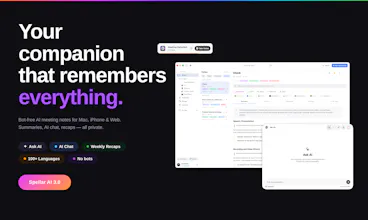
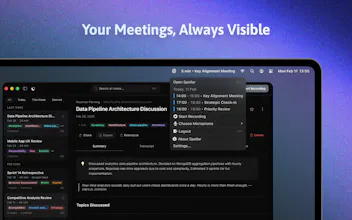
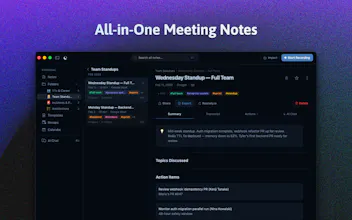
Elevate your online meetings with a native assistant that provides real-time tips, auto-generated summaries, and task extraction—without awkward bot joiners.
Featuring support for 100+ languages and seamless integrations with tools like Notion, Docs, and Jira, Spellar fits perfectly into your existing workflow. Powered by top-tier models (GPT, Gemini, Claude, Perplexity), it offers personalized configurations to maximize your productivity.
Most meeting tools give you notes. Spellar AI gives you memory.
It joins your calls, captures every word, and builds context across all your meetings.
Ask what a client said three calls ago.
Find decisions from last week.
See what’s still open.
Organize by client, use templates, and choose the AI you trust — OpenAI, Anthropic, Perplexity, Gemini and more!
We built it because we were tired of leaving meetings with lost context, forgotten decisions, and action items scattered everywhere.
Spellar 3.0 is an AI meeting companion that records, summarizes, and remembers your meetings so you can stay present during calls instead of worrying about notes
Reviewers mainly see Spellar AI as a practical meeting coach that helps people speak more clearly, catch filler words and mistakes, improve pronunciation and presentation skills, and take useful notes during calls. Several say it has become part of their daily routine, especially for English practice and client-facing work, and praise its speed, design, and Mac integrations. The main caveats are narrow but real: one reviewer hit a Zoom recording issue with AirPods on Mac, while others want broader platform support and stronger privacy options.
The first time I heard about Spellar was when they were focused on English improvement. They've slightly shifted their focus to meetings, but the platform remains great.
Spellar AI has been a game-changer for me in honing my English communication skills. Its real-time personalized feedback during online meetings has significantly boosted my confidence and improved my spoken English. Seamless integration into my routine makes it a must-have tool for effortless communication enhancement. In a nutshell, Spellar AI is simply fantastic!
Audio: stays on your device by default. Recording, storage, and the first-pass transcript all run locally on Mac/iPhone/iPad. We never see raw audio unless you explicitly opt into cloud transcription (off
by default).
Transcript + summary: stored on our backend for cross-device sync. You pick which AI provider sees the transcript for summarization — Claude, GPT, Gemini, or Perplexity, routed through our gateway. None of
the model providers retain it (zero-retention agreements with each).
Local-only mode: if you turn off cloud AI entirely, on-device transcription + the local app continue to work — you just lose AI-generated summaries and Ask AI. Practical for sensitive calls or air-gapped
workflows.
Quick one back: evaluating for personal use, or for something you'd deploy at GPT-trainer? Compliance constraints (SOC2, BAA, etc.) change the conversation if it's the latter — happy to go deeper.
Report
Congrats on the launch looks like a solid product. question is how does yours stand out against fathom note taker?
@danshipit Spellar records any audio on your laptop or iPhone, whether it's from Zoom, Google Meets, Telegram, Slack, or any other platform. Just turn on Spellar and continue with your regular conversations or phone calls - Spellar will handle the rest!
Report
the cross-meeting memory is the feature I didn't know I needed until right now. I've had the experience of jumping on a follow-up call and completely blanking on what was agreed 3 weeks ago — it's embarrassing and wastes everyone's time. what gets me is it does this without a bot joining the call. that detail matters more than people realize; half my clients get uncomfortable the moment a bot icon shows up. the English coaching angle is also a sleeper feature — underrated for non-native speakers in international teams.
@lakshminath_dondeti Yes! Transcription runs fully on-device by default - we use a local Whisper model on your Mac, so audio never leaves your machine. Cloud transcription is opt-in for users who want it (e.g. for speed on older hardware). Summaries / AI notes currently use cloud LLMs, but on-device summarization is on the roadmap.
@lakshminath_dondeti but, just fyi, local engine requires M1+ laptop. Foreigh languages needs larger models - which you can easely donwload/install models in the app's settings
Report
@zinovii_z I’m a big fan of local models. I run and play with several on a M3 Pro laptop and a studio with M3 Ultra and a lot of RAM 😅.
Definitely serious about local LLMs.
That said, aren’t there functional local LLMs on smartphones now?
I have Google’s Edge Eloquent on my iPhone and that uses a small local model for transcription.
@lakshminath_dondeti for mobile, I believe developers will utilize the Siri/Android OpenAI SDK for additional features when it gets more accessible for external integrations. We're closely monitoring this and will be prepared when it happens!
Hi product hunters, my name is Andrii, and I'm a developer on this product.We're live. Spellar 3.0 is on Product Hunt.
There's a specific kind of exhaustion that comes not from the hours but from holding a complex system in your head for weeks straight. Every edge case. Every architectural decision you made at 2am and then spent three days second-guessing. Every "it works on my machine" that turned into a two-hour debugging session the night before a deadline.
The memory layer was the hardest part. Making a system that reliably connects context across meetings — not just stores it, but actually retrieves the right thing at the right moment — is not a small problem. We rebuilt parts of it more than once.
But today it's out. And it works. And I'm pretty proud of that.
Spellar 3.0: AI meeting companion that remembers everything. No bot joining your calls. Just quiet, persistent memory running in the background.
If you want to see what we shipped — it's live on Product Hunt today
I think people rarely see how much invisible work sits behind products that “just work”. Especially features like memory/context retrieval — it sounds simple until you actually try building it.
Watching this come together over time was really impressive. Huge congrats us on the launch 🚀
@daria_dzekunova Daria, appreciate the feedback on the summaries. We spent a lot of time improving the actual understanding of conversations and decision-making context.