
Spellar AI
Intelligent Meeting Companion
5.0•23 reviews•3.5K followers
Intelligent Meeting Companion
5.0•23 reviews•3.5K followers
Elevate your online meetings with a native assistant that provides real-time tips, auto-generated summaries, and task extraction—without awkward bot joiners.
Featuring support for 100+ languages and seamless integrations with tools like Notion, Docs, and Jira, Spellar fits perfectly into your existing workflow. Powered by top-tier models (GPT, Gemini, Claude, Perplexity), it offers personalized configurations to maximize your productivity.
This is the 6th launch from Spellar AI. View more
Spellar 3.0
Launched this week
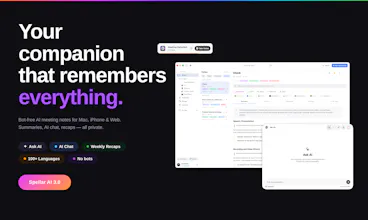
Most meeting tools give you notes. Spellar AI gives you memory.
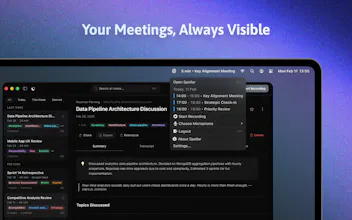
It joins your calls, captures every word, and builds context across all your meetings.
Ask what a client said three calls ago.
Find decisions from last week.
See what’s still open.
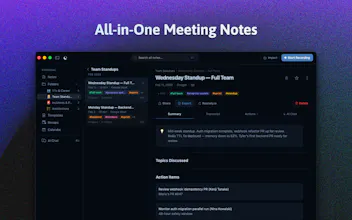
Organize by client, use templates, and choose the AI you trust — OpenAI, Anthropic, Perplexity, Gemini and more!




Free Options
Launch Team / Built With


The cross-device sync is underrated — record on iPhone during a coffee chat, summary is on the Mac when I get back. Question: any plans for Apple Watch quick-record (start recording from the wrist for impromptu hallway conversations)? Would unlock the "captured the idea before I forgot it" use case for me 🤔
Spellar AI
Thanks @slavaakulov — wrist-tap recording for hallway/walking moments is exactly the gap we keep coming back to. Not shipped yet but very much on our v3.x candidate list
Today the closest path is iOS — opening Spellar and tapping record is under 2 seconds, but you still have to pull out the phone. Watch obviously kills that friction
Quick one back: would "start + stop from Watch" be enough for your flow, or would you also want a live recording indicator on the wrist / Voice Memos integration? Genuinely useful input for how we'd prioritize it 🫶
Spellar AI
@gamer05 thanks!
Yes, at Spellar, you can import meetings with audio files, and we will soon release MCP integrations to incorporate your custom meeting notes!
With our extensive integrations—Notion, Miro, Obsidian and more — Spellar manages your second brain setup for yor 🫶
How does the 'bot-free' part actually work? Will anyone else on the call notice something's running in the background?
Spellar AI
@thomas_park2 It's completely unnoticed since this software runs on your laptop and serves as your personal assistant—no one knows about it except you. However, we suggest informing other participants, as it is a requirement in some jurisdictions 🤙
The cross-meeting memory is the part that actually changes the workflow — most tools just dump a transcript per call and leave you connecting the dots yourself. Curious how it handles context when a client refers to the same project by different names across calls — does it pick that up automatically, or does it need some manual tagging to stay organized?
Spellar AI
Thanks @zrimko — that "different names for the same project across calls" is exactly the gap that pushed us to build the memory layer instead of just better per-call summaries.
Honest answer: the AI handles a fair amount of this semantically, without manual tagging. If your transcripts have enough context — "Project Phoenix, the Q3 launch we discussed last week" — Ask AI treats them as one thread when you query. It's pattern-matching on meaning, not keywords.
Where it gets fragile is when references are terse — "remind me what we said about the launch" with no other anchors. Two cheap lifts solve it:
• Folders per project/client narrow the search scope so terse references resolve correctly.
• A custom-context Template can hold a mini-glossary: "Track decisions about Project Phoenix (a.k.a. Q3 launch, Acme deal, new pricing initiative)." The AI reads that on every summary and normalizes naming for you.
Quick one back: how many parallel projects per client are you usually juggling? That changes whether folders alone are enough or whether the template glossary is worth the 30-second setup.
Thesys
Congrats on the launch. A killer feature would be to make it open source
Spellar AI
@zahle_khan honestly, we were considering it, but it would be challenging since we have many infrastructure components for that.
Is your concern privacy? If so, Spellar has several privacy-aware configurations, such as audio retention and local transcription, among others!
Thesys
@zinovii_z yes privacy plus you could have a lot of community plugins too.
We took the same route as well.
Companies would still pay for you manage it. It's a win win
Spellar AI
@zahle_khan thanks for your feedback and suggestion. I promise we will rethink this! 👌
Spellar AI
@avikshit_lp Yes — no transcript-hunting needed. Spellar pulls action items out automatically as a dedicated section, with owner
and context attached when the conversation makes it clear ("Anna will send the deck by Friday" → task with owner +
due).
You can review them on a separate "Action Items" tab, then push each one straight to Linear, Jira, Notion, Todoist,
Asana, ClickUp, or Trello with a single click. The transcript is still there if you want to jump to the exact moment
something was decided, but you almost never need to.
Spellar AI
@avikshit_lp everything is automated. Just turn on Spellar on your calls/meetings - and the app will take the rest 🤙
This is exactly what i am looking for in a meeting tool. How do I send the meeting notes and context I have so far thats broken between Google, Fathom, Day AI and Granola. Yes its a lot but I need Spellar to have context from my previous meetings. Is that even possible or am I starting from zero?
Great product!
Spellar AI
Thanks @its_maddy_a — context portability across tools is the single biggest blocker for switching, you're definitely not alone.
Where we can help directly: Spellar imports audio files (.m4a, .mp3, Zoom recordings, etc.) and runs the full pipeline on them — transcript, summary, action items — so they land in your account as full meetings, indexed by Ask AI exactly like your live recordings. If you've got the raw audio from any of those tools (most let you download it), that's the fastest path to actually rebuilding memory from your back catalog.
Where we don't help yet: importing summaries (markdown / Notion exports) as first-class meetings. We've thought about it, but text-only imports make Ask AI's recall worse — no transcript anchor for citations. If you've got summaries but not audio, the workaround today is creating a "context" recording — open Spellar, hit record, narrate the key points of past meetings for 2-3 minutes per client/project, let the summary land. Crude but effective for seeding the memory.
Which format is your existing context mostly in — raw audio, transcripts, or just summaries? That'll tell me whether you're 80% of the way there or need the manual workaround.