
Spellar AI
Intelligent Meeting Companion
5.0•23 reviews•3.5K followers
Intelligent Meeting Companion
5.0•23 reviews•3.5K followers
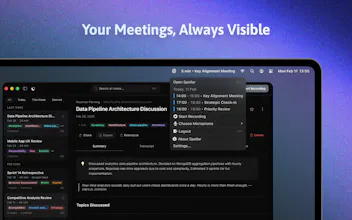
Elevate your online meetings with a native assistant that provides real-time tips, auto-generated summaries, and task extraction—without awkward bot joiners.
Featuring support for 100+ languages and seamless integrations with tools like Notion, Docs, and Jira, Spellar fits perfectly into your existing workflow. Powered by top-tier models (GPT, Gemini, Claude, Perplexity), it offers personalized configurations to maximize your productivity.
This is the 6th launch from Spellar AI. View more
Spellar 3.0
Launched this week
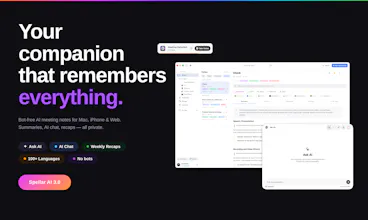
Most meeting tools give you notes. Spellar AI gives you memory.
It joins your calls, captures every word, and builds context across all your meetings.
Ask what a client said three calls ago.
Find decisions from last week.
See what’s still open.
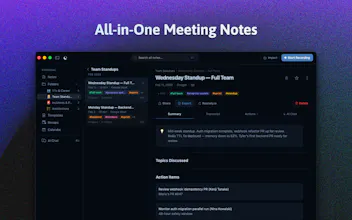
Organize by client, use templates, and choose the AI you trust — OpenAI, Anthropic, Perplexity, Gemini and more!




Free Options
Launch Team / Built With


Is there a way to create templates for recurring meetings — like 1:1s or standups — so the summaries are always structured the same way?
Spellar AI
@rus1ankova1enko Yes, exactly that! Spellar has built-in templates for the most common recurring formats — including 1:1, Stand-up,
Sprint Planning, Retro, Weekly Sync, Project Sync, plus ~15 others (customer discovery, board, investor update…).
You can also create your own: define the structure, add custom context (project background, what to listen for), pick
the AI model, and attach it to specific recurring calendar events — so every Monday standup or weekly 1:1 gets
summarized with the same shape automatically.
Spellar AI
@rus1ankova1enko as Andrii mentioned, templates are your key feature here!
You can set up the type of meeting, add additional context, and establish structure (folders, tags, AI provider)
This is essentially your way to customize your meetings to suit your cases!
Spellar AI
@rus1ankova1enko
Yes 🙌
So recurring meetings can automatically follow the same summary structure every time, which makes everything much easier to scan later 🧠
FuseBase
Congrats, team @zinovii_z @hotfixer Great update with memory angle! Can teammates each run Spellar independently and have their notes connected, or is it only for individuals? GL today!
Spellar AI
congrats, team! any plans for more integrations? I'd love to sync with Linear after calls.
Spellar AI
@igorsorokinua Hi Igor, thanks a lot for the congrats!
We’re always open to feedback from our users and actively add new integrations based on their requests.
We actually already have a Linear integration, and I personally use it to save time when creating tasks after calls 😊
Spellar AI
@igorsorokinua yeah, Linear was one of the first released integrations
We're very open for user feedback / requests. Just let us know what's missing for your workflow?
This is quite cool. The cross-meeting memory is what finally makes this category interesting. I've tried a few note-takers but the problem was always the same: it is great for the moment, useless two weeks later when you're trying to remember what clients actually said about pricing. The fact that it runs natively without a bot joiner is a big deal too! Does the memory search work across meetings with different participants or only the ones you attended yourself?
Spellar AI
Thanks @artstavenka1 — "useless two weeks later" nails the pain. Memory search runs across every meeting in your account, not just the ones you attended yourself: in a personal account that's all your recordings, in a team workspace it's everything that's been shared with you. So "what did clients actually say about pricing last quarter" works even if the call was a teammate's
What makes it really sharp is pairing it with Templates — you define a custom summary structure per meeting type (e.g. a Sales Call template that always pulls out pricing objections, budget signals, and next steps as their own fields). Two weeks later when you query across meetings, the AI has structured, comparable data to work with instead of free-form summaries — recall is dramatically better
Got a specific recall pattern you're trying to solve for? Happy to suggest a template setup 💜
Does the cross-meeting memory work retroactively? Meaning, if I'm starting fresh today, can I import old transcripts from another tool to seed it, or is the memory only built going forward?
Spellar AI
@aroggava
Yes 🙌
You can upload existing recordings and videos into Spellar, so the memory/context doesn’t have to start only from today.
That way you can bring past conversations into the same searchable context layer as your future meetings 🧠
Spellar AI
@aroggava Spellar App has import functionality - so you can seed any your previous meetings you have in other tools
@igal_kalnitsky Hi, we do have a free tier, so people can try the product without jumping straight into a paid plan 🙂 After that, there are different paid plans depending on usage.
Spellar AI
@igal_kalnitsky in addition to the free trial, we have ProductHunt deal - 20% which expires in the end of May 😜
Really interesting shift from meeting transcription to persistent memory. The cross-meeting context and ability to surface decisions from earlier conversations feels more practical than just searchable notes. Curious how Spellar handles conflicting information or changing decisions across long client relationships.
Spellar AI
Thanks @vaibhavi_suvarna — that "conflicting information across long client relationships" question is exactly the messy case most cross-meeting tools wave at.
Honest answer on how it works today:
Cross-meeting search surfaces all the relevant decisions, not just the latest. If you ask "what did we agree about pricing for Acme?", Spellar pulls every mention from the folder and lets you see the evolution — March said $50k, May said $60k, here's both with links to the source meetings. We deliberately don't collapse to "latest wins" because the change is usually the interesting signal.
The pattern that makes this really sharp is Folders + custom-context Templates per client:
- A folder per client (e.g. Acme Corp) scopes the memory.
- A custom Template with client-specific context — e.g. "Track decisions on pricing, scope, deadlines, and owners. If a current decision contradicts prior one in this folder, call it out explicitly and cite the earlier meeting." — instructs the AI to flag contradictions on each new summary, not just at query time.
What we haven't shipped yet: proactive cross-meeting conflict alerts (e.g. notify me the moment a new meeting introduces a contradiction with an earlier one). The data layer makes it possible — we just don't auto-trigger it today. High on the list.
Quick one back: would alert-on-conflict be more valuable inside the meeting (a heads-up while you're still talking) or as a digest after the call?