
NativeBridge
Automate mobile testing on real devices with AI
799 followers
Automate mobile testing on real devices with AI
799 followers
Instant access to real iOS and Android devices with one Magic Link. Run AI-powered tests using Maestro, capture crashes, and share rich bug reports. Turn mobile testing into a superpower.




Scarlett.
minimalist phone: reduce your screentime
@byalexai I knew that this tool would have you as a Hunter when I saw that high comment count! :D
Scarlett.
@busmark_w_nika Appreciate it!
All the credit really goes to the team!
And when you see Nika in the comments, you know the launch (or the hunter xD) is serious.
minimalist phone: reduce your screentime
@byalexai Yes, it gets serious when I show up! :DD
MultiDrive
@byalexai Looks like a great tool to make testing faster and more efficient! Congrats on the launch!
Scarlett.
@tetianai It really is a great tool. And it’s very easy to use.
Thank you for the kind words. I wish you an amazing year ahead @tetianai !
MultiDrive
@byalexai Thank you, Aleksandar!
Wishing you an amazing year ahead too! 🚀🙂
@byalexai From a QA perspective, real-device performance insights like FPS and battery data are huge. Nice to see that included. :D
NativeBridge
👋 Hey Product Hunt! Sahil here, founder of NativeBridge.
For the past 14 months, we’ve been building NativeBridge around a simple belief: mobile testing should reflect how users actually experience apps.
This matters now more than ever. Mobile apps today run on thousands of device variants, unstable networks, and performance-sensitive hardware - yet testing workflows are still slow, script-heavy, and disconnected from real-world usage. As teams ship faster and apps get more complex, this gap is only getting wider.
NativeBridge is our attempt to close that gap:
Start testing on real Android & iOS devices in seconds, without setup or infra headaches 📱
Manually test and collaborate as if you’re holding the phone without passing devices, screenshots, or long feedback loops 🚀
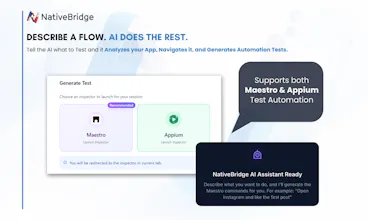
Describe a flow in plain English and let AI generate automated tests in Maestro and Appium 🤖
Catch real-device performance issues early including crashes, slow screens, FPS drops, CPU & battery problems 💨
Share a single Magic Link for every app version bringing builds, tests, and feedback all in one place ✨
This launch represents 14 months of iteration, hard infra work, and countless conversations with developers and QA teams. Today, we’re excited to finally put it in front of the community and learn from your feedback.
If you build or ship mobile apps, we’d love to hear how your team approaches testing today and where the pain really is. We’ll be here all day answering questions and learning from you.
- Sahil
PicWish
@sahil_choudhary22 My question is on the backend: are these bare metal devices or are you virtualizing on top of real hardware to handle the concurrency?
NativeBridge
@mohsinproduct Great question. We support both real physical devices and emulators, depending on the use case.
Under the hood, real-device sessions run on actual Android & iOS hardware (not OS-level virtualization), with a thin control layer for scheduling and concurrency. Emulators are used where speed or scale makes more sense, but anything performance or behavior-sensitive runs on real devices.
Sharing an image from our early days building NativeBridge with real phones wired directly to our servers. The infrastructure has evolved since, but the principle has stayed the same: real devices where it matters, emulation where it’s sufficient.
Happy to dive deeper if useful 👍
Congrats on the launch, @sahil_choudhary22 ! As someone who knows the pain of maintaining a device lab (or dealing with slow emulators), the promise of instant access to real Android/iOS devices is huge. The 'Magic Link' feature for sharing builds seems like a game-changer for closing the feedback loop between devs and QA. Excited to try this out!
@sahil_choudhary22 Hey Sahil and Manisha,
The updated landing page looks significantly better than the initial version you shared. The revamped product positioning and messaging now clearly defines what the product truly offers... excellent work incorporating my feedback so positively.
Manisha, your thorough walkthrough impressed me greatly that I wanted to hunt it but couldn't follow through. I'm proud to see this launch go live today, even though my health and travels prevented me from being there to hunt it.
Rooting for your success ahead. :)
Hey guys, great idea! What specific tests can be automated with this product?
Congrats on your work!
Is it possible to test also hardware functionalities like gyroscope, front/back camera?
NativeBridge
@ghi_a_istrate Thank you! Yes, you get full access to hardware features like the front and back camera. We also support image injection, so you can upload an image and simulate what the camera “sees” during a test.
For sensors like the gyroscope, we support controlled mocking of movement so teams can reliably test those flows without needing physical motion every time.
Happy to share more details if you’re curious!
Emulators just don't cut it anymore. We use NativeBridge to ensure every form created with Dashform renders perfectly on real iOS and Android hardware. The ability to instantly spin up a real device via a 'Magic Link' allows our team to squash mobile-specific bugs in minutes. It’s essential for maintaining our 5-star mobile UX.
Testing on real devices is still one of the most painful parts of mobile dev, so the Magic Link + real device angle makes a lot of sense. Compressing setup, execution, and reporting into minutes instead of days is a real win if it holds up in practice.
Nice focus on removing friction from the testing loop looking forward to seeing how teams integrate this into existing workflows.
NativeBridge stands out by focusing on native context rather than just direct translation. That distinction matters a lot for user trust. Curious to see how teams integrate this into their workflows.