Launching today

HyperSleep
Block social media until you've actually slept
241 followers
Block social media until you've actually slept
241 followers
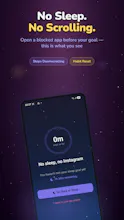
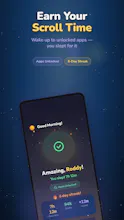
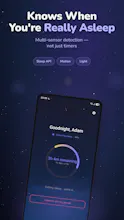
Every screen-time app fails for the same reason: you have to turn it on and at 1am, you won't. HyperSleep flips it. Your social apps stay locked until multi-sensor detection verifies you actually slept. It auto-starts at bedtime, runs 100% on-device, and turns "scroll less" from willpower into an outcome you earn. Android.



HyperSleep
HostDispute
@hypersleep Congrats on the launch, Roddy! Flipping the incentive structure to outcome-based rewards is a super interesting approach. I actually just ran the screen-time blocker and habit-tracking niche through my tool, MarketGapAI, which analyzes thousands of complaints across Reddit and the Google Play Store. Interestingly, the number one reason users delete or give up on strict blocking apps is false positives - like the app failing to unlock because a sensor misread passive awake time (like reading a physical book) as sleep, creating massive user frustration.
Curious to know - how does HyperSleep handle manual overrides or edge cases where the 70% confidence threshold misses the mark, or are you focusing on dialing in the sensor calibration first?
HyperSleep
@alexstartups Great question and you're right that false positives are the #1 killer, so this was a design priority from day one, not an afterthought.
Short answer: we never hold your phone hostage to a sensor reading. The 70% threshold and multi-sensor fusion are how we get accuracy, but they're not the only line of defense, because no threshold is perfect.
Every session has built-in escape hatches:
Quick Break - instant 5-min access, no questions asked (adds 30 min to your goal so it's not free, but you're never locked out cold).
Full Override - ends the session entirely when you genuinely need your apps.
So if you're awake reading a book and the app gets it wrong in either direction, you're one tap from access. The blocking is a nudge, not a prison.
On the calibration side: we fuse Google's Sleep API with motion + light + usage signals and require 20 continuous minutes before counting anything, specifically so passive-awake (sitting still, reading) doesn't get misclassified. That'll keep improving with real-world data, but the override system means users never have to wait for us to dial it in perfectly.
Genuinely appreciate you pushing on this. It's the exact failure mode we lose sleep over (pun intended). What sensors have you seen handle the reading-in-bed case well?
Congrats on the launch Roddy. I build in the recovery space for natural lifters and short sleep is the single biggest driver of bad training days I see, so turning screen time into something you earn by sleeping is a clever inversion of every blocker that relies on willpower. The multi sensor confidence approach is interesting. How does it handle shift workers and split sleepers whose night never looks like one clean block? Strong launch so far, well deserved.
HyperSleep
@oshylabs Thanks Arnold. And coming from someone in the recovery space, that means a lot. You're seeing the same thing that motivated this: short sleep wrecks the next day, and willpower-based blockers fail exactly when you're most tired. The whole bet is that earning access beats restricting it.
On shift workers and split sleepers; great question, because you're right that the "one clean 11pm–7am block" assumption breaks for a lot of people. Two things help here:
1. It's not tied to the clock. You can start a session manually whenever your sleep window is; 9am after a night shift works exactly the same as 11pm. The schedule is yours to set, not a fixed "night."
2. The goal is total verified sleep, not one unbroken block. We confirm sleep in bouts (20+ continuous min of fused signals to filter out noise), and what matters is accumulating toward your goal, so a split night reads as sleep, not a fail.
That said, you've hit on something we want to go deeper on: biphasic/segmented sleep and rotating shift patterns are their own design problem, and "what counts as one night" gets genuinely interesting there. Would love to pick your brain on what good recovery-aware handling looks like for the lifters you work with.
Appreciate the thoughtful launch support which is exactly the kind of feedback that sharpens the product. 🙏
@hypersleep the bouts approach is the right call. One idea worth stealing from training land: track a rolling 7 day sleep debt rather than treating each night as pass or fail. One rough night barely moves performance if the week is solid, but three short nights stack, and that is exactly when stalled sessions and injuries show up. If you ever surface a weekly view next to the nightly one, that is the number people who take recovery seriously will trust. Happy to swap notes on the shift worker problem any time.
Earn your scroll time by sleeping- that's a refreshing twist. Most blockers just guilt-trip you.
Quick question: what happens if the sensors misread a sleepless night (insomnia, travel, etc.)? Does it have an emergency override, or am I locked out of my apps until the algorithm decides I slept?
Love the privacy-first approach. No cloud, no account rare these days. Nice launch.
HyperSleep
@wasil_abdal Thank you Wasil🙏. Frankly, the most important question here, so I'm really glad you asked.
Short version: you're never trapped. It's friction, not a prison.
🚨 Only the apps you pick are ever locked; calls, alarms, messages, maps, all of it stays open. A 3am emergency is never an issue.
🆓 For the blocked apps, there's an "I need my phone" override right on the lock screen, a 5-min quick break or a full override that ends the session. Your call, anytime.
🌙 Overrides carry a small accountability cost (a quick break nudges your goal) so cheating isn't frictionless but you're always the one in control.
And you're spot on that sensors aren't perfect. Insomnia and travel are exactly the cases no detector nails. That's precisely why the override exists. I'd rather be honest (~70% confidence + an easy escape hatch) than pretend it's a flawless sleep lab.
Appreciate the privacy callout too: local-first was a hill I'd die on 🙂 Curious though: does that balance feel right to you, or would you want the escape hatch even more frictionless? Still tuning it.
minimalist phone: reduce your screentime
What other features does it have apart from blocking at certain hours?
HyperSleep
@busmark_w_nika Hello there Nika. Great question! Quick reframe first, because it's kind of the whole point .
HyperSleep doesn't just block during set hours. It keeps your apps locked until it verifies you've actually slept (Google Sleep API + motion + light + usage signals). So even at 2am, opening Instagram won't work until you've hit your sleep goal, there's no timer to wait out.
Beyond that core:
• 🌙 Auto-starts at your bedtime. No remembering to turn it on
• 🎯 You choose which apps to lock and your own sleep goal
• 🔥 Streak tracking + a morning recap - sleep time, quality %, and how you did vs your goal
• 🆓 Real-life overrides. A 5-min "quick break" (adds to your goal) or a full override with an accountability cost, so it's flexible, not a prison
•🔐 100% on-device; no account, nothing leaves your phone
Love what you're building with your minimalist phone app. We're chasing the same goal from different angles
minimalist phone: reduce your screentime
@hypersleep Cool! I think that this list is solid – should be like this on website too!
The “earn your scroll” framing makes sense because willpower definitely fails at night. I’d trust it more if the app showed a simple reason for each unlock, like what signals it used to decide I actually slept.
HyperSleep
@farrukh_butt1 Hi! Great instinct. And good news, transparency is already built in, both live and in the morning.
While a session is active, open your phone anytime and you'll see the Active Sleep Ring - your live sleep progress. The moment the phone detects motion, the timer pauses and switches to "Detecting sleep…" until you've settled and set the phone aside. So you're never guessing what HyperSleep thinks you're doing; it's showing you, in real time.
In the morning, the unlock screen gives you the full summary: total sleep (e.g. 7h 12m), a quality %, how you did vs your goal, and your streak. So it's never a silent unlock. You always see the result you earned.
And we're making a good thing even better: a coming update adds an even more detailed breakdown - a signal-by-signal view (Sleep API ✓ / motion / light / phone-untouched) with the confidence score behind each unlock, so you can see exactly which signals agreed.
Appreciate you raising it. Building trust through transparency is exactly the bar we hold ourselves to. 🙌
Hey Roddy! I have seen a lot of apps like these. How's hyper sleep different?
HyperSleep
@umermedia Hey Umer! Fair question. There are a lot of screen-time apps out there 🙂
Here's the core difference:
Most blockers are time-based. HyperSleep is outcome-based.
Typical apps lock your apps on a schedule or a timer but a timer doesn't care whether you actually slept, and you can usually just tap "ignore" or "5 more minutes" until the willpower runs out.
HyperSleep gates access on verified sleep, not the clock. HyperSleep doesn't need willpower, it uses your body. We use multi-sensor detection (Google's Sleep API + motion + light + usage) to confirm you actually slept before your apps unlock. You can't snooze your way past it.
The psychology flip is the real magic: instead of restricting you ("you've used your 30 min, no more"), you earn your scroll time by sleeping. It feels like a reward, not a punishment, which is the difference between an app you delete in a week and one that actually changes the habit.
And for the inevitable "but what if I really need my phone?"; there are built-in overrides, so it nudges rather than imprisons.
What apps have you tried? Genuinely curious what made you bounce off them.
How does it work? Do you have to put the phone on your bed?
HyperSleep
@louislecat Great question Louis. Nope, you just keep your phone on your nightstand like usual or bedside table, wherever. No need to put it on the bed or under your pillow. HyperSleep reads motion, light, and Google's Sleep API in the background to confirm you slept, then unlocks your apps in the morning. No wearable, nothing on the bed. 😴