No reviews yetBe the first to leave a review for Zoho Tables
How does the AI actually help organize messy data, like does it auto-tag entries or just suggest formulas when prompted?
Report
how does this differ from airtable in practice? curious what ai features actually save me time versus just being a gimmick
Report
How does the AI actually decide what to organize for me versus what it leaves alone? Curious if I have to train it or if it just figures things out from the start.
How does Zoho Tables handle permissions and access control when multiple teams are working from the same base, especially across different views like Kanban, Calendar, and Forms?
Report
With AI being added across the Zoho suite, how do you ensure automation improves productivity without overwhelming users?
Report
The prompt-to-base generation is neat, but the thing that decides whether I'd build on it is getting data back out cleanly. Is there a read/write API and a full export that preserves schema and table relationships — not just flat CSV rows — so a base isn't locked in? And can permissions be scoped per field or collaborator, or is sharing all-or-nothing at the base level?
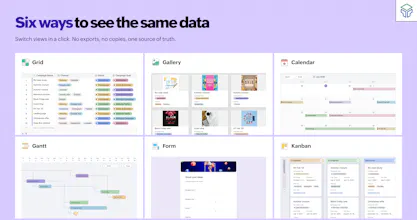
the "same data, zero exports, six views" pitch is the right one, that's the actual pain with spreadsheet-to-database migrations today. curious how far the relational model goes though - once a team outgrows a single base, can you link records across separate bases, or does everything need to live in one base to stay connected? that's usually the point where teams hit a wall and start exporting to glue two systems together anyway




How does the AI actually help organize messy data, like does it auto-tag entries or just suggest formulas when prompted?
how does this differ from airtable in practice? curious what ai features actually save me time versus just being a gimmick
How does the AI actually decide what to organize for me versus what it leaves alone? Curious if I have to train it or if it just figures things out from the start.
How does Zoho Tables handle permissions and access control when multiple teams are working from the same base, especially across different views like Kanban, Calendar, and Forms?
With AI being added across the Zoho suite, how do you ensure automation improves productivity without overwhelming users?
The prompt-to-base generation is neat, but the thing that decides whether I'd build on it is getting data back out cleanly. Is there a read/write API and a full export that preserves schema and table relationships — not just flat CSV rows — so a base isn't locked in? And can permissions be scoped per field or collaborator, or is sharing all-or-nothing at the base level?
the "same data, zero exports, six views" pitch is the right one, that's the actual pain with spreadsheet-to-database migrations today. curious how far the relational model goes though - once a team outgrows a single base, can you link records across separate bases, or does everything need to live in one base to stay connected? that's usually the point where teams hit a wall and start exporting to glue two systems together anyway