Finally, an inbox you'll look forward to. Agents sort your messages, draft your replies, and clear the grunt work behind the scenes, all in a client so well-crafted that email feels light, fast, fun.
Hey Product Hunt! 👋 Louis here, co-founder of Upstream.
When I was at Algolia, I was drowning in 200 emails a day. I was never sure where to focus, and getting through my inbox took forever. I knew it didn’t have to be this way. Instead of creating a new messaging protocol, I bet on rethinking the tool everyone uses: email.
We built the first email client where agents do real work alongside people. We designed Upstream to be easy to pick up and fun to use.
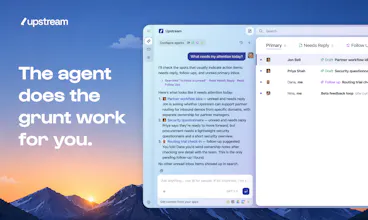
📥 Take the noise out of email Agents automatically triage your inbox, separate signal from noise, and surface only what deserves your attention
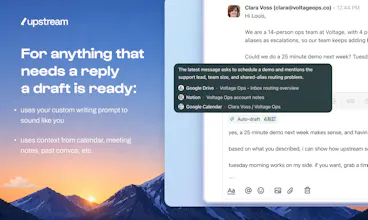
✍️ Every reply starts with a draft Upstream drafts replies for every conversation that needs one. It also changes your voice based on who you’re talking to and the context of the convo
⏰ Never miss a follow-up Agents track open loops and remind you when needed, making sure important conversations don't fall through the cracks
🔎 Ask anything about your work AI can instantly find information across your inbox and connected tools: receipts, meeting notes, introductions, decisions, conversations, and more
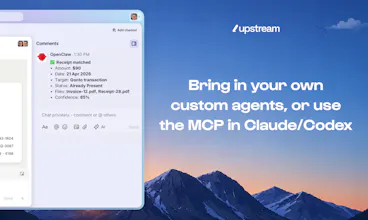
🔗 Bring all your context into your inbox Agents use information from tools like Notion, Calendar, Drive, Granola, and other sources to produce better answers and drafts
👉 As a special thank you to the Product Hunt community, you get one free month of Upstream Pro if you sign up at upstream.do and use the code PH26! 👈
We are all so excited to hear what you think! Please do reply here and let me know
Huge thanks to our hunter @garrytan for hunting us 🙏
@louislecat The amount of work that goes into a launch like this is seriously underrated. Most people only see the announcement not the late nights, the pivots, the doubts. Respect for seeing it through. Stories like yours are exactly why podcast hosts are always looking for real founders to feature, not just polished speakers.
Thanks for your words @danielpodcastagency! To be fair, there were definitely a few moments where we thought, "if someone had told us it'd need so much work" 😅
Seeing people actually use the product makes all the chaos worth it
@mvaxelaire knowing your high standards Mat it means a lot coming from you! What do you think is Upstream's most differentiating feature compared with SH?
@mvaxelaire Welcome aboard, Matthieu - thanks a lot!
Report
Looking sleek. I haven't been able to manage my inbox since Google discontinued Inbox 💔 so I might try upstream. Tech has changed, time for my 999+ unread emails to go.
well-crafted enough that email feels light, fast, fun is a strong claim for a category where almost every alternative feels like a chore by design. curious what specifically makes it feel that way day to day, is it mostly the agent doing less for you to look at, or is there an actual interaction/interface difference, animations, speed, layout, that contributes independently of the AI features. those are separable and it'd be useful to know which one is doing the heavy lifting
@ansari_adin We actually spend time on both the agent automation and the UX/design. They are separate elements, but we think of them holistically in order to make email feel fast and fun. Give Upstream a try and let us know your thoughts and how it makes you feel 🙂
For me personally the biggest difference isn’t drafting emails faster. It’s opening the inbox and immediately knowing what deserves attention and what doesn’t. That sounds like a small thing, but it changes the experience quite a bit day to day.
The interesting problem with a shared human/agent inbox isn't the UI, it's attribution and handoff. When an agent drafts or sends something on my behalf, I need to know exactly what it touched, what it decided autonomously versus what it queued for my review, and what happens when I disagree with a choice it already made. Does Upstream have a clear model for that, or is the agent more of a drafting assistant that still requires explicit approval before anything goes out? Also curious whether this is built on top of existing mail providers like Gmail and Outlook, or whether you're asking people to route actual email through a new address.
We totally agree that control and final decision should remain in your hands. The agents work for you and nothing gets sent without your approval. Upstream works with your existing gmail address and keeps everything in sync with your Gmail account.
TBH I find the attribution/handoff problem fascinating, especially as agents are going to gain in capability. Do you have a take on what the right approach should be here?
+1 to what you said @fberrez, as a developer who uses agents every day, the question of security or risk when you give too much power to agents is something that obsesses me. So for me, it was extremely important that users always approve their actions and it'd say it’s a very strong principle for Upstream






Upstream
Hey Product Hunt! 👋 Louis here, co-founder of Upstream.
When I was at Algolia, I was drowning in 200 emails a day. I was never sure where to focus, and getting through my inbox took forever. I knew it didn’t have to be this way. Instead of creating a new messaging protocol, I bet on rethinking the tool everyone uses: email.
We built the first email client where agents do real work alongside people. We designed Upstream to be easy to pick up and fun to use.
📥 Take the noise out of email
Agents automatically triage your inbox, separate signal from noise, and surface only what deserves your attention
✍️ Every reply starts with a draft
Upstream drafts replies for every conversation that needs one. It also changes your voice based on who you’re talking to and the context of the convo
⏰ Never miss a follow-up
Agents track open loops and remind you when needed, making sure important conversations don't fall through the cracks
🔎 Ask anything about your work
AI can instantly find information across your inbox and connected tools: receipts, meeting notes, introductions, decisions, conversations, and more
🔗 Bring all your context into your inbox
Agents use information from tools like Notion, Calendar, Drive, Granola, and other sources to produce better answers and drafts
👉 As a special thank you to the Product Hunt community, you get one free month of Upstream Pro if you sign up at upstream.do and use the code PH26! 👈
We are all so excited to hear what you think! Please do reply here and let me know
Huge thanks to our hunter @garrytan for hunting us 🙏
ApplySeed
@louislecat Congrats on the launch 🚀
Upstream
@bengeekly Thanks so much!
Upstream
@louislecat @bengeekly thanks 🙏🏾
Upstream
@louislecat @bengeekly Thanks, it means a lot! 🙏
Upstream
Bluerails Discovery
@garrytan @louislecat Congrats on the launch! Definitely using.
Upstream
@j_mannanal Thanks Jens! 🙏
Upstream
@louislecat @j_mannanal 🙏🏾🙏🏾
Upstream
@garrytan @louislecat @j_mannanal thanks!
@louislecat The amount of work that goes into a launch like this is seriously underrated. Most people only see the announcement not the late nights, the pivots, the doubts. Respect for seeing it through. Stories like yours are exactly why podcast hosts are always looking for real founders to feature, not just polished speakers.
Upstream
@danielpodcastagency I appreciate that sentiment. There was definitely a concentrated effort by the entire team!
Upstream
@danielpodcastagency @louislecat effort, to say the least!
Upstream
@danielpodcastagency @louislecat @jontiret yeah we worked quite hard on this !
Upstream
Thanks for your words @danielpodcastagency! To be fair, there were definitely a few moments where we thought, "if someone had told us it'd need so much work" 😅
Seeing people actually use the product makes all the chaos worth it
Upstream
@jontiret i totally agree :)
@louislecat @danielpodcastagency I saw Jon work night and day haha
Upstream
Yes 😅
memi
@garrytan @louislecat Congrats on the launch man! loved trying it
Upstream
@sarveshsea Thanks so much for giving Upstream a try!
Upstream
Thanks @sarveshsea for signing up and testing the product 😊
Upstream
@garrytan @louislecat @sarveshsea love hearing that!
Mention ✪ Insights Center
Came over from Superhuman and haven’t looked back, the drafts actually sound like me. Congrats!
Upstream
@mvaxelaire Glad to have you on Upstream! Any features requests you have in mind?
Mention ✪ Insights Center
@louislecat Build a calendar app too :)
Upstream
@mvaxelaire What would be the top features you'd want? 🤓
Upstream
@mvaxelaire @louislecat calendar app is a big one haha!
Upstream
@mvaxelaire knowing your high standards Mat it means a lot coming from you! What do you think is Upstream's most differentiating feature compared with SH?
Upstream
@mvaxelaire that’s so awesome! Thanks for giving us a shot
Upstream
@mvaxelaire Appreciate it!
Upstream
@mvaxelaire Welcome aboard, Matthieu - thanks a lot!
Looking sleek. I haven't been able to manage my inbox since Google discontinued Inbox 💔 so I might try upstream. Tech has changed, time for my 999+ unread emails to go.
Upstream
@syswarren Yes, give Upstream a go! We'd love to hear your feedback 😄
Upstream
I used to love Google Inbox too, but now I enjoy doing email 100x more with Upstream 😏
Upstream
@syswarren big same with Inbox. I think you’ll enjoy Upstream :)
Upstream
@syswarren Appreciate it! Would love your feedback once you try it
Upstream
@syswarren Thank you so much for considering upstream 🥰
Indistractable
Impressive how far you’ve taken the product, well done on the launch @louislecat , @jontiret and team!
Upstream
@jontiret @jeremylv The whole team appreciates it!
Upstream
Thanks so much for the support @jeremylv ❤️
Upstream
@louislecat @jontiret @jeremylv thanks Jeremy!
Upstream
@louislecat @jontiret @jeremylv Thank you Jeremy! It's been a wild ride! And yet we still have so much to do 🔥
Upstream
@louislecat @jontiret @jeremylv thanks!
Product Pages
Total game changer. Congrats team for the launch!
Upstream
@adrienm Thanks Adrien!
Upstream
Thanks Adrien ❤️
Upstream
@adrienm thanks so much!
Upstream
@adrienm thanks a lot!
Upstream
@adrienm Thank you so much Adrien!
well-crafted enough that email feels light, fast, fun is a strong claim for a category where almost every alternative feels like a chore by design. curious what specifically makes it feel that way day to day, is it mostly the agent doing less for you to look at, or is there an actual interaction/interface difference, animations, speed, layout, that contributes independently of the AI features. those are separable and it'd be useful to know which one is doing the heavy lifting
Upstream
@ansari_adin We actually spend time on both the agent automation and the UX/design. They are separate elements, but we think of them holistically in order to make email feel fast and fun. Give Upstream a try and let us know your thoughts and how it makes you feel 🙂
Upstream
For me personally the biggest difference isn’t drafting emails faster. It’s opening the inbox and immediately knowing what deserves attention and what doesn’t. That sounds like a small thing, but it changes the experience quite a bit day to day.
Upstream
@ansari_adin Thank you so much Ansari!
Foyer
The interesting problem with a shared human/agent inbox isn't the UI, it's attribution and handoff. When an agent drafts or sends something on my behalf, I need to know exactly what it touched, what it decided autonomously versus what it queued for my review, and what happens when I disagree with a choice it already made. Does Upstream have a clear model for that, or is the agent more of a drafting assistant that still requires explicit approval before anything goes out? Also curious whether this is built on top of existing mail providers like Gmail and Outlook, or whether you're asking people to route actual email through a new address.
Upstream
@fberrez1
We totally agree that control and final decision should remain in your hands. The agents work for you and nothing gets sent without your approval. Upstream works with your existing gmail address and keeps everything in sync with your Gmail account.
TBH I find the attribution/handoff problem fascinating, especially as agents are going to gain in capability. Do you have a take on what the right approach should be here?
Upstream
+1 to what you said @fberrez, as a developer who uses agents every day, the question of security or risk when you give too much power to agents is something that obsesses me. So for me, it was extremely important that users always approve their actions and it'd say it’s a very strong principle for Upstream