


Viktor.comAn AI coworker that actually does the work
Promoted

1.5K followers
1.5K followers


Thank you so much for sharing your experience! We’re thrilled to hear how TheLibrarian.io is making a difference in your daily workflow and helping you stay organized and productive. It’s great to know that features like quick messaging, voice commands on WhatsApp, and the Daily Summary are making things easier for you. Your recommendation means a lot to us, and we’re excited to keep building even more tools to help you save time and focus on what matters most. If you have any ideas or feedback, we’d love to hear them! 👍
Wow Iwan, your Review is super accurate! You've covered all the strong points of our WhatsApp AI Assistant and I really appreciate you taking time to share it here with the community! 🫡
The Greetings
A big hello to all Product Hunters out there! 🖖 My name is Tiago and I'm the CEO of TheLibrarian.io. We're really excited to make our debut in Product Hunt and hope that you will give our WhatsApp AI Assistant a try. Also looking forward to reply to any questions or feedback, even if negative, as that's the only way we can improve.
The Pain
I'm someone who hates inefficiencies, so I was blown away when I came across research by IDC and McKinsey where it was concluded that professionals spend ~60% of their work week in peripheral tasks (eg Email, Searching for Info, Scheduling / Attending Meetings) leaving only ~40% for Role-specific Tasks.
The Solution
So my Team and I took the challenge of changing the status quo. After almost a year of very hard work, we're proud to introduce TheLibrarian.io to the world. It's a 𝐖𝐡𝐚𝐭𝐬𝐀𝐩𝐩 𝐀𝐈 𝐀𝐬𝐬𝐢𝐬𝐭𝐚𝐧𝐭 designed to help you Master Your Inbox, Control Your Schedule, and Find Anything You Need - so you can focus on what truly matters.
It seamlessly integrates with all your 𝐆𝐨𝐨𝐠𝐥𝐞 𝐀𝐩𝐩𝐬 (𝐆𝐦𝐚𝐢𝐥, 𝐃𝐫𝐢𝐯𝐞, 𝐂𝐚𝐥𝐞𝐧𝐝𝐚𝐫, 𝐂𝐨𝐧𝐭𝐚𝐜𝐭𝐬), 𝐒𝐥𝐚𝐜𝐤, 𝐚𝐧𝐝 𝐍𝐨𝐭𝐢𝐨𝐧 with Apple and Microsoft coming soon, driven by user demand.
The Features
TheLibrarian.io does much more than sending emails, scheduling meetings, or retrieving files and messages, but here are some of the things our users love and cannot live without:
1. Morning Briefs: start your day with a clear, concise overview of what’s ahead. Your meetings, tasks, and priorities—all in one place.
2. Voice Commands: whether you’re driving or walking, simply tap the mic button on WhatsApp and dictate your instructions.
3. Memories & Facts: it remembers everything about you, from your home to the office addresses, default Zoom link, email signature, and more.
The Pricing
TheLibrarian.io is 100% free to use with some Advanced Premium features (eg multiple accounts, customised email signatures) planned for later this year.
The Security
We're Google CASA Certified with robust data encryption (both in transit and at rest) and stringent privacy controls to protect all user interactions and data. More info available here.
The Feedback
When building a new tool, embracing all feedback, even the negative, is essential. So please do not hesitate to leave a comment here or, if you prefer, to send an email to support@thelibrarian.io - we would love to hear from you!

Hey PH fam 👋
I'm super excited to introduce TheLibrarian to the global product and founder community today! 🚀
Ever feel like you're drowning in emails, calendar chaos, and endless document searches?
Enter TheLibrarian: A WhatsApp AI Assistant that transforms how you interact with your digital world, putting everything you need just a message away! 📱
What makes it special:
→ Dead simple interface - it's just WhatsApp, which you already use
→ Powerful AI that understands context across your apps
→ Morning briefs that eliminate the "what's on my calendar today?" scramble
→ Free to use for core functionality (this is HUGE!)
I recently got a demo of the product and loved how seamless it was! The ability to handle emails, find files, and manage my calendar through simple chat commands without opening multiple apps is a game-changer.
The team led by @tiago_alves5 brings the perfect mix of AI expertise and workflow optimization, with a strong focus on security and user privacy.
Simply put, The Librarian feels like having a personal executive assistant in your pocket!
Check it out and drop your thoughts below ⬇️ The entire team is here today ready to answer your questions and gather feedback!
@thisiskp_ thank you KP, I think you have captured really well the essence of what TheLibrarian.io is all about. and yeah, the team and I will be around all day to reply to any questions or feedback you may have! 🙌

Tool looks great, will definitely give it a go! Do you integrate with automation tools like n8n or Make? Congrats on the launch tho 🎉
@hugo_pochet Hey Hugo, thanks for the comment and the question. For now we are not integrating with any of those automation tools. We've decided to actually integrate directly using the APIs from the Google Apps, Notion, Slack and of course WhatsApp. I'm curious on your opinion on that? Do you think we've done the right choice here?
@tiago_alves5 I think you might consider those options (integrate with automation tools) to create infinite workflow possibilities :) Yet, the current integrations seem super useful!
@hugo_pochet agree with you 100% so we can scale the integrations. but on the other hand, if I work with those intermediary automation integration tools (I usually call it the Zapier-type), will we then have to rely on them if we want to change something, etc? Right now whenever we want to change anything we just need to change the code on our side and it's done. And btw, really appreciate you sharing your thoughts with me. 🙏
@tiago_alves5 Indeed, that might create some dependency on those platforms, but if you're scaling in the B2B market, you'll likely get that request often, as many teams are already used to working that way.
At the same time, opening up your tool for the community to build on top of it can be a great strategy. It not only increases engagement but also helps surface real-world use cases that you might eventually want to support natively within your product.

@taniabell Hi Tania, we could not push it on time, sorry. I hope you don't mind that I share the mockup with you here and maybe you will have some feedback? 🙏

@tiago_alves5 right, cool.
it feels super intrusive tbh, I'd have to give your tool access to very person stuff. don't feel comfortable with that tbh
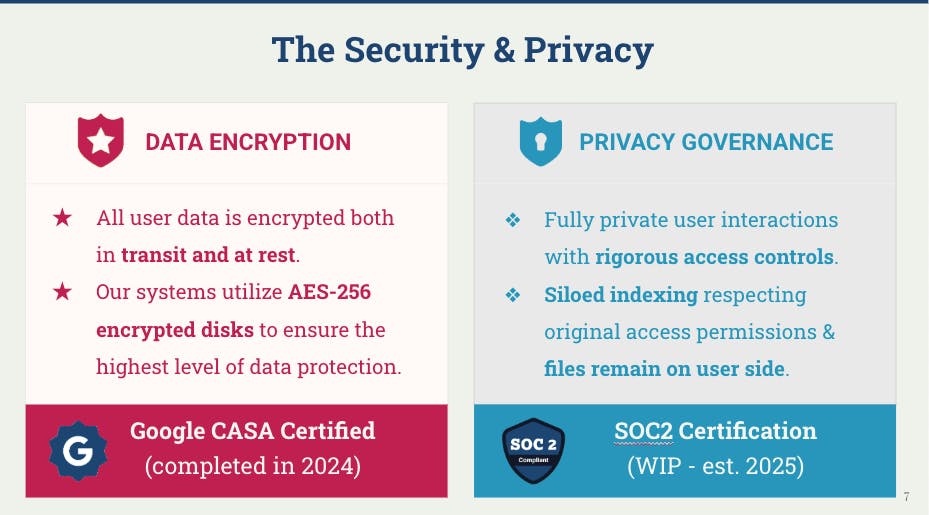
@taniabell I totally understand Tania. I know users are fine to store everything with bigger companies like Apple and Google but not with us who are just a small startup. It's one of the challenges we will have to overcome. Having said that, you don't need to give access to anything you don't feel comfortable with and I do have many users that only connect their Google Calendar. Finally, sharing one slide that I use during my Onboarding Calls to explain the measures we have around Security and Privacy: 🔐

🎉 Huge congrats on launching TheLibrarian.io on Product Hunt! 🚀 Your WhatsApp AI Assistant sounds like a game-changer for managing our busy lives. I love how it integrates seamlessly with Google Apps, Slack, and Notion—this will definitely help streamline my workflow!
The Morning Briefs feature is particularly impressive; starting the day with a clear overview is something we all need. 🙌 One suggestion I have is to consider adding a feature for customizable reminders based on user preferences. This could enhance user engagement and make the tool even more personal!
Looking forward to seeing how TheLibrarian.io evolves. Keep up the great work! 💪
@rocsheh Hey Zepeng, thank you for taking time from your busy schedule to leave us a comment. Do you mind sharing a bit more about your idea of the "customizable reminders"? Because we already support you setting up your reminders for whatever time and date? You just need to say "Send me the weather info every morning at 9am" and The Librarian will send you a WhatsApp message every day at 9am with the latest weather report. ⏰
@tiago_alves5 For example, more complex custom reminders, such as sending me the hottest news in the AI field at 9 AM today.
@rocsheh Interesting. So we did give The Librarian the capacity to connect directly to the Internet and retrieve information where news are included. So yes, you can try to say to The Librarian something like "Every morning at 9am go on Google News and check the past 24h for any interesting AI news and send a summary to me". Please try it and let me know how it goes? 📰

Hi @tiago_alves5 - I use WhatsApp alot so I'm wondering how easy is it to setup Librarian and also what do you think are the top 3 things I can use Librarian's WhatsApp function for?
@caleb_k Hey Caleb, really appreciate the questions! So, we've decided to go with WhatsApp because it's used by 3Bn people all over the world and after our first MVP so many users asked us to add it as one of the Apps that we integrate with. Today it's already super easy to create an account with The Librarian using your Google Login and then immediately connect your WhatsApp. Now, it's still being tested but we're making this even easier soon where you can just send a WhatsApp message to our phone number and boom, you've created an account and can start chatting with The Librarian immediately (stay tune for the announcement). For the Top 3 things, I'm biased, but I would say our Morning Briefs (overview of your day ahead), Scheduling Events (I don't open my Gcal anymore) and Networking Follow-ups (where I just snap a pic of someone's biz card and ask The Librarian to send an email on the spot). 😎😎😎

@jennieweng Hi Jennie, thank you for reaching out and for your question. We do have the Slack integration but our users gave us the feedback that they prefer to use Slack when they are on their computers but on the go they prefer to use WhatsApp. 💬
@jennieweng thank you for asking! please do let me know if any further questions or feedback. 🙏


TheLibrarian.io
Thank you so much for your detailed review and for highlighting both the strengths and areas where we can improve!
Regarding the calendar bugs, we’ve released a series of fixes over the last couple of weeks to address issues like freezing when removing duplicate events. If you’re still experiencing any problems, we’d really appreciate it if you could reach out to us at support(at)thelibrarian.io so we can investigate further. We always work to fix every bug that’s reported to us—some are resolved quickly, while others may take a bit more time, but we’re committed to getting them sorted.
For the image OCR, we just announced in today’s newsletter that we’ve rolled out a new OCR model that handles pictures much better, including improved recognition of handwriting. If you have a chance, please try it out and let us know if you notice an improvement.
Rest assured, we’ll continue working hard to earn that 5-star rating from you. Your feedback is invaluable in helping us make our WhatsApp AI Assistant even better! ⭐️⭐️⭐️⭐️⭐️