
NativeBridge
Automate mobile testing on real devices with AI
799 followers
Automate mobile testing on real devices with AI
799 followers
Instant access to real iOS and Android devices with one Magic Link. Run AI-powered tests using Maestro, capture crashes, and share rich bug reports. Turn mobile testing into a superpower.




Free Options
Launch Team / Built With


AWS Startup AdvisorPersonalized AWS guidance that meets you where you’re already building
Promoted
I like the Magic Link idea, removing context switching alone could save teams hours every week. Good stuff.
@roopreddy Thanks a lot for the support Roop! Really appreciate it!
@iftekharahmad Thanks Iftekhar!!
@dubd59 Thank you so much Darrell, really appreciate the kind words and support - fingers crossed 🤞
Hey @Product Hunt 👋
I take care of Marketing at NativeBridge, and today honestly feels unreal.
This launch is the result of 14 months of building, breaking, rethinking, and rebuilding, driven by a small team that showed up every single day, even when things didn’t work the first (or fifth) time.
We built NativeBridge because we kept seeing solid mobile apps fail for avoidable reasons: testing in perfect conditions while real users live in messy, unpredictable ones. Our goal was simple: make mobile testing feel closer to real life and less painful for teams.
Today isn’t just about shipping a product.
It’s about sharing what we’ve built, learning from this community, and getting honest feedback.
If you check us out, I’d genuinely love to hear:
What excites you
What feels unclear
What we should improve next
Huge respect to the Product Hunt community for supporting builders ❤️
Happy to answer anything in the comments!
- Shrey, Marketing @NativeBridge 🚀
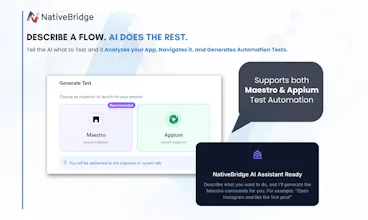
The support for Maestro and Appium is a good strategic choice. This means that via Webview automation, we can test and measure not just Native apps but hybrid apps like ionic/cordova too.
You guys really do more than you claim. Kudos to the team for pulling this off 👏🏼
Curious to know more about the analytics Native Bridge provides on the performance side of things and your plans for the future.
@gokulsundar Thanks a lot — really appreciate you noticing that nuance 🙏
On the performance side, NativeBridge focuses on surfacing the signals teams actually need to act on while tests run on real devices. Today that includes things like FPS drops, CPU and memory usage, battery drain, crashes, and network behavior, all captured in the context of a specific flow rather than just raw logs.
Looking ahead, we’re investing in making this more trend- and regression-aware - so teams can see how performance changes across app versions, devices, and releases, not just within a single run. The goal is to move from “here’s what happened” to “here’s what changed and why it matters,” without adding noise.
Happy to go deeper on any specific metric or use case you have in mind.
@sahil_choudhary22 Amazing... thanks for sharing. The metrics are becoming increasingly relevant as enterprises start moving more towards edge computation for privacy and security. Excited for whats in store, wishing the team the best ahead 👍🏼
@sasha_buratynskyi Thanks a lot! We’ve heard this a lot from QA managers - resource constraints are real, and that’s a big part of why we built NativeBridge.
Great idea! I’ve seen a similar service before for testing across different browsers for web — it took screenshots of individual pages. You went further, and that’s really cool.
Can you run tests in batches? For example, my QA provides a group of 50 test cases, you execute all of them on selected devices, record the results on video, and send a report? That would be a really awesome feature.
@mykyta_semenov_ Yes, you can run tests in batches (even through CI/CD) on selected devices. After every test execution, NativeBridge generates a detailed report including video recording of the execution and other parameters like CPU usage, FPS etc.