
Databox is an agentic analytics platform that brings performance data from across your business together with consistent metrics and business context. Ask its AI Analyst questions about your business, use Routines to surface important changes automatically, and turn insights into reports that explain what happened and why it matters. Databox does more of the recurring reporting and analysis, so you can understand performance faster and take better-informed action.
This is the 10th launch from Databox. View more

MCP Connectors by Databox
Launching today
Connect your AI Analyst to the tools your business runs on. It pulls context from your CRM or support desk, so every answer reflects what's happening in your business, and it can act on what it finds. Choose from 10+ connectors or add any MCP server.



Free Options
Launch Team / Built With


 HubSpot
 Power BI
Databox
Hi Product Hunt! 👋
I'm Pete from Databox. Today we're launching MCP connectors for Genie, our AI Analyst.
Genie analyzes your live metrics and tells you what changed. But a metric alone rarely explains what's going on.
Trial signups dip, and the reason is a pricing change your team shipped two weeks ago. Traffic jumps, and behind it is an influencer mentioning you on reddit that none of your analytics can track. The numbers alone can't tell you why something happened.
The deal context in your CRM, the tickets in your support desk, the tasks in your project tool and the Slack messages where your team discussed that unexpected Reddit mention. That's the explanation, and it's spread across the tools where work and conversations happen.
That context is what separates a generic report from a useful one. Any AI can look at a chart and tell you a number fell 12%. Knowing that two big deals slipped because you didn't anticipate a more extensive legal review, support tickets spiked after a feature release, and the reasons your ad strategy changed mid-month is what makes a report useful and actionable. Until now, getting that kind of answer meant someone gathering the context by hand, every time.
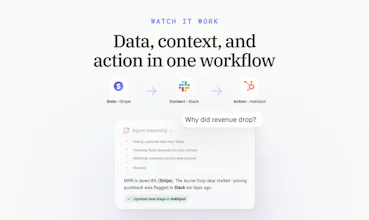
MCP connectors give Genie that context. Connect your tools, and Genie pulls from them during analysis, so its answers reflect what's actually happening in your business.
In addition to automating reporting, you can also use Databox's new MCP connectors to execute actions in other tools, based on your analysis. Want to shut down an ad campaign once it stops performing? No problem. Just write a skill in Databox that instructs your ad platform to shut down a campaign once frequency hits 5 and conversion rate drops below 1%. Want to update content on a website page after it stops getting search traffic? Easy. Want to create a task for your sales team if they have too many deals open without a next step? Even easier.
How it works:
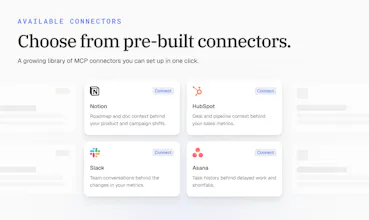
One-click connectors: HubSpot, Slack, Notion, Linear, Mixpanel, Semrush, Klaviyo, Ahrefs, and more, with 10+ available at launch
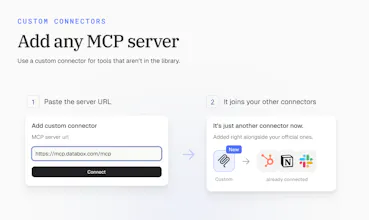
Custom connectors: add any MCP server by URL, with OAuth, API key, or bearer token support
Permissions you control: set every tool to always allow, needs approval, or blocked, so Genie only acts where you've said it can
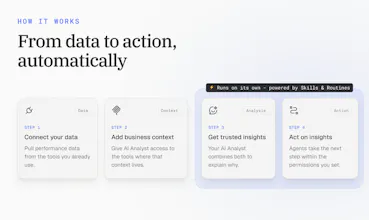
Skills & Routines: Write skills that pull data from specific integrations and context from specific MCP servers, automate actions based on the analysis. Run it completely autonomously using Routines.
MCP connectors are live today: https://databox.com/
If there's a tool you want Genie connected to, tell us below.
Thanks for checking it out 🙏
Routines and skills are nice on their own, they give the power to anyone using them. But pairing them with MCPs inside Genie, AI Analyst? Sweet :) Having MCPs to provide more context for a report (e.g. a CRM note) so I can better understand why the numbers changed is super helpful.
Now all three parts come together into one system that can help me get better results and insights. Can't wait to also get the agents in the mix, I've heard they're coming soon.
Databox
@mateja_verlic_bruncic Thanks, Mateja! That's the part we're most excited about too. Skills tell Genie, our AI Analyst, how to do the work. Routines make sure it happens on schedule. Connectors bring in the context behind the numbers, like that CRM note. Put together, a weekly report doesn't just show what changed, it also explains why.
Agents are next, and they build on all three. Stay tuned.
Do you trust AI tools to explain your business data or do you still perfer checking the numbers yourself
Databox
@shivam_kushwaha16 Both, and that's how it should be. We don't think you should trust an answer you can't check.
That's why the AI Analyst shows its work. When it explains why a number moved, it points to the actual deal, ticket, or conversation behind it, so you can open the source and see for yourself. The difference is you're checking an answer instead of building one from scratch across five tools.
Trust comes from being right a few times in a row. Showing the source makes that easy to judge.
@zigapotocnik Exactly this is what makes ai useful for data work the ability to check the source instead of just trusting the answer
Databox
Hey PH, I am Jakob, one of the engineers who worked on MCP connectors.
The idea is simple: Genie already knows your number, and now it can check the tools where the whole story behind them lives, eg. your CRM, Slack, or ad account. It can also act there on your behalf, like updating a deal or posting a message.
Since that means AI touching real tools, we put a lot of care into permissions. Every single action can be set to always allow, needs approval, or blocked. Anything that can change something asks you first by default, and Genie waits for your OK before running it.
And if any tool you use isn't in our predefined catalog, you can still connect it yourself. Many apps now offer MCP connection link, so you just paste that in and Genie picks up that functionality. Because that link could point anywhere, we check it carefully before connecting.
Happy to answer any technical questions :) Which tool is the first you would trust Genie to use?
How much setup is needed before the AI Analyst understands the company context?
Databox
@linpeng Very little, Lin. Pick a tool, click connect, and sign in. That's the whole setup, and it takes a few minutes. There's nothing to map or configure.
From there, the AI Analyst pulls in context from that tool whenever it's relevant to your question. You can adjust what it can access tool by tool, but you don't have to before you start. Most teams connect one tool first, ask a question they'd normally dig for, and add more from there.
Can it understand custom metrics that a company has created rather than only standard analytics metrics?
Can it learn which business questions matter most to a specific team?
Databox
@jasonwu Good question, Jason. Today your team shapes that directly rather than waiting for it to learn on its own. With Skills, you tell Genie, our AI Analyst, how your team works: which questions matter, which metrics to look at, and how to answer. Routines then run those questions on a schedule. Connectors add each team's own tools, so sales gets answers from sales context and marketing from marketing context.
It's more predictable this way, since the team decides what matters instead of the AI guessing.