
Like Google Photos, but fully local. Turn the terabytes of video, audio, meetings, and files you work with into searchable memories, without uploading anything to the cloud. Clipto automatically tags people, dialogue, and scenes, so you can instantly find any moment buried in your media just by describing what you're looking for. It's fast too: on a MacBook Pro M5, Clipto indexed 2TB of videos in just 24 hours.
This is the 2nd launch from Clipto. View more
Clipto MCP
Launched this week
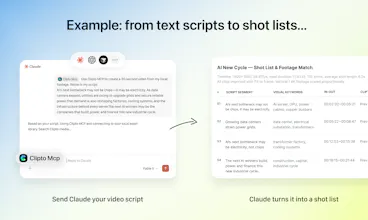
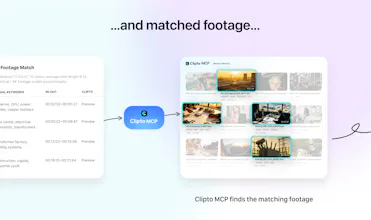
Clipto MCP gives Claude, ChatGPT, and other AI agents the ability to source clips and more from inside the videos, photos, and audio recordings stored on your computer.
Instead of manually browsing files, simply describe what you need. For example, turn a script into a video by matching each sentence with your local footage; find every scene where someone mentioned a topic; create rough cuts; or search years of media as if you have a dedicated assistant editor.




Free Options
Launch Team / Built With


Progress AI Observability
As someone with TONS of footage, not the best file organization (to be kind to myself about it) and content creation as a side project, I am really excited to try this one, congrats on the launch!
Clipto
@denitsapenchevavaltchanova It sounds like Clipto could be a great fit for your workflow. You shouldn’t need a perfect folder structure—or spend your limited side-project time organizing files—before you can use your footage. Just describe the moment you remember and let Clipto find it.
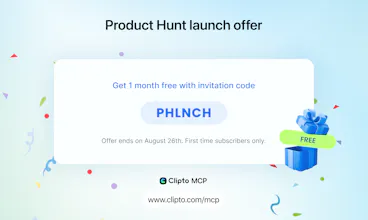
You can also use our invite code to get a one-month trial. We’d love for you to give it a try and share any feedback or suggestions. Thanks so much!
ViewCoder
Does this work the same way with Claude and Cursor?
Clipto
@erok_chen yes, it is the same. Just download the Clipto app and install the MCP for the corresponding agent.
Surgeflow
Congrats @henrykang and the team on the official PH launch of Clipto MCP! 🎉 I’ve been following since your first release, and this MCP upgrade is a game-changer – the idea of letting AI agents "understand" terabytes of local media instead of just accessing files is brilliant. "Turn a script into footage" and "search meeting decisions" are killer use cases for creators and teams alike.
Huge props for keeping everything 100% local (privacy first!) and that 2TB/24hrs indexing speed on M5 is seriously impressive. 💪
One concrete suggestion: since MCP is all about agentic workflows, could you add semantic filters like "emotional tone" (e.g., excited, serious) or "shot type" (close-up, wide) for more nuanced retrieval? Also, custom tag hierarchies (project + client) would make enterprise adoption much stickier.
Quick question: any plans to support shared indexing across NAS or external drives? Or maybe a lightweight API for developers to plug into tools like Notion? I'd love to see how far this ecosystem can go.
Wishing you a huge launch! 🔥 Can't wait to hear your thoughts!
Clipto
@rocsheh Thanks Zepeng! Really appreciate you following us since the first launch, and you nailed the distinction we care about most: access to files is relatively easy now, but understanding what’s actually inside years of media is a very different problem.
Love the semantic filter idea. We’re already extracting much richer information than just transcripts, and things like shot type, emotion, people, scenes, and other visual context are exactly the kind of signals we want agents to be able to reason over.
NAS and external-drive workflows are also very much on our radar, especially for professional media libraries where terabytes quickly become tens or hundreds of terabytes. And on the developer side, MCP is really just the beginning. We’d love to make Clipto’s media understanding useful well beyond the Clipto app itself.
Thanks for the thoughtful feedback and for being with us again for this launch! 🙌
Elisi : AI-powered Goal Management App
I’d love to see more examples of Claude or Cursor taking the retrieved content and turning it into a finished project.
Clipto
@rydensun Thanks! That’s where combining Clipto with Claude or Cursor opens up a lot of possibilities. We’ve added some recommended prompts in both the app and on our website to help you explore these workflows.
For anyone who wants to try it but doesn’t have enough footage ready, we’ve also prepared a starter library with 1,000 general-purpose clips. You can download it here:
https://www.clipto.com/mcp/demo-library
We’d love to see what you create!
LinkedCRM AI
Clipto
@zenda1122 Yes, that’s the key. Clipto uses multimodal models to understand what’s actually inside your local video and audio, not just filenames or transcripts.
It’s amazing how far AI has come in just one year. We’re working hard to turn that progress into something genuinely useful for real workflows like this. Once your media is indexed locally, MCP lets you bring that understanding into the AI tools you already use, opening up a lot more possibilities. Thanks!
Lancepilot
Clipto
@odeth_negapatan1 Thanks! It starts by downloading the app, adding your media, and giving Clipto some time to index the library. The initial indexing only needs to happen once, and Clipto will analyze new media as you add it.
Once that’s done, you can search your library smoothly inside the Clipto app, or connect it to your preferred AI Agent through MCP for more advanced workflows. You can find a specific shot, gather useful moments around a topic, match B-roll to a script, or locate an exact line in a long recording. The goal is simple: less time hunting for footage, and more time creating.
The Elon/Daft Punk demo is wild lol.
How much manual cleanup did you actually skip vs what Claude + FFmpeg pulled off on its own?
Clipto
@boyuan_deng1 Thanks Boyuan! ;) actually that's the point, we left everything to Claude, the video was produced with zero-human-touch. We are preparing the Elon Musk's clips so you can give it a try.
Check back here in a couple of hours.
https://www.clipto.com/mcp/demo-library