See the plan. Approve it. Watch it execute. SurgeFlow turns browser chaos into transparent automation across multiple tabs. Research, shopping, job applications—all with one command. Works in your browser—no need to download or install a new one.
I chose SurgeFlow over other solutions because it works directly in my browser without requiring me to switch tabs or install additional software. Unlike complex automation tools that need technical setup, SurgeFlow lets me describe tasks in plain English — like "Update user info from Dashboard to Google Sheets and send welcome emails" — and it automatically executes all 9 steps in 30 seconds. It's the simplest, most intuitive automation tool I've used.
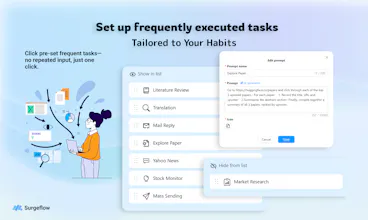
I’m Zepeng She, co-founder of Tate-A-Tate — the no-code AI agent platform we launched here before. Today, I’m thrilled to share our new project: SurgeFlow — an AI-powered Chrome extension that turns hours of repetitive browser work into seconds with just one natural language command.
This tool was born directly from our pain points running Tate-A-Tate. While building and scaling our AI agent ecosystem, our team found ourselves drowning in 50+ browser tabs daily: switching between dashboards to track user sign-ups, copying data to Google Sheets, drafting onboarding emails, and cross-referencing competitor tools. We were wasting 30% of our time on mindless, repetitive tasks that should have been automated — and none of the existing tools solved it without forcing us to learn code, switch platforms, or abandon our workflow.
ChatGPT was powerful, but bouncing between it and the browser just added another step. We realized: work happens in the browser, so AI should live there too. That’s why we built SurgeFlow — to let you talk directly to your browser, no setup or technical skills required.
🧭 What is SurgeFlow?
It’s the simplest way to automate complex multi-tab workflows without coding. Just tell SurgeFlow what you need in plain language (e.g., “Follow Surgeflow on X”) — and it executes across all your tabs automatically.
✅ Zero setup: Stay in Chrome/Edge, no extra downloads or sign-ups
✅ Natural language commands: Speak like you would to a colleague
✅ Multi-tab automation: Connects dashboards, sheets, email, and more
✅ 10-50x faster: Reclaim hours of your day from repetitive work
💡 Why it matters (from our Tate-A-Tate journey)
When we were scaling Tate-A-Tate, every minute spent on manual data entry or tab-switching was time taken away from building features, supporting users, and growing our ecosystem. We built SurgeFlow to fix the “invisible work” that plagues founders, teams, and anyone relying on browsers to get things done.
It’s not just for startups — our early users (including Tate-A-Tate team members!) are using it to:
Automate user onboarding process
Organize research papers and competitor data
Analyze information across multiple platforms
Post content to 5+ social channels in seconds
Compare prices across e-commerce sites instantly
✨ What makes us different?
Browser-native: Lives in Chrome/Edge — no platform switching/ no new browser downloading (we hate context switching as much as you do!)
No learning curve: No code, scripts, or tutorials — just type what you need
Multi-tab superpower: Unlike tools that only handle single-tab tasks, SurgeFlow connects your entire browser workflow
Built by builders: We built this for ourselves first, so we’re obsessed with solving real pain points (not just adding features)
We’d love your support — and more importantly, your feedback. Note that SurgeFlow is currently in beta — there are still improvements to be made, and we’d truly value your honest feedback to make it better. SurgeFlow is lightweight and ready to use in 2 clicks. Try it for free, test your most tedious workflow, and let us know what you think!
💬 Let’s chat: What’s the first repetitive browser task you’d automate with SurgeFlow?
@nikitaeverywhere Hi Nikita! Thanks so much for the congrats and great question! 🚀
Great question—here’s the key distinction: ChatGPT’s browser/Claude’s extension are built for AI-powered chat & single-page assistance, while SurgeFlow is laser-focused on multi-tab workflow automation (the stuff that involves hopping between tabs to get real work done).
Let me break it down simply:
Tools like ChatGPT Browser/Claude Extension excel at things like explaining a single page’s content, drafting text, or answering questions about what’s on your current tab.
SurgeFlow is designed to connect multiple tabs into a seamless workflow—e.g., “Pull sales data from Dashboard Tab → Compare to Competitor Tab → Fill into Google Sheets Tab → Draft a summary email in Gmail Tab” —all with one natural language command.
We also built our core on our own Tate-A-Tate agent framework (Planner + Executor + Evaluator), which is optimized specifically for browser tab context persistence and cross-tool automation—something generic AI extensions don’t prioritize. No chat-first experience, no need to switch browsers—just pure efficiency for the repetitive tab-hopping work you do daily.
Since it’s beta, we’d love for you to test it out and see how it fits your workflow! Any specific multi-tab pain point you’re looking to solve? 🙏
@rocsheh thanks a lot! While still I'm not convinced: thinking how switching tabs is better than visiting everything in a single tab even in sequence. That's the background job for humans unless they want to closely supervise it
@nikitaeverywhere Thanks Nikita! The main difference is a planner-navigator-validator system in Surgeflow, which means you can see what AI will do step-by-step, unlike a black box. You can stop at the planner stage to reschedule or stop at any time. Also, Surgeflow focuses on fastening existing workflow, so we don't want our users to download anything extra. How're you feeling, Nikita?
Report
Congratulations Surgeflow Team on the launch! 🎉
How is your product different from other no-code platforms?
@jin_shang1 Hi Jin! Thanks so much for the congrats and great question! 🚀
Biggest difference is we’re a browser extension, not a full browser replacement—no need to ditch Chrome/Edge or migrate all your bookmarks/settings! Dia/Comet are standalone browsers, but SurgeFlow lives right in the browser you already use daily.
Plus, we’re hyper-focused on multi-tab workflow automation via natural language—you can tell it to pull data from your dashboard tab, populate a Sheet tab, and draft an email tab all in one command. Most AI browsers prioritize browsing/chat, but we’re built to automate the repetitive tab-hopping work you do every day.
We’re still in beta, so would love your feedback if you give it a spin! Thanks again for checking us out! 🙏
Great question—this is exactly the kind of high-impact workflow we want to nail, and here’s where we stand:
✅ Currently possible (beta version): You can use SurgeFlow to pull posts/topics from X, LinkedIn, and Reddit tabs into a centralized Google Sheet (e.g., “Search ‘AI trends’ on X/LinkedIn/Reddit → Extract top 20 trending posts + their engagement → Export to Sheets with links”). It works for manual searches right now, and we’ve tested it with creator/marketer friends who loved having all trends in one place.
You’re 100% right—this would be a game-changer for creators (content ideation), marketers (campaign research), and researchers (topic analysis). We’re prioritizing it because beta users keep asking for it, and your feedback just reinforces how valuable it is.
Quick follow-up: If you were using this for trending topics, would you want to track specific keywords, hashtags, or user accounts? And how often would you need updates (daily, weekly, real-time)? Your input will help us build it exactly how users need it!
Thanks again for spotting the potential—we’re stoked to deliver this feature soon, and can’t wait to have you test it when it’s live! 🙏
Just give it a command, and let it handle the heavy lifting. It navigates, analyzes, and writes just like a human would.
🚀 Stop the manual grind of jumping between tabs! Just tell it: "Find 5 recent papers on LLMs, summarize each one, and organize them into a Google Doc." There’s something truly magical about watching it navigate pages and fill out documents right before your eyes.



Surgeflow
👋 Hi Product Hunt!
I’m Zepeng She, co-founder of Tate-A-Tate — the no-code AI agent platform we launched here before. Today, I’m thrilled to share our new project: SurgeFlow — an AI-powered Chrome extension that turns hours of repetitive browser work into seconds with just one natural language command.
This tool was born directly from our pain points running Tate-A-Tate. While building and scaling our AI agent ecosystem, our team found ourselves drowning in 50+ browser tabs daily: switching between dashboards to track user sign-ups, copying data to Google Sheets, drafting onboarding emails, and cross-referencing competitor tools. We were wasting 30% of our time on mindless, repetitive tasks that should have been automated — and none of the existing tools solved it without forcing us to learn code, switch platforms, or abandon our workflow.
ChatGPT was powerful, but bouncing between it and the browser just added another step. We realized: work happens in the browser, so AI should live there too. That’s why we built SurgeFlow — to let you talk directly to your browser, no setup or technical skills required.
🧭 What is SurgeFlow?
It’s the simplest way to automate complex multi-tab workflows without coding. Just tell SurgeFlow what you need in plain language (e.g., “Follow Surgeflow on X”) — and it executes across all your tabs automatically.
✅ Zero setup: Stay in Chrome/Edge, no extra downloads or sign-ups
✅ Natural language commands: Speak like you would to a colleague
✅ Multi-tab automation: Connects dashboards, sheets, email, and more
✅ 10-50x faster: Reclaim hours of your day from repetitive work
💡 Why it matters (from our Tate-A-Tate journey)
When we were scaling Tate-A-Tate, every minute spent on manual data entry or tab-switching was time taken away from building features, supporting users, and growing our ecosystem. We built SurgeFlow to fix the “invisible work” that plagues founders, teams, and anyone relying on browsers to get things done.
It’s not just for startups — our early users (including Tate-A-Tate team members!) are using it to:
Automate user onboarding process
Organize research papers and competitor data
Analyze information across multiple platforms
Post content to 5+ social channels in seconds
Compare prices across e-commerce sites instantly
✨ What makes us different?
Browser-native: Lives in Chrome/Edge — no platform switching/ no new browser downloading (we hate context switching as much as you do!)
No learning curve: No code, scripts, or tutorials — just type what you need
Multi-tab superpower: Unlike tools that only handle single-tab tasks, SurgeFlow connects your entire browser workflow
Built by builders: We built this for ourselves first, so we’re obsessed with solving real pain points (not just adding features)
We’d love your support — and more importantly, your feedback. Note that SurgeFlow is currently in beta — there are still improvements to be made, and we’d truly value your honest feedback to make it better. SurgeFlow is lightweight and ready to use in 2 clicks. Try it for free, test your most tedious workflow, and let us know what you think!
💬 Let’s chat: What’s the first repetitive browser task you’d automate with SurgeFlow?
Toki: AI Executive Assistant
Surgeflow
@sophialgrowth Yes, Thanks for your support, Sophia!
Jinna.ai
Congrats on the release! How is your product different from ChatGPT’s browser or Claude’s browser extension?
Surgeflow
@nikitaeverywhere Hi Nikita! Thanks so much for the congrats and great question! 🚀
Great question—here’s the key distinction: ChatGPT’s browser/Claude’s extension are built for AI-powered chat & single-page assistance, while SurgeFlow is laser-focused on multi-tab workflow automation (the stuff that involves hopping between tabs to get real work done).
Let me break it down simply:
Tools like ChatGPT Browser/Claude Extension excel at things like explaining a single page’s content, drafting text, or answering questions about what’s on your current tab.
SurgeFlow is designed to connect multiple tabs into a seamless workflow—e.g., “Pull sales data from Dashboard Tab → Compare to Competitor Tab → Fill into Google Sheets Tab → Draft a summary email in Gmail Tab” —all with one natural language command.
We also built our core on our own Tate-A-Tate agent framework (Planner + Executor + Evaluator), which is optimized specifically for browser tab context persistence and cross-tool automation—something generic AI extensions don’t prioritize. No chat-first experience, no need to switch browsers—just pure efficiency for the repetitive tab-hopping work you do daily.
Since it’s beta, we’d love for you to test it out and see how it fits your workflow! Any specific multi-tab pain point you’re looking to solve? 🙏
Jinna.ai
@rocsheh thanks a lot! While still I'm not convinced: thinking how switching tabs is better than visiting everything in a single tab even in sequence. That's the background job for humans unless they want to closely supervise it
Surgeflow
@nikitaeverywhere Thanks Nikita! The main difference is a planner-navigator-validator system in Surgeflow, which means you can see what AI will do step-by-step, unlike a black box. You can stop at the planner stage to reschedule or stop at any time. Also, Surgeflow focuses on fastening existing workflow, so we don't want our users to download anything extra. How're you feeling, Nikita?
Congratulations Surgeflow Team on the launch! 🎉
How is your product different from other no-code platforms?
Surgeflow
@bhautikmewada37 SurgeFlow is a chrome plugin to turn your Chrome into an "AI browser", not a no-code platform.
Agnes AI
Time to get rid of all the mess! I like surgeflow in the way that it keeps me tidy! not so easy in Agentic era...
Surgeflow
@cruise_chen Thanks for your support Cruise!
Readever
Congrats on the launch! Quick question: what's the biggest difference from AI browsers like Dia, Comet etc?
Surgeflow
@jin_shang1 Hi Jin! Thanks so much for the congrats and great question! 🚀
Biggest difference is we’re a browser extension, not a full browser replacement—no need to ditch Chrome/Edge or migrate all your bookmarks/settings! Dia/Comet are standalone browsers, but SurgeFlow lives right in the browser you already use daily.
Plus, we’re hyper-focused on multi-tab workflow automation via natural language—you can tell it to pull data from your dashboard tab, populate a Sheet tab, and draft an email tab all in one command. Most AI browsers prioritize browsing/chat, but we’re built to automate the repetitive tab-hopping work you do every day.
We’re still in beta, so would love your feedback if you give it a spin! Thanks again for checking us out! 🙏
Youkti
Congrats on the launch! @rocsheh @eeeeeach @orman_canida
This looks genuinely interesting. Browser automation done cleanly can save crazy amounts of time if it actually works as promised.
Curious though can this be used to search and track trending posts + topics across X, LinkedIn, and Reddit?
Because if it can handle that well, this becomes insanely useful for creators, marketers, and researchers.
Excited to see where this goes. Feels like a lot of potential here 👀
Surgeflow
@eeeeeach @orman_canida @rashiaroraofficial Hi Rashi! Thanks so much for the congrats and the kind words—means the world that you find SurgeFlow interesting! 🚀
Great question—this is exactly the kind of high-impact workflow we want to nail, and here’s where we stand:
✅ Currently possible (beta version): You can use SurgeFlow to pull posts/topics from X, LinkedIn, and Reddit tabs into a centralized Google Sheet (e.g., “Search ‘AI trends’ on X/LinkedIn/Reddit → Extract top 20 trending posts + their engagement → Export to Sheets with links”). It works for manual searches right now, and we’ve tested it with creator/marketer friends who loved having all trends in one place.
You’re 100% right—this would be a game-changer for creators (content ideation), marketers (campaign research), and researchers (topic analysis). We’re prioritizing it because beta users keep asking for it, and your feedback just reinforces how valuable it is.
Quick follow-up: If you were using this for trending topics, would you want to track specific keywords, hashtags, or user accounts? And how often would you need updates (daily, weekly, real-time)? Your input will help us build it exactly how users need it!
Thanks again for spotting the potential—we’re stoked to deliver this feature soon, and can’t wait to have you test it when it’s live! 🙏
Tate-A-Tate
💡 What can Surgeflow do?
Just give it a command, and let it handle the heavy lifting. It navigates, analyzes, and writes just like a human would.
🚀 Stop the manual grind of jumping between tabs! Just tell it: "Find 5 recent papers on LLMs, summarize each one, and organize them into a Google Doc." There’s something truly magical about watching it navigate pages and fill out documents right before your eyes.
Surgeflow
@lisa_helicopter_l Go!