Spent the last few months talking to founders and indie hackers who are quietly frustrated with subscription Chrome extensions.
The pattern I keep hearing: someone pays $20 to $50 a month for an extension that does one specific thing (usually an SEO checker, a research tool, a screenshot annotator, or an LinkedIn scraper). The extension itself is a few hundred lines of code, the underlying task is mechanical, and the monthly charge feels like rent on something that should be a one-time purchase.
I'm running growth for PlugThis (launching here on Product Hunt soon) and part of the pitch is that you can build or clone those tools yourself instead of renting them. But I want to stress-test the premise.
Two questions for this forum:
PlugThis
Hey PH 👋 Udaya here, founder of PlugThis. We're a team of four in Bangalore.
Till last year we were building AI products for large enterprises. Then the AI builder wave hit, and tools like Lovable, Bolt, and v0 genuinely inspired us. I built web apps, dashboards, and visualisations with them, and they performed incredibly well.
But when I tried building Chrome extensions with them, it just didn't work. Extensions have a completely different architecture (manifests, content scripts, service workers) and these tools weren't designed for that.
I've been building extensions since 2015 in my first startup, so I know this pain personally. Extensions are the most personal software there is 🧩
We spend 7 hours a day in a browser, and everyone of us has some 15 minute repetitive task they wish would disappear. But there was nowhere to go to build a simple extension for ourself.
We searched the market for something like this. Couldn't find it, so we built it.
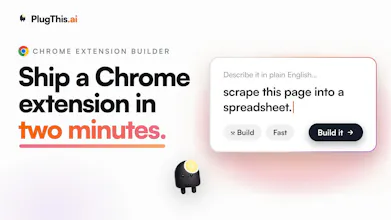
PlugThis builds Chrome extensions from a plain English prompt. Real Manifest V3 code that you own, and you can wire up a Supabase backend to make it full stack.
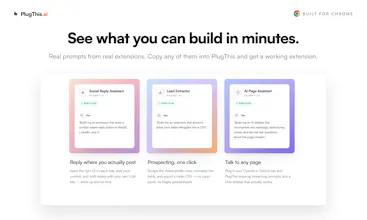
One from my own browser: an extension that reads a Twitter profile as I scroll, researches the person, and scores how close they are to my ICP. Took a few prompts ⚡
For launch week, the Builder plan is at the Starter price, 3 days only 🎁
We are here through the day. Try it out, and tell us what you liked and what you wish it did.
And if you build an extension for yourself today, please share it in the comments. That's honestly the whole point of this product 🙌
The focus on one narrow thing is what stands out here, since Lovable and Bolt genuinely do fall apart once you hit manifest files and content scripts. Curious how it handles permission scoping, since that's usually where generated extensions either ask for way more access than they need or break silently when Chrome tightens something. Also, since the code is yours to download, does switching between chat refinement and hand editing the code directly cause any drift, or does it stay in sync both ways.
PlugThis
@elhart05 Two good questions, both hit the parts that usually rot.
On permission scoping: it's need-based at generation time, so broad host access and content scripts only get added when the feature actually injects into pages, not by default. And because generation and validation run server-side against current Chrome rules, when Google tightens something we update it in one place and every new build follows. So it leans toward minimal rather than the usual "request everything to be safe," and it doesn't silently rot when Chrome shifts.
On the sync question, this is the part I'm actually happy about. There's no separate "chat copy" and "your copy" that drift apart. Both modes read and write the same single source of truth.
- When you hand-edit the code directly and save, that's stored as a normal tracked version.
- When you go back to chat refinement, the AI pulls the current saved files, including your hand edits, not some stale earlier snapshot. So it refines on top of your manual changes instead of clobbering them.
We actually hit that drift bug early and fixed it deliberately: enhancement now prefers the database as the source of truth, specifically so a stale client-side copy after an undo or restore can't make the model edit and then overwrite the wrong version. So it stays in sync both ways, and every switch between chat and hand editing is its own version you can roll back to.
Basically you can bounce between "talk to it" and "just fix the line myself" freely, and it holds together. Curious if that back and forth is how you'd actually want to work.
the manifest/content-script/service-worker mismatch is exactly why lovable and bolt hit a wall on extensions. the abstraction they picked works for pages not for browser plumbing.
real q: how does plugthis handle the distribution side? chrome web store trust is the second wall after the code works. asking because building the extension is now the easier half of shipping one.
PlugThis
@thenameisarian You nailed the framing. Once codegen is solved, building is the easy half and the Web Store is the second wall. That's the part we spent the most on, because "here's your zip, good luck" is where most tools stop.
Concretely, PlugThis treats distribution as a first-class step:
- It generates the listing from your actual code: long description, the 25 to 132 char short description, and the single-purpose statement Google now requires.
- It auto-drafts the compliance surface that usually triggers rejections: per-permission and host justifications, remote-code justification, and privacy disclosures mapped to Chrome's data categories.
- It packages the zip and writes the metadata into the manifest at publish time.
- Then it connects to your Chrome Web Store account over OAuth (refresh token encrypted at rest) and uploads and publishes directly. It remembers your Store item ID, so after the first listing, updates are basically one-click.
The honest boundary: we can remove the mechanical friction and the "did I fill the disclosures right" guesswork, but we can't make Google approve you. Review, trust, and the one-time developer registration are still theirs. What we kill is the part where the code works but you stall for a week because the listing and disclosures are a maze.
Curious if that matches where you have seen bolt and lovable users get stuck, at the store submission rather than the build.
With PlugThis sitting under Chrome Extensions, AI Workflow Automation, and AI Agents, how much of the extension-building process are you trying to cover? Is the goal prompt-to-working extension, or more like generating the boilerplate and helping refine pieces such as popup UI, background scripts, and permissions?
PlugThis
@crystalmei Great question! Prompt to working extension is the goal and not providing a boiler plate.
You describe what you want, PlugThis generates manifest, popup, content scripts, background scripts, permissions. It also verifies the build compiles before showing it to you, and auto-fixes if something breaks.
Then you refine by chatting. "Add a keyboard shortcut", "make the popup dark" etc.
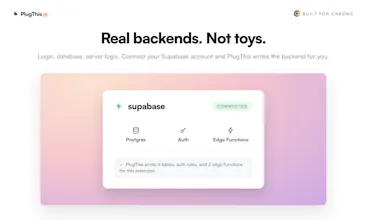
You can connect your Supabase and it wires up auth and a database. For AI features you plug in your own OpenAI or Gemini key.
When you're ready to ship, it generates the icons, screenshots and listing copy the Web Store asks for. And the code is yours to download anytime, so nothing is locked in.
Will it handle every exotic extension idea perfectly? Honestly, no. But for the stuff most people actually want to build, you go from a sentence to something installed in your browser in a couple of minutes.
We have managed to build fairly complex extensions, simply by chatting and describing what we want in plain english.
If you have an browser itch, please try out the platform. I am fairly certain PlugThis will be able to solve it.
I like that you picked a narrow but painful category. Chrome extensions look small from the outside, but manifests, content scripts, service workers, permissions, store rules, icons, screenshots, and listing copy make them very different from a normal web app. as a builder, I can immediately think of a few annoying browser workflows that would be perfect as tiny personal extensions.
Curious how PlugThis handles permissions and Chrome Web Store review risk. if someone asks for an extension that reads pages, injects UI, or works across many websites, does it guide them toward safer/minimal permissions automatically?
PlugThis
@andrasczeizel Thanks Andras, this is exactly the part most people underestimate.
Yeah, permissions are handled deliberately. When you describe an extension, PlugThis only grants what the feature actually needs. <all_urls> content scripts only get added if the extension truly injects into pages, and things like tabs, storage, sidePanel are added on demand, not by default. So a "read this one page" tool doesn't quietly end up with broad host access.
On review risk: there's a built-in step that runs over the generated code like a Web Store reviewer would. It flags sensitive permissions (cookies, identity, history, scripting, etc.), tells you when a privacy policy is required, and auto-drafts the host-permission and remote-code justifications for the CWS submission form. The goal is that when you hit "submit," you're not guessing what Google wants.
Would genuinely love to hear which annoying browser workflows you had in mind. Those tiny personal extensions are the sweet spot.
"Complex extensions from plain English" is bold. Where's the actual ceiling here?
PlugThis
Hi @hannah_parker5 one of our favourite questions to ask ourselves.
What works really well today: scraping pages into CSVs, AI stuff on page content like summaries and reply drafting, Gmail tools, highlighters and note savers with cloud sync, tab utilities. You can also wire up Supabase for login and a database and build real full stack extensions.
I am fairly certain, you ll be able to rebuild almost 90% of extensions found on the Chrome webstore in few prompts.
The actual ceiling: recording calls, monitoring pages in the background for days, and complex integrations with other apps.
The best and fastest way to find the ceiling is to throw your boldest idea at it. You get 5 free builds, no card. If it breaks, come back and tell me, I genuinely want to know.
I enjoy the idea of creating Chrome extensions without extra setup but how do you test compatibility across different Chrome versions Providing built in testing tools before publishing could help developers catch problems earlier with confidence.
PlugThis
@stacey_connolly2 Really glad this resonates, Stacey, and you're pointing at the right gap.
Two honest layers here. Manifest V3 is a versioned, fairly stable contract, so most compatibility comes down to which APIs you use versus the minimum Chrome version your manifest declares, rather than surprises between recent Chrome builds. PlugThis generates against current stable MV3, so you're not landing on deprecated patterns to begin with.
On the "catch problems before publishing" side, there is already a pre-publish pass built in: it compiles and bundles the code (so it won't ship if it doesn't build), runs a structural manifest validation, a lint pass that auto-fixes common issues, and a Chrome Web Store pre-flight checklist that flags pass, warn, and fail items before you submit.
Where you're right that we're not there yet: we don't spin the extension up across multiple Chrome versions and run it. That kind of "load it in Chrome N and Chrome N-2 and watch it behave" testing is exactly the kind of built-in confidence tool worth adding, and it's the honest next step rather than something I'll pretend already exists.
Would you want that as automated smoke tests on publish, or more of a manual "preview in a sandbox" you can click through? Curious which would actually earn your trust before hitting submit.