
Toyo is a personal AI assistant that lives in your messages and can call you on the phone. Talk to it like you'd message a coworker. Toyo triages your inbox, preps you for calls, can help keep your projects moving, and pulls answers and context from your company's tools. It works over text and voice: Have it call you when you want to get updates or just talk through some work. It lives in iMessage, so there's no new apps, and no new tabs to manage.




Hey Product Hunt 👋
Aidan here, co-founder at Toyo.
Like many of you, our team spends too much of every day ping-ponging between inboxes, tabs, notifications and follow-ups.
We're tinkerers with some degree of AI psychosis. We'd rather be burning tokens than dealing with email, so we built dozens of internal agents to automate the busywork. They worked, until we were spending our days maintaining an increasingly complex agent stack instead.
So we decided to productize the best of it, and Toyo is the result: the assistant we built for ourselves (and the first part of a larger product vision).
Toyo lives in your messages. You onboard by a quick phone call with Toyo, then connect your tools. Your Toyo gets to know you and your work. Then, it can help you with things like:
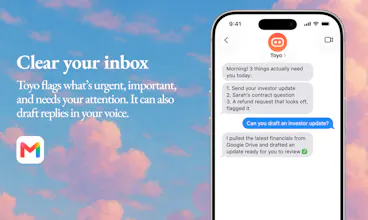
Inbox: triages email overnight, texts you a brief on what needs you, drafts replies in your voice.
Meetings: prep before calls, follow-ups after, no scheduling back-and-forth.
Voice: call it, voice-note it from the car, or have it call you.
Projects: connects Linear, Todoist, Asana, Slack and your meeting notes, so nothing from a call evaporates.
Knowledge: ask "what's our current pricing, and what changed last quarter?" and get an answer instead of a search.
We've run lots of our own busywork through it for months, along with a group of early users, and found it can be really helpful — especially when you have connected your email and calendar and set up a few basic workflows.
For me, the combination of scheduled updates tuned to what is important to me + Toyo actively scanning my inbox for urgent/ important emails and notifying me as they come in has super helpful. I start the day with a quick briefing of what is most important when I sit down at my desk and check my inbox way less than I used to throughout the day, which has helped me get distracted less.
The team and I are here all day to help anyone get set up and answer any questions.
Try it, break it, and tell us what you'd want yours to do. We want your feedback and ideas!
If you use PRODUCTHUNT at checkout you can try it out for one month free 🥳
@aidanhornsby Since Toyo handles autonomous workflows like inbox triage and outbound outreach, what specific guardrails or 'human-in-the-loop' confirmation steps are in place to ensure the AI doesn't send inaccurate information or violate communication preferences with sensitive VIP contacts?
@makimum_dev great question! We're thinking about this very carefully. Right now Toyo by default cannot send any messages on your behalf (only sort, and draft), and requires explicit confirmation from you before taking any destructive action like deleting an email, etc.
How and where Toyo gathers context from you and how it remembers and uses it to try and make more intelligent and informed choices in how it can be useful is an area we are investing a lot of time in getting right. For example, right now Toyo tries to identify VIPs based on the context it draws from you and your tools, but have also been experimenting with more direct onboarding questions to explicitly name all of the VIPs in your life.
@aidanhornsby Thanks for the clarity, Aidan. It’s good to hear the 'draft-first' default is in place. Regarding your experiment with explicitly naming VIPs is there a plan to make that 'VIP list' a dynamic, version-controlled configuration in the agent’s memory that users can inspect and modify, rather than it being a black-box discovery process? As an agent grows in autonomy, having an auditable 'allow-list' feels like a must have layer for safety.
@makimum_dev yes absolutely. There's certain things that happen in the agent's 'brain' that we want to make explicitly viewable and configurable for the user. We have some plans we're excited about here — stay tuned!!
@aidanhornsby Really like the "lives in your messages" approach instead of another dashboard to check. Curious how Toyo handles tone — does it draft replies that actually sound like the user, or more generic/professional by default? Building something in the messaging space myself and that's always the hardest part to get right.
@powell_parker this is a good question! Sounds like you already know how hard getting tone right can be (even with the current, amazing, frontier LLMs). As with anything, the answer is context-related: We've found that we can get quite a lot of mileage out of scanning the last hundred of so messages a user has sent by email or Slack. Although, notably, some people prefer to communicate differently depending on the channel.
All that to say, this is an ongoing area we're trying to keep improving, would love any feedback from you on how it feels and anywhere you think we can improve :)
I've been following @dctanner @aidanhornsby and team's journey since the early days, and I'm amazed by the level of thought and attention to details they put into their work. It started with @Layercode (launched here in October 2025, ranked #3 Product of the Day), then pivoted, and now @Toyo. Different products, same level of craft.
If you're looking for an AI assistant built with care, @Toyo is a no-brainer.
Thank you @fmerian! That's very kind. It's a crazy time to be building and launching products and the pivot from @Layercode was only obvious after the fact.
As we were building the voice AI platform we increasingly felt that despite voice dictation exploding in popularity, conversational voice is a really overlooked way to give agents rich context — it's so natural to verbally dump context to an agent that asks questions).
Alongside that, we observed that many builders and founders were spending increasing amounts of their time building, experimenting with, and maintaining their own internal AI agents to the point that they had created multiple new full-time jobs for themselves and their teams. A totally new kind of busywork that didn't exist even a year ago.
That to say, Toyo is the result of us becoming incredibly passionate about these two insights and we want to try to give more people access to the promise of an AI agent that can communicate with them wherever is easiest, and actually help them get real work done without all the engineering headaches.
@aidanhornsby brilliant! keep up the great work (and keep launching) 👏👏
Hey Product Hunters, CEO and co-founder of Toyo here.
We’ve had a lot of fun building Toyo and throwing lots of automations and tasks at it for the last couple of months and it continues to surprise us!
Under the hood we built a completely new agent architecture. This allows you to have a never ending single iMessage or voice conversation with Toyo, whilst it seamlessly uses subagents to get things done.
We’ve integrated over 1,000 MCP tools so you can connect all the tools you use today.
Some ideas our team and early users came up with:
Summarize newsletters that hit my inbox and never get read.
Track receipts and expenses in a Google Sheet.
Call me everyday on the phone and talk through my plan for the day.
Send a voice note with the blog post idea and get an instant draft.
We’d love to hear what you’d want to automate.
@dctanner S/O for the great work! curious how you use @Toyo personally? what are your favorite use cases?
@fmerian the most sci-fi thing is Toyo calls me every morning and we talk through my plan for the day 🧑🚀
@dctanner the "never ending single conversation" part is what I'm most curious about mechanically. months of iMessage history plus 1,000 connected MCP tools is a lot to keep live in context. is there some rolling summarization/compaction happening under the hood so old threads don't get forgotten, or does it lean more on re-fetching from the connected tools each time rather than remembering the raw conversation itself
great question! @dctanner wrote about this in more detail in this blog post: Why we cancelled our entire SaaS stack, and how we built what replaced it
tl,dr: they cancelled their CRM, their email automation, their website builder, their prospecting tools. all of it.
over to you! toyo.ai
@thys_beesman For me it's meeting prep. I have my Toyo research all the attendees for an important meeting, then call me and give me the background on each one, then we discuss whatever prep exists for the meeting (slides or pdfs) - and go back and forth to align on what's important to cover. Then usually I have it write a summary for whatever my part in the meeting is that I need to cover.
@stuartbowness great example!
people can learn more about this capability here btw: toyo.ai/capabilities/meeting-prep
@thys_beesman Great Q! For me: I used to check my inbox reflexively throughout the day and would get distracted by things that were neither urgent nor important.
We spent a bunch of time how Toyo scans, labels and helps manage your inbox and I am finding it very reliable for me at pinging me when something time-sensitive actually hits my inbox. As a result, I actually don't check my email anywhere near as much, which is saving me from those distractions. I feel that in my day and it's awesome.
(the email logic is fairly opinionated, actually. huge shoutout to @stuartbowness & @charles_catta for building an refining how it works today — more info here if interested: https://toyo.ai/capabilities/inbox-triage).
The “lives in iMessage and calls your phone” part is interesting because it suggests Toyo can handle both async and more urgent workflows. How do you decide when the assistant should call versus just continue in the message thread? I’d also be curious whether users can set rules by topic, like sales follow-ups, calendar changes, or personal errands.
@crystalmei spot on!
picture this: you're waking up. @Toyo has already scanned your inbox, tracked competitor changes, and flagged what matters. you get a 2-minute brief tailored to your current priorities. not a notification flood, not another dashboard.
get started at toyo.ai
@crystalmei Good question! Right now there's two ways:
Ask Toyo to call you reactively (good if you want to do something like talk through an idea for a piece of content or team update you need to get drafted, and hand off the outline/first draft to Toyo, etc)
Ask it to call you on a schedule with a specific prompt or instruction. This is more useful for things like a daily update every morning (something that is useful in text but some people prefer a call because they have commute at the same time every day, etc).
@crystalmei @aidanhornsby yes! and you can learn more about this capability here: toyo.ai/capabilities/phone-call
Great launch! The iMessage-native call is kind of wow. The usual failure mode for these assistants is becoming one more tab we forget to open and living where you already text sidesteps that. One thing - iMessage has no official API, so handling deliverability and Apple changing things might be tricky if I got it right - but I am sure you get it covered in the very near future?
Thanks @artstavenka1! Yeah this is definitely an area we've invested a lot to tune the experience to feel right. We couldn't be here without the amazing team + infrastructure of @linq which is powering this part of Toyo!
We're very excited to build on this with iMessage apps which they just launched last week: https://linqapp.com/blog/supercharge-your-agents-with-imessage-apps
@aidanhornsby any plans to support @WhatsApp?
@fmerian yes it's on the list! If it's something users are asking for we will prioritize it 👍
How does it actually pull context from company tools without needing a full-on integration setup each time, and is that something you have to configure per tool or does it work out of the box?
@aseldover13449 there's a few ways:
Foundational/high level context (what the business does, what tools you use, etc) primarily gets pulled from (1) a scrape of your website and (2) what you tell Toyo during your onboarding (text + phonecall)
More timely/less evergreen context is drawn from the tools you connect: Email, Slack, calendar, etc.
Different companies store key information in many different places but we've found connecting Notion and Slack is very helpful to give Toyo a good understanding of what's going on in your organization.
This is a very big challenge to get right though — especially as what is important and timely evolves slowly over time, and many tools like Notion do not store their data in ways that is optimized for agents. We have some strong opinions on this and are building something to help solve this as elegantly as we can — watch this space!