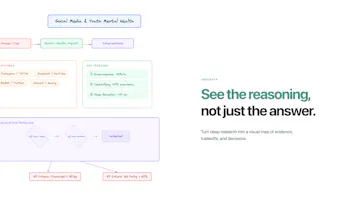
Most AI research tools give you an answer and move on. Innogath is built for what comes after: understanding, branching, revisiting, and turning research into something usable. It combines a structured report, a visual graph, branching pages, and linked notes so your thinking doesn’t disappear into a chat thread.
👋 Hey Product Hunt,
I’m Eric, founder of Innogath. Thanks for checking us out today.
I built Innogath because most AI research tools feel great at one thing: giving you an answer fast.
But real research usually starts breaking right after that.
You open a few threads.
You go deeper on one branch.
You want to come back to an earlier idea.
You want to compare two paths, keep notes, and turn the work into something usable.
And suddenly everything is trapped inside one long chat thread.
That’s the problem Innogath is built for.
Innogath turns deep research into a workspace you can actually navigate:
* a structured report you can read like a book
* a visual graph of ideas and branches
* branching pages you can return to anytime
* linked notes you can turn into writing
* node-based chat, so you can continue research in context instead of starting over
The core idea is simple:
**Research is not linear. Your workspace shouldn’t be either.**
What makes Innogath different isn’t just that it can generate a report.
It helps you stay inside the research, keep the structure alive, and keep building on it.
A few things we focused on:
* turning one-off answers into a navigable research map
* making branches visible instead of burying them in chat history
* letting you move between reading, exploring, note-taking, and writing in one place
* keeping sources and structure tied to the work, not detached from it
Who it’s for:
* people doing deep research on complex topics
* founders comparing ideas, markets, and product directions
* writers and learners who want to revisit and expand their thinking
* anyone who feels chat-based AI tools “end too early”
What I’d love feedback on:
1. Does the book + graph workflow feel genuinely different from chat-based tools?
2. Do branching pages make research easier to revisit and extend?
3. At what point does the workflow feel powerful vs. overwhelming?
I’ll be here all day answering questions and would genuinely love blunt feedback.
Thanks for taking a look.
The ‘parent memory’ idea sounds powerful but also risky: if a parent page contains a mistaken assumption, that error can propagate down the tree. What guardrails do you have (or plan) to help users correct upstream facts and keep downstream branches consistent without rerunning everything?
@curiouskitty Good question — child branches in Innogath aren’t just RAG over the parent report. They keep parent context so you don’t restart from zero, but they can also search the web again and bring in new sources where needed. So the design is more “inherit + re-ground” than “inherit and trust forever.”
Report
Research for myself is one thing — but I usually need to hand it off. What does sharing look like? Does the other person get the full graph with branches, or just the final report?
@klara_minarikova At the moment, you can share the report and notes, but not the full graph yet. The graph is still more of an internal thinking layer. We definitely think handoff gets a lot more interesting once the structure itself becomes shareable too, but we wanted to first make sure the actual output is useful on its own.
Report
Could be useful! Alhtough one big problem with research tools is knowledge decay, so how does Innogath help users revisit and reuse old research months later? Also can I export my book and graph in other formats?
@lak7 Yes — that's a big problem, and I think a lot of "AI research" tools quietly break here.
Generating something once is easy. Coming back to it months later and still being able to trust it, understand it, and reuse it is much harder.
What I want Innogath to do is make research less disposable. The report, notes, and branch structure stay connected, so when you return later you're not just looking at an old answer with no context — you can see how the work was shaped and pick it back up from there. Every citation has a timestamp so you can spot-check what's still current. The piece I haven't shipped yet is an automatic "re-verify" pass — re-run the original searches on an old report and flag claims where the ground truth has shifted. Planning that for the next cycle.
For export: Markdown (free), PDF and DOCX (Pro) for the report. You can also export your full account as a ZIP — that includes the canvas structure as JSON and the node tree with all parent/child relationships, so the graph is portable even though there's no dedicated PNG/SVG button yet.
Report
Deep research is still one of my favorite use cases for AI. This is a really interesting project. How do you guys actually orchestrate your agents? Do you allow users to choose the primary model used? I could easily use more than $9.60 in Opus credits on a single deep research run!
We orchestrate deep research as a multi-step workflow rather than one big model call. Different stages handle different parts of the process, which makes the whole thing much more controllable.
And yes, model choice definitely matters to us — that’s something we think about a lot.
Hi Eric Just kicked off my first research on it — really interesting product, I like the branching approach over linear chat. Good luck with the launch!
@thomaswainstein Thank you, really appreciate it! 🙏 Branching was the whole reason I built this, so glad it clicked.
Btw for the best report quality, hit the Deep Research button when sending — it pulls way more sources and generates a full cited report instead of a quick summary. Curious what you'll research!
Report
This resonates — in structured finance and renewable energy M&A, research outputs rarely have a useful structure. You end up with stacks of memos that nobody navigates after the deal closes. The "navigable book + graph" format is exactly what due diligence research should look like. I publish financial model templates on Eloquens for exactly this reason — structured, navigable outputs rather than raw files. Really looking forward to seeing how this develops for technical/financial research use cases.
Innogath
Product Hunt
Innogath
@curiouskitty Good question — child branches in Innogath aren’t just RAG over the parent report. They keep parent context so you don’t restart from zero, but they can also search the web again and bring in new sources where needed. So the design is more “inherit + re-ground” than “inherit and trust forever.”
Research for myself is one thing — but I usually need to hand it off. What does sharing look like? Does the other person get the full graph with branches, or just the final report?
Innogath
@klara_minarikova At the moment, you can share the report and notes, but not the full graph yet. The graph is still more of an internal thinking layer. We definitely think handoff gets a lot more interesting once the structure itself becomes shareable too, but we wanted to first make sure the actual output is useful on its own.
Could be useful! Alhtough one big problem with research tools is knowledge decay, so how does Innogath help users revisit and reuse old research months later? Also can I export my book and graph in other formats?
Innogath
@lak7 Yes — that's a big problem, and I think a lot of "AI research" tools quietly break here.
Generating something once is easy. Coming back to it months later and still being able to trust it, understand it, and reuse it is much harder.
What I want Innogath to do is make research less disposable. The report, notes, and branch structure stay connected, so when you return later you're not just looking at an old answer with no context — you can see how the work was shaped and pick it back up from there. Every citation has a timestamp so you can spot-check what's still current.
The piece I haven't shipped yet is an automatic "re-verify" pass — re-run the original searches on an old report and flag claims where the ground truth has shifted. Planning that for the next cycle.
For export: Markdown (free), PDF and DOCX (Pro) for the report. You can also export your full account as a ZIP — that includes the canvas structure as JSON and the node tree with all parent/child relationships, so the graph is portable even though there's no dedicated PNG/SVG button yet.
Deep research is still one of my favorite use cases for AI. This is a really interesting project. How do you guys actually orchestrate your agents? Do you allow users to choose the primary model used? I could easily use more than $9.60 in Opus credits on a single deep research run!
Innogath
@jim_jeffers Thanks, really appreciate that.
We orchestrate deep research as a multi-step workflow rather than one big model call. Different stages handle different parts of the process, which makes the whole thing much more controllable.
And yes, model choice definitely matters to us — that’s something we think about a lot.
Pilot5.ai
Hi Eric
Just kicked off my first research on it — really interesting product, I like the branching approach over linear chat. Good luck with the launch!
Innogath
@thomaswainstein Thank you, really appreciate it! 🙏 Branching was the whole reason I built this, so glad it clicked.
Btw for the best report quality, hit the Deep Research button when sending — it pulls way more sources and generates a full cited report instead of a quick summary. Curious what you'll research!
This resonates — in structured finance and renewable energy M&A, research outputs rarely have a useful structure. You end up with stacks of memos that nobody navigates after the deal closes. The "navigable book + graph" format is exactly what due diligence research should look like. I publish financial model templates on Eloquens for exactly this reason — structured, navigable outputs rather than raw files. Really looking forward to seeing how this develops for technical/financial research use cases.