

i think we've been building to-do apps backwards

quick thought on launch day, and a genuine question for this room
every to-do app fights over features .. tags, projects, dependencies, AI everything. but i think the real reason we abandon them sits way earlier: the 3 seconds between "i just remembered something" and it actually being saved.
that gap is where thoughts die .. you open the app, there's a form, a date picker, a dropdown, and by the time you're done you've half-forgotten why you opened it .. so you dump it in apple notes with a "sort later" that never comes, sound familiar?
so instead of piling on features, i spent the whole build obsessing over those 3 seconds, type it the way you'd say it .. "dentist thurs 2pm", "gym mon wed fri 6am" .. and it figures out the date, time, and recurrence, then shows you what it understood before you commit .. no form, back to work in seconds
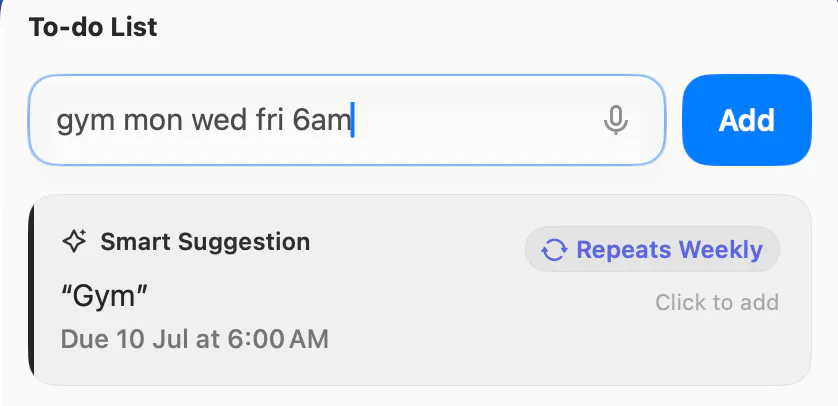
PopTask v2.3 went live today 🚀 but honestly i'm more curious about the debate:
what's in your to-do app graveyard? name the last one you abandoned and why
my theory: it's almost never the features that kill it, it's the friction!
Replies
Your 3 second gap idea really resonates. did you measure whether users actually create more tasks with natural language or is the biggest improvement that they stop abandoning the app altogether?
@ashir_murtaza1 it's abandonment, not volume .. small sample so no hard data yet, but people don't create more tasks .. they just stop quitting :| retention over count
what convinced you this should be a standalone app instead of a keyboard or system level extension?
@maya_boothman an extension can grab the text but can't own the rest .. schedule, reminders, sync
i wanted one thing that owns capture > remind > sync end to end, so i leaned on system surfaces for entry instead (CMND ⌃ P + menu bar on mac, control center + widgets on iphone)
i think you search an underrated issue. i don't forget tasks because i lack organizations i forget them because i never save them in time. what surprised you most from early users?
@zajindacos123_coder you said it better than my landing page .. it's a capture problem, not an organization one 💯
Yeah, this is where most to-do apps lose me.
If I have to organize the task before saving it, I’m probably just going back to Notes.
Typing it like I’d say it feels like the right bet.
@evan_kang1 that's the entire bet in one line .. thanks for getting it 🙌🏽
@lilhadi Exactly. Capture first, organize later.
my graveyard entry is Things 3, not because it lacked features but because opening it felt like starting a mini project just to write "buy milk". the capture-vs-organize framing is right.
genuinely curious about the "your input never reaches me, all on-device" line though. natural language date/time parsing with all the shorthand you're describing ("blue thing thurs") is not a trivial rules-based problem. is that running a small local model on-device, or is it closer to a big pattern library plus heuristics? asking because "fully on-device NLP" is a real technical flex if true and I'd want to know how you pulled it off
@galdayan most input never hits a model .. on iOS and macOS 26+ the model parse is Apple's on-device one
older OS (rare case) or a genuinely cursed input falls back to a cloud call (title text only, transient, not stored) so on-device for the common case, cloud for the tail
i won't pretend that fallback never leaves the device 🙌🏽
@lilhadi respect the straight answer, most makers would've just said "it's all on-device" and left it there. follow-up: is the cloud fallback rare in practice across your whole user base, or does it end up concentrated on a handful of people whose natural typing style is messier than average, so for them "mostly on-device" is more like "often cloud" while everyone else barely triggers it
@galdayan the axis is OS more than typing style
on macOS 26+ the on-device model catches almost all of the tail, so cloud rarely fires no matter how messy you type
pre-26 (which are older macs) has no on-device model, so that's where messy input actually leans cloud .. and it trends toward zero as people upgrade
honestly, i can't even measure the exact split .. telemetry is local only, nothing phones home .. so i'm a little blind to my own funnel by design 🫠
@lilhadi os-version split makes way more sense than typing-style, that's a clean falsifiable answer instead of a vibe. and the "i can't measure my own funnel" bit is honestly more convincing than if you'd claimed a precise number, a made up split would've been the red flag, not the admission you don't have one. good thread, appreciate you actually engaging the follow-ups instead of just replying to the original post and moving on.
This is such a sharp reframe. You nailed it, the friction is the killer, not the missing features. My graveyard is a project tool I dropped last year because logging one task felt like filling out a form at the DMV, and running a restaurant taught me that anything resembling data entry during a busy shift simply does not get done. Capture has to match the speed of the thought, otherwise the thought wins. Curious whether people trust the natural language parsing right away, or does that leap of faith take a few weeks?
@ceciliatran it's quick for most people because you see what it understood before you hit add, so there's nothing to trust blindly 🙌🏽
This resonates a lot. Running a few different ventures at once, I have noticed the exact same gap happens with more than just tasks, it happens with signals too. A customer comment that hints they are unhappy, a decision someone is waiting on me for, they show up for a few seconds inside Slack or email and if I do not catch them right then they get buried under the next fifty messages. The real friction is never about features, it is about how much attention it costs to notice something important before it quietly disappears into the noise.
@stacywycof83995 this is the sharper cut 🙌🏽
but heads up (just to be transparent) PopTask only solves one side of it the second YOU catch something, saving it costs almost no attention .. 3 seconds, no derail
but catching the signal before it drowns under the next fifty slack messages .. that's a different story, it means watching your inboxes, which is a scope and privacy rabbit hole i haven't gone down
my graveyard entry is Todoist - not because it lacked features, it had every feature I could want, but because adding a task required picking a project first and half the time I didn't know which project a random thought belonged to yet. so I'd just... not add it. the "figure out the structure later" part you're describing is the same lesson, just applied to capture instead of scheduling. curious whether your on-device parsing ever gets a date/time wrong in a way that's actually dangerous, like silently scheduling something for the wrong day rather than just failing to parse it - a loud failure seems safer than a confident wrong one for something time-based.
Totally agree — the friction isn't the feature set, it's that 3-second capture gap. The apps that stuck for me are the ones where I can dump a thought in one tap and sort it later. Curious how you're handling the "sort later" pile so it doesn't just become another graveyard?