
Tencent WorkBuddy is an AI agent built for everyday office work. Make a request. Guide your AI expert team. Bring in a second opinion. Get sharpened, ready-to-use results.





Free Options
Launch Team

AWS Startup AdvisorPersonalized AWS guidance that meets you where you’re already building
Promoted
For enterprise teams, governance will matter. Are there admin controls for which files WorkBuddy can access, where outputs are saved, and what context is remembered?
@jocky Great question — completely agree that governance becomes critical for enterprise teams.
WorkBuddy is designed around explicit authorization rather than open-ended access. Teams can control which file locations WorkBuddy is allowed to access, and in enterprise scenarios permissions can be scoped even further by expert/agent role — for example, a data expert can access the data folder while a writing expert only accesses templates.
Outputs are also controllable. By default, WorkBuddy saves results into an authorized local folder, and teams can configure output destinations such as Tencent Cloud COS or Google Drive.
For memory, we think it has to be treated as governed context, not hidden context. WorkBuddy supports memory capabilities, but for enterprise use our principle is that remembered context should respect the same permission boundaries, be intentional, and be manageable by the team — not silently accumulate in the background.
So yes, admin controls around access, output location, identity, and context governance are a major part of how we think about WorkBuddy for enterprise teams.
@caddy_liu Glad to hear, Congratulations on the launch!
@jocky Thanks for asking! That's definitely an important one.
With WorkBuddy, you decide what it can access, and tasks run inside an isolated sandbox. You also control where files are saved.
Another thing worth mentioning is that project memory stays local to each workspace, so context isn't shared across projects.
If you're looking at it for enterprise use, we also rely on Tencent Cloud's infrastructure for permission management, runtime auditing, and compliance support.
Happy to dive deeper if you have a particular use case in mind!
@ledo Glad to hear, Congratulations on the launch!
Congrats WorkBuddy team. How does WorkBuddy decide which experts should join a task? Is it based on the prompt, the selected team, or user history?
@blink_66 Thank you! Right now, users can choose the experts they need based on the actual task and then launch the collaboration. The task prompt gives WorkBuddy the context, and the selected team determines which experts are available to join.
We’re also working on expert recommendations powered by the prompt and memory, so WorkBuddy can suggest the right experts automatically and help people get all kinds of work done faster and better.
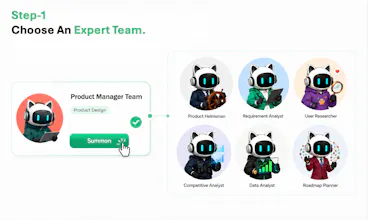
@blink_66 Right now, it's user-driven. You choose the experts based on your task. We've organized them into categories (Content Creation, Investment Analysis, Legal Consulting and more) so it's easy to find the right fit, and you can also search by title or create your own custom expert. Smart recommendations based on prompt and memory are on the roadmap!
100+ pre-built expert teams is a lot, BTW how do you actually find the right one fast? Is there search, or do you browse by category?
@abod_rehman Both! You can search by title if you already know what you need, or browse by category like Content Creation, Research, Investment Analysis, Legal Consulting and more. And if none of them quite fit, you can create your own custom expert. It's user-driven for now, so you stay in control of which expert handles what. Smart recommendations based on your prompt and memory are on our roadmap, so it'll get even easier over time.
I’d like to have Workboddy take over my browser to perform repetitive tasks, but I’m very concerned about the potential leakage of my account details, payment information, and personal data. How do you handle the uploading and protection of personal information?
@bob_bo Hi, thanks for you questions. WorkBuddy is not meant to freely crawl everything in your browser or silently collect account/payment details. It works within the scope the user authorizes: the task workspace, connected tools, installed skills, or the specific browser/task context needed for the job.
By default, higher-risk actions are guarded by permission controls. For example, actions involving sensitive paths, deletion, scripts/external programs, or sensitive network capabilities can require user confirmation rather than running silently.
For personal data, our principle is to process only what is needed to complete the task. Users should avoid putting unnecessary passwords, card numbers, or private personal data into prompts. Memory is also user-manageable — you can view/edit entries and tell WorkBuddy what to remember or forget.
The goal is to make repetitive browser work faster while keeping access explicit, scoped, and reviewable.
@bob_bo Thanks for asking,it's definitely something we'd ask too~
WorkBuddy only works with the data you allow it to access, and tasks run in an isolated sandbox so you stay in control throughout the process.
For enterprise users, it runs on Tencent Cloud's infrastructure with support for permission management, runtime auditing, and compliance. If you're evaluating it for a specific use case, feel free to reach out—we'd be happy to talk through the details.
@thys_beesman Hi~Great question!
It mainly depends on the complexity of the task. For straightforward requests, a single expert is usually the fastest and most efficient choice. But for longer, more complex tasks—especially those involving planning, research across multiple sources, or several execution steps—a team of experts can work together, with each contributing its own expertise to different parts of the workflow.
Our goal is to help users get the best results in the most efficient way. WorkBuddy supports both single-expert and expert-teams workflows, so feel free to give them a try and see which works best for your tasks!
the "bring in a second opinion" framing is a nice touch. most AI-work tools stop at one answer, and leaning into an expert-panel idea instead is more how real teams actually decide things. curious how you keep the experts from just agreeing with each other. congrats on the launch.
@alex_watson2110 Thanks so much for the thoughtful comment!
That's something we care about a lot. Our experts are designed with different workflows, curated domain knowledge, and specialized skills, so each one can contribute its own perspective to a task.
We're continuously improving them, and we'd love to hear your feedback if you give WorkBuddy a try~
@etiennegarcia Thanks a lot! Yes—users can jump in anytime. You can refine direction, adjust scope, or switch/bring in experts mid-way without restarting the workflow.
We designed it to stay flexible and collaborative throughout the process.
Would love your thoughts if you try it!