
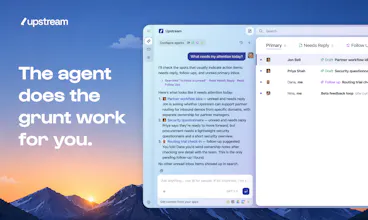
Finally, an inbox you'll look forward to. Agents sort your messages, draft your replies, and clear the grunt work behind the scenes, all in a client so well-crafted that email feels light, fast, fun.



Free
Launch Team / Built With


CloudflareDeploy serverless functions globally in seconds
Promoted


The UI looks absolutely beautiful and lightweight. Since it's built to clear out backend grunt work, does Upstream integrate directly with standard business tools like CRMs or project management platforms to log customer conversations automatically, or is it strictly focused on the email client layer?
@andika_fadhilah Thanks so much Andika! We have integrated with a handful of business tools, but are planning to increase our support for many more. I'm curious which tools would you like to see an integration for?
Thank you for your words @andika_fadhilah
@andika_fadhilah as the designer at Upstream, I really appreciate your comment 😄
Joseph deserves a lot of the credit here
I still remember the first designs he showed us and thinking "wait, email can actually look good?" 😂
@jontiret we’ve come a long way!
This looks really promising! Does it work across multiple Gmail accounts?
@kimberlee_calvo Yes, you can connect as many Gmail accounts as you like!
@kimberlee_calvo did you want to connect pro & perso or did you have another use case in mind?
@kimberlee_calvo excited for you to give it a try!
@kimberlee_calvo Thank you Kimberlee!
@kimberlee_calvo please drop some feedback once you try it :)
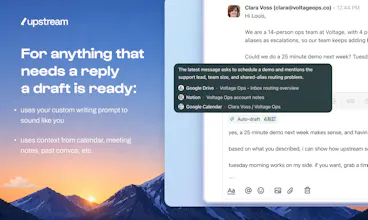
The voice-matching per audience is what caught my eye — does it learn over time from how you edit the drafts, or is it mostly set from the initial analysis?
@doganakbulut Right now it’s mostly set from the initial audience analysis. However, the tone of the drafts do change according to the context of the thread.
That said, learning from how you edit drafts is definitely on our roadmap. It’s the natural next step: the more you tweak tone, phrasing, and structure for a given audience, the better Upstream should get at matching that voice over time.
I would add that each time we generate a draft we use your most recent conversations with the recipient in question to generate the reply, so if you tweak the drafts they will naturally converge toward the writing style you use for a given recipient
@jontiret The agentic drafts are definitely one of the strengths of upstream. This, plus the fact you can integrate it other data sources like notion or google drive makes for excellent drafts!
yeah good point @skwph, for now this is google drive and notion but later potentially with 1000s of sources so that agents have full context
HI @louislecat my question is, most tools that connect to slack and notion hit token limits or lag heavily when syncing large workspaces. how often does upstream index the connected apps for fresh context? such a great launch
hey Priya ! That's a very good question :)
Today we're mostly doing retrieval on demand rather than maintaining a giant synchronized index of all connected apps. When an agent needs context, it queries the relevant sources directly.
This gives us fresh data by default, but it also means retrieval quality and performance on very large workspaces are challenges we’re actively working on. I think the long-term answer will likely be a hybrid approach rather than fully indexing everything
@priya_kushwaha1 I'm curious if you have experience dealing with it?
Congratulations! Upstream looks really promising. I know you support multiple accounts, but would I have to pay multiple times as well? I have 5 accounts, and no matter how good your service is, I can't pay $100 / month for an email client. :)
Also, I have a couple of different aliases under one email. Do you support email alias under one account as well?
@akiarostami Thanks Ahmad! Upstream is free to use with any or all of your accounts. However, upgrading to Pro is done per account.
We currently don't support aliases, but we do have it on our roadmap 😄
Five email accounts sounds like exactly the kind of setup we built Upstream for 😅
Out of curiosity, what are they for? Multiple businesses, client work, or just years of email accumulation?
@jontiret Thanks Jonathan. These emails are from multiple businesses and domains, plus my personal email. My guess is most people have more than a couple of accounts. And to be completely honest, adding some other business's name to the bottom of all my emails sounds like Hotmail and 1999, so I would not use the free account. I usually don't have a problem paying for services I use, but I can't justify $100-$125 / month for something I'm doing for free right now. Perhaps your product is built for multiple business accounts, but your pricing model isn't (yet)? 😅
If it helps, I'm using Spark as my email client right now, and I'm paying one monthly fee for any number of email accounts.
Honestly, that’s fair 😅
If you’re managing multiple businesses, our current pricing can become expensive pretty quickly. It’s definitely something we’re thinking about and we have that use case in mind so we'll do something about it! Thanks a lot for taking the time to share your use case and feedback
Curious how Upstream handles the trust gap though when an agent drafts a reply on your behalf, how much do you let it send autonomously vs. always queue for human approval? That's usually where these tools either win or lose people fast.
Thanks for the question @alexander_gray3! That's actually one of our strongest product principles: nothing ever sends automatically.
Agents can draft replies, prepare follow-ups, suggest actions, and do a lot of the grunt work, but a human always has to hit the Send button. We think organizing and preparing work can be highly autonomous. Sending an email is a different trust boundary altogether.
Our opinionated stance for now is that every message needs to be reviewed by you before it's sent - curious what you would expect?
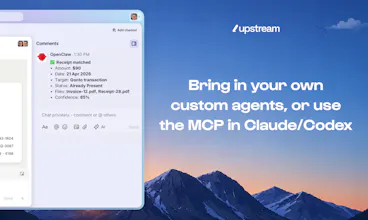
Love the fact that you can bring in your custom agent. How does that work?
@_felx Thanks! Your agents can have their own accounts in Upstream and participate directly in the workspace. They can read threads you’ve given them access to (for example through channels or by tagging them on a conversation), take actions, and leave private comments so you can see what they’re doing and interact with them directly.
They connect through MCP (Settings → MCP), which lets them use Upstream while keeping access to all the context and tools they already have (eg your docs, CRM, codebase, support system, etc.)
What kind of agent are you thinking of connecting, and what use case do you have in mind?
@_felx curious to know what agents you use and for what use cases :)
@_felx Thank you felix! :D
@_felx thanks Felix!