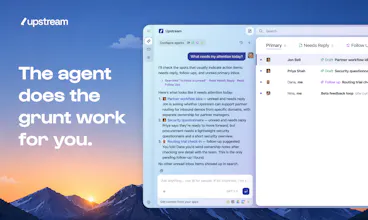
Finally, an inbox you'll look forward to. Agents sort your messages, draft your replies, and clear the grunt work behind the scenes, all in a client so well-crafted that email feels light, fast, fun.
The human + agent inbox model is interesting - most tools treat agents as a bolt-on to an existing workflow, and it creates friction. Building the inbox around the assumption that agents will be first-class participants from day one is a different design choice. What's the biggest behavioural change you've seen in users when they start treating the AI as a teammate rather than a tool?
Very good question Lava! I'd say that the biggest change is that people start delegating much earlier. Instead of opening a thread, reading everything, thinking for a few minutes and then asking AI for help, they immediately pull an agent into the conversation and work from there
most tools treat agents as a bolt-on to an existing workflow, and it creates friction.
I couldn't agree more. Putting AI where it doesn't belong is such a bad experience. that's why we took our time before integrating it. We really wanted to add AI where it made a difference, and was actually useful to out users.
Thanks @mikestaub ! Out of curiosity, what part do you think benefits the most from being open source: is it the customization, the trust/transparency, something else?
Report
@jontiret trust and transparency is #1, but customization is #2. If you go open source you can create an extension ecosystem and go for a real platform play like VSCode or Slack
That’s an interesting way to think about it. The platform angle wasn’t the first thing that came to mind, but VS Code is definitely a compelling example. Thanks for sharing your perspective! 🙏 🙏
Thanks @mikestaub , would you use it if it was open source? Would you want to host it yourself or use a hosted version?
Report
Great time-saver. Particularly value the 'Follow Ups' feature which surfaces emails requiring a follow-up, including the actual wording so you can just press send. These get totally lost in gmail.
@jacob_waern Completely agree! And one of the followup features is the agent knows when to remind: if you tell someone "please reply ASAP", you'll get a follow-up the next day. If you say instead "i need your reply before the end of the week", you'll get a followup on thursday/friday. This makes the feature much more useful!
@skwph That's one of my favorite parts too. also what I really like is that before reminding me to follow up, the agent checks other related threads to see whether the person already got back to me somewhere else. It sounds simple, but it avoids a surprising number of unnecessary follow-ups 😅
@jacob_waern what kind of conversations do you use it for most often?
@jacob_waern happy to hear that the followups help! Was fun to work on this :)
Report
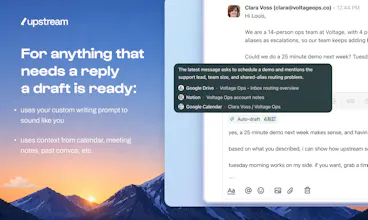
I’ve been using Upstream and what really stands out is how natural the drafts feel — they actually sound like me, not like a generic AI reply. Opening a thread and already having a solid response waiting there saves a surprising amount of time. The follow-up nudges are also genuinely useful for keeping important conversations from slipping through the cracks. Congrats on the launch — this is one of the few AI email tools that feels built for real daily use.
they actually sound like me, not like a generic AI reply
That was exactly our intent. Before upstream, i had to rewrite most of my drafts because they just didn't sound right. We're going to keep improving them! (and we have so many ideas...)
@greg_lpz This means a lot, Grégoire - thank you! 🙏
Report
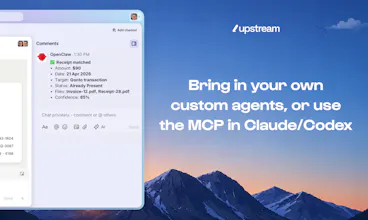
Congrats on the launch Upstream team! It’s the only product where I find myself hitting « send » most of the time without changing anything in the AI’s draft. It’s so much faster than having to prompt Claude Code or Codex, wait for it to find the thread, analyze, draft and answer, then re-write half of it manually
@artstavenka1 We think that you should make the final decision when it comes to sending. For triage we automatically sort what needs reply and what needs a follow up. But we allow you to completely customize the prompts.
What's your take on what should be autonomous vs manual?
@artstavenka1 the fact that an agent can never send a message without your approval is a core principle of Upstream that I personally hold very dear ❤️






Decode by Entropik
The human + agent inbox model is interesting - most tools treat agents as a bolt-on to an existing workflow, and it creates friction. Building the inbox around the assumption that agents will be first-class participants from day one is a different design choice. What's the biggest behavioural change you've seen in users when they start treating the AI as a teammate rather than a tool?
Upstream
Very good question Lava! I'd say that the biggest change is that people start delegating much earlier. Instead of opening a thread, reading everything, thinking for a few minutes and then asking AI for help, they immediately pull an agent into the conversation and work from there
Upstream
I would add that people stop complaining about their inbox all the time and actually have a different relationship with it!
Upstream
Yeah, that's a very good point indeed @louislecat
Upstream
@louislecat 100% agree with this
Upstream
@productrambler I just want to jump on one thing:
I couldn't agree more. Putting AI where it doesn't belong is such a bad experience. that's why we took our time before integrating it. We really wanted to add AI where it made a difference, and was actually useful to out users.
Tindog
Upstream
@jberrebi Thanks! His last name is "Leca", so no relation 😄
Upstream
The coincidence is still fun, though ^_^
Upstream
@jontiret haha totally
Upstream
@amperisk maybe sparrow evolved into Upstream and gained an extra letter along the way 😅
This is a great product but I encourage you to embrace an open source strategy like paperclip.ing, it is more scalable and builds more trust
Upstream
Thanks @mikestaub ! Out of curiosity, what part do you think benefits the most from being open source: is it the customization, the trust/transparency, something else?
@jontiret trust and transparency is #1, but customization is #2. If you go open source you can create an extension ecosystem and go for a real platform play like VSCode or Slack
Upstream
That’s an interesting way to think about it. The platform angle wasn’t the first thing that came to mind, but VS Code is definitely a compelling example. Thanks for sharing your perspective! 🙏 🙏
Upstream
@mikestaub thanks for sharing your thoughts, building trust is core
Upstream
@mikestaub @amperisk ➕
Upstream
Thanks @mikestaub , would you use it if it was open source? Would you want to host it yourself or use a hosted version?
Great time-saver. Particularly value the 'Follow Ups' feature which surfaces emails requiring a follow-up, including the actual wording so you can just press send. These get totally lost in gmail.
Upstream
@jacob_waern This is one of those features that I use almost every day. I'm glad it's been saving you some time!
Upstream
Upstream
@jacob_waern Completely agree! And one of the followup features is the agent knows when to remind: if you tell someone "please reply ASAP", you'll get a follow-up the next day. If you say instead "i need your reply before the end of the week", you'll get a followup on thursday/friday. This makes the feature much more useful!
Upstream
@skwph That's one of my favorite parts too. also what I really like is that before reminding me to follow up, the agent checks other related threads to see whether the person already got back to me somewhere else. It sounds simple, but it avoids a surprising number of unnecessary follow-ups 😅
@jacob_waern what kind of conversations do you use it for most often?
Upstream
@jacob_waern this is one of those features that makes me glad every time I see a new follow up
Upstream
@jacob_waern happy to hear that the followups help! Was fun to work on this :)
I’ve been using Upstream and what really stands out is how natural the drafts feel — they actually sound like me, not like a generic AI reply. Opening a thread and already having a solid response waiting there saves a surprising amount of time. The follow-up nudges are also genuinely useful for keeping important conversations from slipping through the cracks. Congrats on the launch — this is one of the few AI email tools that feels built for real daily use.
Upstream
@greg_lpz Thanks so much Grégoire!! Are there any features that would help make AI replies even better for you?
Upstream
Upstream
That was exactly our intent. Before upstream, i had to rewrite most of my drafts because they just didn't sound right. We're going to keep improving them! (and we have so many ideas...)
Upstream
@skwph so many ideas 😎
Upstream
This means a lot. "Sounds like me" is the bar we’re aiming for with drafts
Upstream
@greg_lpz This means a lot, Grégoire - thank you! 🙏
Upstream
@thomaslecat Thanks so much Thomas! Super happy that you're saving so much time with Upstream
Upstream
Upstream
@thomaslecat thank you!
Upstream
@thomaslecat Best signal we can get. Thanks!
Upstream
@thomaslecat Sending drafts as is is the goal - thank you, Thomas! 🙏
Upstream
@thomaslecat @webkonstantin fully agree! so happy we nailed it!
Where do you guys draw the autonomy line on triage vs sending? Those two might fail completely differently IMO. Anyways, great work!
Upstream
@artstavenka1 We think that you should make the final decision when it comes to sending. For triage we automatically sort what needs reply and what needs a follow up. But we allow you to completely customize the prompts.
What's your take on what should be autonomous vs manual?
Upstream
@artstavenka1 the fact that an agent can never send a message without your approval is a core principle of Upstream that I personally hold very dear ❤️
@jontiret respectfully noted, thanks!
Upstream
🙌