
Finally, an inbox you'll look forward to. Agents sort your messages, draft your replies, and clear the grunt work behind the scenes, all in a client so well-crafted that email feels light, fast, fun.



Free
Launch Team / Built With


Context.devAPI to scrape anything for AI, 20,000+ developers trust us.
Promoted


Sales Compensation Hub
congrats team!
I've a quick question. How can I edit the soul or voice of the agent when writing email draft? Can I create multiple profiles, eg. when writing to a team member, a lawyer, a customer, or a VC?
Upstream
@jelorillon Thanks Jean! You can edit the prompt for your voice by going to Settings > Configure Agents. You'll be able to tweak your global writing style prompt as well as the prompts for each audience. You can also create a custom audience and define your voice for it.
Just curious what are your most common audiences?
Upstream
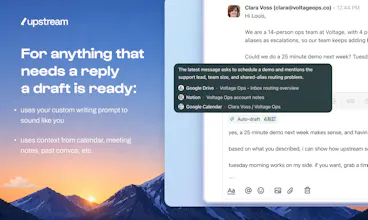
Also, when you sign up, our custom writing agent will review your past emails to identify your audiences (the typical categories of people you interact with) - most likely the categories you mentioned will already be filled out in the "audiences" section during the onboarding :)
LoadFast Snippet Expander
The open-loops part is the bit that stands out to me. Drafting replies is useful, but remembering what needs a follow-up is where email quietly taxes people every day. Curious whether those reminders are purely email-thread based or can pull from Calendar/Granola context too.
Upstream
@vidur_saini We create follow ups on email threads. We also create follow up emails after each Granola meeting, with a summary, action items and recipients added.
What other types of follow ups do you have in mind?
Upstream
@vidur_saini Before generating a follow-up in a given conversation, we also check other conversations to see whether you actually received a reply on the topic before following up. Also, I’m curious to learn what use cases you have in mind for Calendar.
FetchSandbox
the "agents do the grunt work" angle is interesting because most AI email tools still make you manage the AI. curious how the triage actually works in practice, does the agent learn your priorities over time or is it more rule-based out of the box?
Upstream
Hey Raj, a couple things come out of the box:
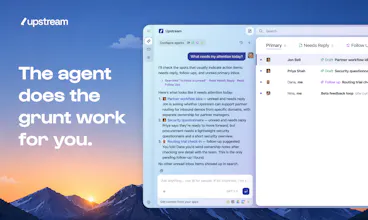
1 agent identifies everything that needs a reply and puts it in 1 place
1 agent identifies the noise / spammy emails and moves them to a less intrusive place
1 agent identifies when people don't reply to you and brings it back at the exact right time
And from there you can customize and add more triaging options
Upstream
One thing we’ve learned is that people have surprisingly different definitions of what important means 😅
That’s why we start with sensible defaults and then let users customize the behavior from there
The human + agent inbox positioning is interesting. Email has a lot of hidden context, so I like that you are not framing this as just another summarizer. How do you decide which actions should stay manual versus agent-assisted?
Upstream
@xuanlin right now agents help you draft, follow up, or triage the spammy emails. And you can ask in the chat for more stuff. You can always do anything manually obviously
Curious how you would want things to work ideally?
Upstream
Also, one principle that is important to us is that even if agents prepare a draft for you, sending is always done with your approval
The hardest part of AI email assistants seems less about drafting and more about trust. At what point do users become comfortable sending agent-generated replies with minimal edits, and where do they still prefer to stay fully in control?
Upstream
@yagnaveena the user maintains control in both scenarios. You can edit agent generated drafts or completely write them from scratch.
Love your promise! Out of curiosity: every other email tool say they sound like me these days, what makes you claim you are better here?
Upstream
@geoffroy_de_cooman1 As soon as you join, Upstream creates a custom writing agent that analyzes writing style, tonal shifts, lowercase usage, abbreviations, greetings, sign offs, and more for each audience. We also adjust the tone of AI drafts depending on the context of the current conversation. On top of that you can even customize the prompt to fine-tune exactly how you want to sound.
Upstream
I couldn't have said it better! :)
Twenty
Congrats Louis, Jonathan, and team! Can you plug your codebase/github repo as context?
Upstream
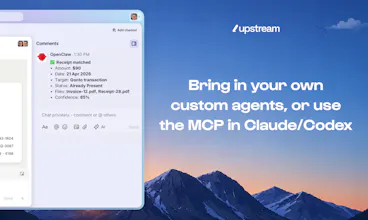
@thomas_df Not yet natively. The current workaround is to open your codebase in Claude Code, Codex, or Cursor, let it gather the relevant repo context, and then have it use Upstream via MCP to draft the reply.
What’s the use case you have in mind?
Twenty
@louislecat today I have a Codex automation that drafts me Gmail answers for Sales & Support messages using the codebase as context, this is really useful!
Upstream
@thomas_df That's a great use case! For now, you can do the same with Upstream MCP, and agents can also have their own service accounts so they can tag you and post private comments for you and your team on email conversations, or simply reply directly on your behalf like what you describe with Gmail
Upstream
@thomas_df oh the codex thing seems really cool!
Upstream
@thomas_df Thank you Thomas!
Upstream
@thomas_df thanks a lot! Appreciate it