


Migma AIEmail marketing from Grok Bot
Promoted


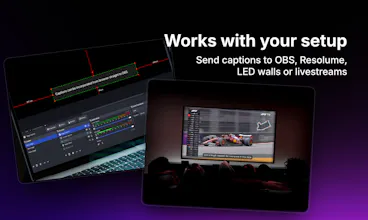

What stood out immediately was how easy it was to start using. There was no complicated setup, no hardware, and no need for extra technicians. We just opened it in the browser and it worked. The captions in Polish were accurate and appeared quickly enough to follow the speaker naturally. This was especially helpful during medical presentations, where people could read along and stay engaged. It also made the event feel more modern and accessible.
The most valuable improvement would be real-time translation. Since our conference is in Polish, being able to automatically show English captions would make it much easier for international guests to follow along.
We also looked at AI Media. It is a professional solution, but it relies on dedicated hardware and a much more complex setup. For our conference, this would mean more logistics, higher costs, and less flexibility. We wanted something lightweight that we could deploy quickly without bringing in additional equipment or external operators.


Love that this is framed around real events, not just recordings, @martinc1 @jarekavi
From an accessibility standpoint, I’m curious how you’re thinking about scale. For large conferences with thousands of viewers across devices, are captions pushed via a central stream or rendered client-side per device?
Also wondering if you’ve explored multilingual captioning live, or if accuracy at scale is still the primary focus.
Clean execution. Congrats to the team.

@martinc1 @virajmahajan22 very good points :) I'll try to address them:
Large conferences with thousands of viewers - our server is built to handle that scale. Each client connects to our API via WebSocket connection, which gives us control over how many viewers can join a room to keep things stable. We obviously have safety limits from security and reliability perspective, but if an organizer needs higher capacity - we can expand.
Multilingual captioning: great feature request. We actually had an MVP of it, but the accuracy didn’t meet our standards and expectations. Live translation requires more context, which means that word-by-word results tend to constantly change on screen, which can be distracting. So for now, we have dropped this idea (might come back to it though).
Thanks for the genuine interest and such targeted questions!
@martinc1 @jarekavi That makes a lot of sense. The WebSocket architecture explains how you are keeping latency low while still controlling room stability. For live environments, that’s probably the only way to maintain consistent caption delivery across devices without buffering issues [please correct me if I am wrong here, because I worked on a project where they had also used WebSocket]
And I completely agree on multilingual translation. Word-by-word streaming translations can quickly become chaotic on screen. Context windows and stabilization are still a real challenge for live systems. If I am not mistaken, there are tools like Notta or Fireflies that have solved this issue to some extent, right?
Out of curiosity, have you experimented with a hybrid approach where the live captions remain in the original language, but translated captions appear with a small delay once the sentence stabilizes? It might preserve accuracy while still supporting multilingual audiences.
Also, I spend a lot of time working with AI products around transcription, translation, and real-time communication systems, so tools like this are fascinating to watch evolve. If you ever want an external perspective or someone to pressure-test product positioning, accessibility use cases, or event workflows, I would be happy to help.
Really interesting build. I’ll be following how this develops.

@tereza_hurtova Thanks so much, really appreciate it! Making events more inclusive is exactly what we’re aiming for 🎯
For accuracy, we take a direct feed from the speaker’s mic or the mixer rather than room audio, which removes most background noise and keeps captions clean even in loud venues.
For accents, we rely on modern speech recognition models trained on diverse voices, so they handle different speaking styles quite well :)
![wisdom ojieh [copywizard]](https://ph-avatars.imgix.net/8750687/5f99b5ab-b191-4427-8983-396c3298b24d.png?auto=compress,format&codec=mozjpeg&cs=strip&fit=crop&frame=1&h=32&w=32)
Love the origin story; building it because you actually needed it shows in the simplicity. The browser first approach feels especially event friendly, no downloads and no friction for attendees is huge. I’m curious, when you used it at the medical conference, what moment made you think, ‘Okay, this really works’? Was it attendee adoption, AV team setup, or something else?
@copywizard for me there were several such moments:
The setup took us around 20 minutes. The AV team gave us direct audio output from all microphones via a single XLR cable into our Focusrite interface. We plugged it into a laptop, opened Stage Captions in the browser, joined the room and it just worked!
The second moment was realizing we could leave it running independently. We went for a longer coffee break to talk to people and checked on our phones - everything was still running smoothly without any interaction. That independence felt great 💯
And of course the feedback from attendees. People were surprised by speed and accuracy of the captions. This kind of acknowledgement from others made it all worth it 🤘

Real-time captioning for live events solves a huge accessibility gap!
How do you handle technical jargon or industry-specific terms during live transcription? Can speakers pre-load a custom vocabulary?
Important work!
@adam_lab yes, we support custom dictionaries as well. Users can create a dictionary by selecting the language and adding industry-specific terms. Later while creating a "room" they can select created dictionary from the dropdown. Thanks for raising such an important question! :)

This is a smart idea - you should work on partnerships, because it would enhance the viewing experience in a big way. Is this the route you're going on?
@jake_friedberg yep, that's one of the direction we are willing to take. Currently we don't have many well established connections with event organisers and AV production teams, but we're working towards it.


stagecaptions.io
Thank you for leaving such a detailed review. It was a pleasure working on PSML PFMM conference. Looking forward to future events together 🤝