
Skippr AI
Live AI employees for product onboarding and demo
779 followers
Live AI employees for product onboarding and demo
779 followers
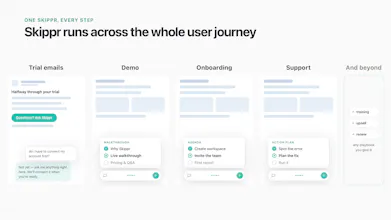
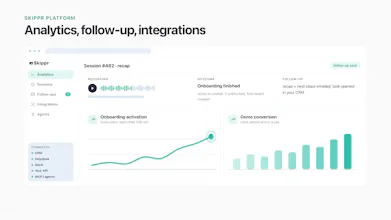
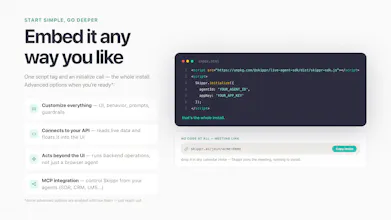
Real-time agents that see, talk, and operate software. They onboard, activate, and unblock your users. On their own. Skippr agents keep agenda and memory across full sessions, speak 10 languages, and act on screen with built-in browser automation. Fully self-serve: spin up an agent in minutes, embed with 2 lines of code, or share a meeting link. Trained on your knowledge, styled to your brand. 200 free credits to start, no card required. Talk to me for the deeper enterprise version.


Free Options
Launch Team / Built With


I love this approach. Do you have any B2C customers? How does it compare to just having a chatbot inside your application that is tuned to your platform?
@rich_sun Great question! Until now we've worked with B2B customers only, but the new self-serve tier lets anyone embed an agent in their app or share it via a video meeting link (it can even see a screen share from outside the product). Curious what B2C use cases you have in mind!
Compared to a chatbot trained on your app:
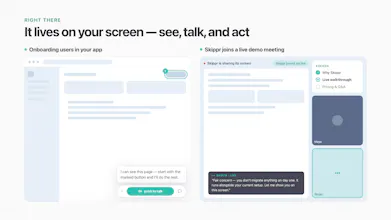
Eyes. It sees what's happening on the user's screen in real time, not just answers from docs.
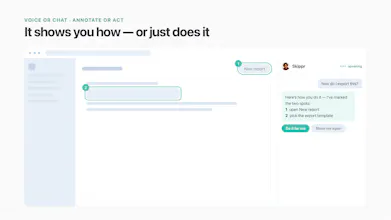
Hands. It can move the UI itself and complete long multi-step tasks.
Voice + brain. It talks naturally and digests the live session, past history, and long-term user memory.
Lives beyond the product. It can join your team's flow, like guiding a session in a meeting room.
Less chatbot, more live expert that watches, talks, acts, and remembers.
kinda wild that it actually clicked around my app on its own without me hand holding it, felt like watching a coworker onboard a new hire. honestly the multi language thing surprised me the most, gonna throw a spanish speaking user at it and see
@feyza1156028 This made my day Feyza, "watching a coworker onboard a new hire" is exactly the feeling we were chasing 🙌 Please do throw the Spanish speaker at it, the agent follows their language mid-session without being asked. Tell me how it goes, and if anything feels off I want to hear that even more.
The browser automation is the part I'm most curious about. One thing that would make it feel way more trustworthy is a small audit trail window showing what the agent just clicked or typed, so users can follow along and intervene if it drifts. That kind of transparency would help a lot during onboarding flows where trust is everything.
@aslhanbukrzy5q Love this — transparency is exactly the design principle we're building around. Today the agent uses a plan-and-approve flow: it shows you what it intends to do before executing, and nothing runs without a green light. A live audit trail during execution (what was just clicked/typed, in plain language, with a pause/take-over button) is the natural next layer, and it's on our radar — especially for onboarding flows where you're right that trust is everything. Really appreciate the thoughtful feedback; this is the kind of input that shapes the roadmap.
an agent that can act on screen with real browser automation is a bigger trust leap than a chatbot. if it clicks the wrong button in a live user session, who catches that before the user does - is there a confidence threshold where it hands back to a human instead of just acting?
@omri_ben_shoham1 Totally agree it's a bigger trust leap, that's why acting is opt-in and layered. Before the agent executes, it shows a plan the user approves; every action is visible on screen and interruptible mid-action (one click/keystroke stops it). Clients define zones where the agent never acts: payments, destructive settings - it explains and hands off instead. And when it's not confident it doesn't guess: it defaults from acting to guiding (highlighting, walking the user through), and escalates hard cases to a human with full session context. The user is never the last line of defense, they're the approval step before anything happens.
Hey PH fam 👋
Excited to hunt Skippr AI for the global tech and startup community today!
Here’s the shift I think Skippr represents:
Software went self-serve two decades ago, and we quietly accepted the tradeoff. Nobody greets you when you land in a product. Nobody walks you through setup. Nobody notices when you’re stuck on step 3 and about to churn.
We optimized for scale and lost the floor staff.
Skippr puts that layer back. Think Apple Store Genius Bar energy inside your product, instead of a laminated FAQ binder. An agent that’s present in real time and handles onboarding, activation, demos, and support like a person would.
What impressed me when I tested it:
→ It doesn’t just tell users what to click. It clicks. Built-in browser automation means the agent completes actions on screen, which is the difference between a tour guide and a driver
→ It holds agenda and memory across an entire session instead of resetting like most conversational tools
→ Speaks 10 languages out of the box, so your onboarding works in São Paulo as well as it does in San Francisco
→ Setup is genuinely instant. Trained on your docs, styled to match your brand, live in minutes
Sagi and the Skippr team are here all day. Free tier gets you 200 credits to try it, no payment info needed.
Question for the community: as agents get good enough to staff our products, which parts of the user journey should stay human, and which would you hand over first? Curious where people draw the line 👇
This looks useful. Does the agent adjust its pacing if a user skips multiple steps quickly?
@dhiraj_patel5 Sure, it's not strict on step by step, has the flexibility and context to skip!
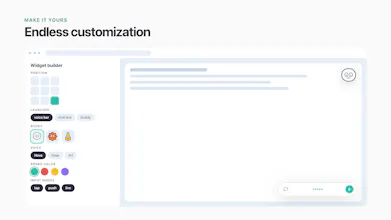
Interesting. How much can I customise Skippr’s appearance? Can I incorporate my own design system?
@max_smith20 Quite deep, this was a big ask from our design partners. You control the widget style (avatar, strip, or always-on launcher), colors, brand assets, animations, and the voice and personality to match your tone. Our Buddies avatars are optional, plenty of agents run with their company's own face.
So yes, you can bring your design system's look and feel through the appearance settings, self-serve. If you mean deeper, like pixel-level component integration with your own UI kit, that's an SDK conversation, ping me and I'll show you what's possible.
Would love to see what you'd style it into 🙂