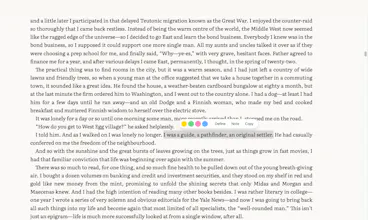
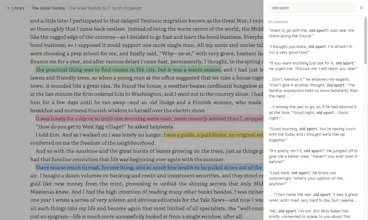
A lightweight reader for your PDFs and EPUBs, entirely in your browser; no install, no account, no ecosystem. Highlight both formats, keep a per-book journal, and read offline. Your files stay on your device. Sync to your own Google Drive coming soon.
I read on a Mac, a Windows laptop, and my phone, and no app could follow me across all three. Apple Books is stuck on Apple, Kindle on Amazon, and Calibre is a heavy desktop install. I just wanted to open my own PDFs and EPUBs anywhere and keep my highlights with me.
So I made ReadHere. It runs entirely in your browser: read PDF and EPUB, highlight and take notes in both, keep a per-book journal, all of it offline. No account, no upload, your books stay on your device.
It's free. To be honest about where it's at: everything is local to your browser right now. Syncing to your own Google Drive (yours, not mine) is what I'm building next, and there's a waitlist if that's your thing.
Would love your honest feedback, especially on how it actually feels to read in. Thanks for taking a look 🙏
Report
no account, no ecosystem is a stance not just a feature. the entire reading software space drifted into "we own your library now" over the last decade. kindle apple books kobo all want lock-in. choosing to not own anything of the user's by default is rare.
the per-book journal is sneakily the strongest feature. that's where re-readers live. quick question for v2: when google drive sync ships, do journal entries sync separately from highlights or together? annotations leaking across devices is one thing. half-formed thoughts on chapter 3 is another vibe entirely.
This is such a clean and thoughtful product. ❤️ I love that everything stays on my device, works offline, and doesn't require creating yet another account. Definitely something I'd actually use.
One small feature I'd absolutely love: automatically remember where I left off in every PDF/EPUB. It would be amazing if I could close a book and, the next time I open it, it jumps right back to the exact page/position I was reading. That tiny detail would make the experience feel perfect. Great work !!
@priyanktyagi Thank you, that really means a lot. And you'll like this: it already does that. ReadHere saves your spot in each book, so when you reopen one it jumps right back to where you left off. Give it a try and let me know if it feels right.
@tanay_pant Thanks! Sync is next, but to your own Google Drive first, so your library follows you across devices. Sending books straight to a Kindle or e-ink reader isn't built yet, but it's a great idea and I'm noting it down. Which device would you want it for?
@qmaruf I've been using Xteink X4 with Crosspoint, so would love it for that!
Report
"No install, no account, no ecosystem" is doing a lot of heavy lifting in the best possible way. Most PDF tools bury you in upsells before you even open a file. The per-book journal is the feature I didn't know I needed - does it store in localStorage or IndexedDB? Curious how it survives a browser data clear.
@galdayan Thanks, glad the journal clicked for you. It's all in IndexedDB, not localStorage, so it survives normal browsing and stays on your device. But you're right: clearing your browser data wipes it. That's the honest trade-off of staying local, and exactly why I'm building sync to your own Google Drive next, so you get a backup you control.
Report
Great idea & just tested - super convenient to use! is there any way to ever make this work without wifi? ex. if i want to read the book on a flight w/o wifi
@virajkadakia Thanks for testing it! And good news: it already works without wifi. Once you open a book, it saves on your device. After that you can read it on a flight with no internet, including your highlights and notes. Just open it once before you go offline.
Report
I really like the privacy-first approach here. Being able to read PDFs and EPUBs with highlights and notes directly in the browser, without creating an account or uploading personal documents, feels refreshingly simple and practical. Google Drive sync sounds like a great next step. Do you also plan to support other sync options like OneDrive, Dropbox, or even WebDAV so users can choose where their library lives?
@malachi_koester Thanks! Happy you like the privacy part and yes, that's the plan. I'm starting with Google Drive because that's where I keep my own files. Dropbox, OneDrive, and WebDAV are all on my list too. Which one would you want first?






ReadHere
Hi PH 👋
I read on a Mac, a Windows laptop, and my phone, and no app could follow me across all three. Apple Books is stuck on Apple, Kindle on Amazon, and Calibre is a heavy desktop install. I just wanted to open my own PDFs and EPUBs anywhere and keep my highlights with me.
So I made ReadHere. It runs entirely in your browser: read PDF and EPUB, highlight and take notes in both, keep a per-book journal, all of it offline. No account, no upload, your books stay on your device.
It's free. To be honest about where it's at: everything is local to your browser right now. Syncing to your own Google Drive (yours, not mine) is what I'm building next, and there's a waitlist if that's your thing.
Would love your honest feedback, especially on how it actually feels to read in. Thanks for taking a look 🙏
no account, no ecosystem is a stance not just a feature. the entire reading software space drifted into "we own your library now" over the last decade. kindle apple books kobo all want lock-in. choosing to not own anything of the user's by default is rare.
the per-book journal is sneakily the strongest feature. that's where re-readers live. quick question for v2: when google drive sync ships, do journal entries sync separately from highlights or together? annotations leaking across devices is one thing. half-formed thoughts on chapter 3 is another vibe entirely.
ReadHere
@thenameisarian Thanks for your feedback. Our plan is to sync everything together.
PeakRoutine
This is such a clean and thoughtful product. ❤️ I love that everything stays on my device, works offline, and doesn't require creating yet another account. Definitely something I'd actually use.
One small feature I'd absolutely love: automatically remember where I left off in every PDF/EPUB. It would be amazing if I could close a book and, the next time I open it, it jumps right back to the exact page/position I was reading. That tiny detail would make the experience feel perfect. Great work !!
ReadHere
@priyanktyagi Thank you, that really means a lot. And you'll like this: it already does that. ReadHere saves your spot in each book, so when you reopen one it jumps right back to where you left off. Give it a try and let me know if it feels right.
Technically True Podcast
This is awesome, congrats on the launch! Any plans to add a Calibre style sync to move books to other devices like Kindle or Xteink?
ReadHere
@tanay_pant Thanks! Sync is next, but to your own Google Drive first, so your library follows you across devices. Sending books straight to a Kindle or e-ink reader isn't built yet, but it's a great idea and I'm noting it down. Which device would you want it for?
Technically True Podcast
@qmaruf I've been using Xteink X4 with Crosspoint, so would love it for that!
"No install, no account, no ecosystem" is doing a lot of heavy lifting in the best possible way. Most PDF tools bury you in upsells before you even open a file. The per-book journal is the feature I didn't know I needed - does it store in localStorage or IndexedDB? Curious how it survives a browser data clear.
ReadHere
@galdayan Thanks, glad the journal clicked for you. It's all in IndexedDB, not localStorage, so it survives normal browsing and stays on your device. But you're right: clearing your browser data wipes it. That's the honest trade-off of staying local, and exactly why I'm building sync to your own Google Drive next, so you get a backup you control.
Great idea & just tested - super convenient to use! is there any way to ever make this work without wifi? ex. if i want to read the book on a flight w/o wifi
ReadHere
@virajkadakia Thanks for testing it! And good news: it already works without wifi. Once you open a book, it saves on your device. After that you can read it on a flight with no internet, including your highlights and notes. Just open it once before you go offline.
I really like the privacy-first approach here. Being able to read PDFs and EPUBs with highlights and notes directly in the browser, without creating an account or uploading personal documents, feels refreshingly simple and practical. Google Drive sync sounds like a great next step. Do you also plan to support other sync options like OneDrive, Dropbox, or even WebDAV so users can choose where their library lives?
ReadHere
@malachi_koester Thanks! Happy you like the privacy part and yes, that's the plan. I'm starting with Google Drive because that's where I keep my own files. Dropbox, OneDrive, and WebDAV are all on my list too. Which one would you want first?