
Motion
A video agent for tasteful motion design
305 followers
A video agent for tasteful motion design
305 followers
Motion is a frontier video agent for tasteful motion design. Give it a prompt with links, X threads, videos, assets, or references. Motion researches, storyboards, and creates explainers, launch videos, logo animations, or motion design for existing videos. Then edit everything directly: resize, drag and drop, modify elements, or iterate with chat.




Mosaic
Hey everyone, my name is Adish and I'm one of the founders of Mosaic, the company behind Motion.
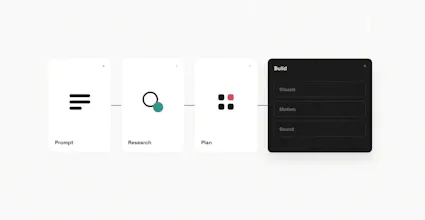
Motion is our new frontier video agent made for tasteful motion design. Here's how it works:
1. Give Motion a prompt — include any context like product links, X threads, YouTube videos, personal assets, and more. Motion will reference styles, incorporate research, and storyboard scenes.
2. Motion creates the video — it can orchestrate entire explainers, launch videos, logo animations, or even add motion design to your own talking head videos. Motion has taste in its visual animation.
3. Edit everything — resize, drag and drop, modify elements, or iterate with chat. Tell Motion to iterate on selections or add new elements until you’re satisfied. No need to re-generate entire scenes or deal with hallucinated artifacts.
To see what Motion can do, check out our launch video, which was made entirely with Motion.
Motion is in early access but we are giving everyone that finds us on ProductHunt free invite codes. Sign up for Motion today with access code phmotion.
For support, please jump into our growing Discord community and if you're interested in API access or end-to-end produced launch videos, please schedule a quick call.
PicWish
@adishj great work but make the flow smooth
Mosaic
@mohsinproduct are you referring to the flow between visual frames for Motion or the onboarding flow?
PicWish
@adishj visuals
Fascinating to see multi-step agentic workflows applied to motion design. I love that it parses external links and storyboards first, but I'm curious about how it maintains state during element-level editing. When iterating via chat, how does the agent isolate and update a single asset without hallucinating changes across the rest of the rendered scene? I was also curious whether there a system of "Version control" exist, allowing users to go to previous versions.
Mosaic
@rugved_chavan thanks for the comment!
We have an internal representation of the video that allows individual element-level decisions to be made without affecting the rest of the state.
And yep, we have version control built in so you can undo any manual changes or go back to any checkpoint in the chat just like with Cursor.
@adishj Ohh cool then, All the best
The element-level editing is the right place to be opinionated. For product/launch videos, “tasteful” usually depends on constraints that are easy to lose: brand pacing, how much product proof appears before flourish, which animations feel off-brand, and which references are actually approved.
One thing I’d love to see is a small style-memory / “why this direction” panel: pulled from website, these references, these uploaded brand notes, then user corrections like “too kinetic” or “not enough product detail.” That would make the agent feel more like a reusable creative director than a one-off generator.
Mosaic
@jim_jeffers taste is a hard thing to imbue into an agent but we've done our best and are improving everyday!
Style references are useful context for an agent to know what to do but also just super detailed prompting with breakdowns by timestamp of desired voiceover / music / sfx / visual components is all helpful context for the agent.
Really like the idea of a "why this direction" panel that elaborates on the agent's thought process and creative decision making + memory that evolves over time to understand your brand and identity.
BetterClaw
every other video tool makes you start over if one frame is off. how granular is the editing.. like can you swap out a single element mid-scene or is it section level
Mosaic
@tina_chhabra editability makes such a big difference — with something as visual as video, "almost" good enough is not good enough and the painful process of re-generating videos again and again just to run into more AI hallucinations burns a lot of time and credits. Motion solves that by giving you full editability at the element-level for every frame of your generated video!
Mosaic
@tina_chhabra You can edit every single motion design element independently of one another :)
Firecoach AI
The edit individual elements instead of regenerating the whole scene part is the unlock everyone's been waiting for.
Every other AI video tool turns into a slot machine...pull the lever, hope, repeat.
Curious about the taste claim though. That's the hardest thing to get right and the easiest to fake in a launch reel. Is there a style library it pulls from, or is it composing from scratch per prompt?
Grabbing an invite. If it can turn a product link plus a few bullets into a real explainer, it saves me a week.
Mosaic
@midori_verity agreed — the editability post-generation is a fundamental difference between AI video generation and our internal and modifiable representation of video.
With something as visual as video, "almost" good enough is not good enough and the painful process of re-generating videos again and again just to run into more AI hallucinations burns a lot of time and credits. Motion solves that by giving you full editability at the element-level for every frame of your generated video!
Styling can be included directly in the prompt through specific instructions around brand guidelines or simply by dropping in your own website link and having it pull the design system from there. We also allow you to upload your own Design MD or provide other videos as style references.
Try it out at https://motion.so. Let me know how it goes for you!
Why redirection from product hunt invalid access. Invite code failing
Mosaic
@codec_headec Can you please let me know what you're seeing? Please head to https://motion.so. Access code is phmotion.
@adishj Invite code has no remaining uses
Motion
@codec_headec please try again , just added some uses.
How to get invite code?
Mosaic
@hadia_kamran You can use the invite code phmotion for access!