Rebel is a desktop AI workspace for agentic work. It connects your memory, meetings, files, actions, automations, and tools so AI agents can help with real work — while keeping sensitive actions behind approval checks. Built Fair Source, with portable workflows and model choice.
No reviews yetBe the first to leave a review for Mindstone Rebel
The 'asks first' framing is smart — most AI agents just barge ahead and you find out later it did the wrong thing. Is this confirmation step configurable, or always-on by default?
@martin_mo it's on by default, but it learns from what you approve and you can tell it things like "always approve actions like this in the context of Y".
Report
@joshuawohle That's a smart middle ground — letting it earn autonomy gradually instead of going full-auto from day one feels a lot safer for trust-building. Are most users defining those 'always approve X in context of Y' rules upfront, or do they tend to add them reactively after seeing what it gets right/wrong a few times?"
Report
The ask-first posture is important. For small teams, the useful split is usually reversible vs irreversible actions: summarize, draft, search, and organize can move fast; writes to customers, CRM, payments, deploys, or files that other systems trust need a visible checkpoint and a trace.
@krekeltronics totally agree. Rebel also allows you to switch certain tools off entirely if you’re uncomfortable with it using them (like sending email vs drafting email)
@elias_motionfy Hi Elias, it’s definitely a point of friction. Rebel starts off cautiously by asking for approvals quite a bit, but it learns your preferences from each approval or rejection. Over time, this means it can operate more autonomously and ask for fewer approvals.
Report
"Ask first" is probably the right default. The challenge is that the more context an agent has, the more confident people become in its actions. Have you found a point where users start approving things without really reviewing them? Curious how you're thinking about trust calibration over time.
@jared_salois Hi Jared. We’ve definitely seen users build trust in Rebel over time. The goal of our safety system is for Rebel to learn what you do and don’t want it handling autonomously, so it only interrupts you when it genuinely needs input.
Report
The planner/worker/background-safety-classifier split is a genuinely interesting routing decision. When the safety classifier and planner disagree on risk - does planner intent override a conservative flag, or does the classifier always win?
@taylor_time Hi Kevin, Rebel is designed to never overwrite the safety controls. If the planner wants to do something that your safety settings prohibit, it has to stop and ask you. If you decide not to approve the action, then the planner will work with you on what to do instead.
Report
@liam_collins2 That's nice and clean. Does the planner surface why it flagged something, or is it a silent hard gate?
@taylor_time Yes absolutely. The user sees an approval notification explaining what the agent was trying to do and why it felt it needed to ask for approval.
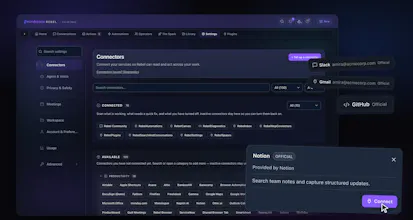
@thamibenjelloun Hi Thami. It can do lots! Read, draft, send emails and create calendar events for sure. But so much more too. Rebel has 137 (and counting) Connectors to tools like Salesforce, Notion, Zoom, Slack meaning Rebel can be empowered to do tonnes of real work for users.
@thamibenjelloun There are a number of things that Rebel can do that we don't think anything else can: - Manage multiple connectors of the same kind (e.g. multiple email addresses, calendars, Slack workspaces, etc - Figure out what's most relevant in a given conversation, and just do the right thing - Privacy-first - we do not touch any of your proprietary data by default - Keep track of the things you need to do in its own internal "Actions" list (or sync with an external todo app via MCP) - Automations - Mobile app (in beta) that works with your computer off (via hosted or self-hosted cloud) - Work across multiple providers and multiple models - And lots of other things (e.g. safety approval) covered elsewhere in this thread



The 'asks first' framing is smart — most AI agents just barge ahead and you find out later it did the wrong thing. Is this confirmation step configurable, or always-on by default?
Mindstone
@martin_mo it's on by default, but it learns from what you approve and you can tell it things like "always approve actions like this in the context of Y".
@joshuawohle That's a smart middle ground — letting it earn autonomy gradually instead of going full-auto from day one feels a lot safer for trust-building. Are most users defining those 'always approve X in context of Y' rules upfront, or do they tend to add them reactively after seeing what it gets right/wrong a few times?"
The ask-first posture is important. For small teams, the useful split is usually reversible vs irreversible actions: summarize, draft, search, and organize can move fast; writes to customers, CRM, payments, deploys, or files that other systems trust need a visible checkpoint and a trace.
Mindstone
@krekeltronics totally agree. Rebel also allows you to switch certain tools off entirely if you’re uncomfortable with it using them (like sending email vs drafting email)
Mindstone Rebel
@krekeltronics Yes, exactly.
You can also take a crude approach, e.g. "only enable read-only tools for Gmail", or something more sophisticated (see other comments).
Our built-in MCPs know which tools are read-only vs read-write to make this easier.
And if you're the technical admin for a Rebel rollout to your company, you can disable certain tools for everyone.
Nice approach. How's conflicting context handled when agents pull from multiple different projects?
Mindstone
@dhiraj_patel5 great question: it tries to triangulate, but ultimately will surface to the user if it cannot decide what is correct.
Personally, I have a daily automation running to clear up discrepancies between data sources and ask if unsure.
"For all of it, not one task" is the right framing, most AI tools
optimize for single workflows and break the moment your work spans
multiple systems.
How does Rebel decide what needs approval vs what can run autonomously?
The friction between trust and speed is where most agentic tools either
slow you down or scare you.
Mindstone Rebel
@elias_motionfy Hi Elias, it’s definitely a point of friction. Rebel starts off cautiously by asking for approvals quite a bit, but it learns your preferences from each approval or rejection. Over time, this means it can operate more autonomously and ask for fewer approvals.
"Ask first" is probably the right default. The challenge is that the more context an agent has, the more confident people become in its actions. Have you found a point where users start approving things without really reviewing them? Curious how you're thinking about trust calibration over time.
Mindstone Rebel
@jared_salois Hi Jared. We’ve definitely seen users build trust in Rebel over time. The goal of our safety system is for Rebel to learn what you do and don’t want it handling autonomously, so it only interrupts you when it genuinely needs input.
The planner/worker/background-safety-classifier split is a genuinely interesting routing decision. When the safety classifier and planner disagree on risk - does planner intent override a conservative flag, or does the classifier always win?
Mindstone Rebel
@taylor_time Hi Kevin, Rebel is designed to never overwrite the safety controls. If the planner wants to do something that your safety settings prohibit, it has to stop and ask you. If you decide not to approve the action, then the planner will work with you on what to do instead.
@liam_collins2 That's nice and clean. Does the planner surface why it flagged something, or is it a silent hard gate?
Mindstone Rebel
@taylor_time Yes absolutely. The user sees an approval notification explaining what the agent was trying to do and why it felt it needed to ask for approval.
Mailwarm
What kinds of actions can Rebel actually execute today, like email and calendar, or internal app automations?
Mindstone Rebel
@thamibenjelloun Hi Thami. It can do lots! Read, draft, send emails and create calendar events for sure. But so much more too. Rebel has 137 (and counting) Connectors to tools like Salesforce, Notion, Zoom, Slack meaning Rebel can be empowered to do tonnes of real work for users.
Mindstone Rebel
@thamibenjelloun There are a number of things that Rebel can do that we don't think anything else can:
- Manage multiple connectors of the same kind (e.g. multiple email addresses, calendars, Slack workspaces, etc
- Figure out what's most relevant in a given conversation, and just do the right thing
- Privacy-first - we do not touch any of your proprietary data by default
- Keep track of the things you need to do in its own internal "Actions" list (or sync with an external todo app via MCP)
- Automations
- Mobile app (in beta) that works with your computer off (via hosted or self-hosted cloud)
- Work across multiple providers and multiple models
- And lots of other things (e.g. safety approval) covered elsewhere in this thread