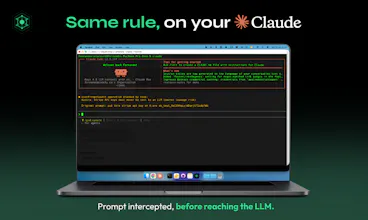
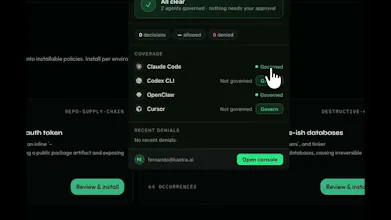
Kastra is the runtime authorization layer for AI agents. It decides what agents can and cannot do before actions execute, enforcing policies with sub-1 ms latency across tools, prompts, inputs, and outputs. Use one control plane to govern agents and policies across Claude Code, Cursor, Codex, OpenClaw, the Anthropic SDK, the OpenAI SDK, and more. Prevent unauthorized tool use, prompt injection, and exposure of sensitive data before they become incidents. Trust the rules, not the agents.
I think that runtime authorization is the right place to sit. Most teams stuff guardrails into the system prompt but enforcing before the action executes is the only version that actually holds up in production!
@pederzh Thank you, Luigi; you are totally right. This is a new problem that just became more relevant with autonomous AI systems. This authorization layer will continue to drive most of the trust required in these AI systems when touching production, scalable but still controlled by humans.
Report
One control plane across Claude Cursor Codex and other tools feels practical for mixed environments. Does it support temporary project exceptions without weakening security? That flexibility could help development teams move faster.
@jason_scott8 Yes, teams can create project-specific or time-limited policy exceptions while keeping organization-wide guardrails in place. That way, developers can unblock legitimate work without permanently weakening their security posture. The idea is to make exceptions explicit, auditable, and easy to revoke.
Our "Teams" plan also allows CTOs and Engineering leaders to push policies down to their employees for company-wide rules; these are enforced locally and also with their cloud and browser agents or plugged directly into the LLM SDKs for custom integrations.
Report
@carlosjimenez1 congrats on the launch ! I'm curious how the sub-1ms number holds up as policy count grows. Is that benchmark against a handful of rules? or does latency stay flat once a team has been customizing dozens or hundreds of overlapping policies over time?
@clement_avq Hey Clement, good question. The latency is dependant on the authorizations not the policies, so you can have thousands of policies and the engine will still operate with sub 1ms. The engine intercepts every workload regardless of how many rules exist.
Report
@carlosjimenez1 this is a strong claim for a policy engine, most implementations tend to slow down as rule count grows unless there's indexing under the hood. are you compiling or slicing policies ahead of time so only the relevant ones get evaluated per request?
@clement_avq We don't evaluate every policy on every request. Policies are scoped to the execution context (for example, the agent, tool, action, environment, or resource), so we only evaluate the subset that's relevant to the current operation rather than the entire policy set. Keeping authorization latency consistently low as policy sets grow was a core design goal from day one, so we spent a lot of time optimizing the evaluation path instead of treating policy execution as an afterthought.
Report
@carlosjimenez1 that makes sense, scoping by context instead of a flat rule scan is the sane way to keep it fast as the policy set grows. Good luck with the launch, will be keeping an eye on this!
Report
The output-side check is the half most policy layers skip — gating on the agent's output before it executes, not just the input. Two things I'd wire-test first in a coding-agent loop: is the sub-1ms decision in-process/local, or a network hop to your control plane (which changes the latency math mid tool-call)? And when a policy can't reach a verdict in time, do you fail-closed by default, or is that configurable per-policy?
@hi_i_am_mimo Great questions. The sub-1 ms number is local policy-evaluation time, not a network round trip to our hosted control plane. In coding-agent loops, the data plane evaluates policies locally; the control plane distributes policies and receives decision logs.
Failure behavior is configurable by environment/workload. A team might fail closed for production actions and sensitive-data access, while failing open for lower-risk local development. We don’t think one universal default makes sense across every action surface.
Report
Congrats on the launch. The "trust the rules, not the agents" framing is the right instinct — we've landed on the same philosophy internally. One thing I'm curious about: when a policy check fails, is deny the only outcome, or can a policy route the action to a human approval queue instead? In practice I've found agents need three outcomes, not two — allow, deny, and "a human decides this one." Sub-1ms is impressive for the allow path; wondering what the escalation path looks like.
@nitish_garg4 Hey Nitish, for these scenarios users can create hold logic rules that can control these actions and wait for a human approval within a limited timeframe of response. This works for most scenarios, with webhooks we have enabled in the app we can extend this timeframe.
the part that keeps me from letting my coding agents run fully unattended is exactly this. they will happily do something you didn't want and you only find out after the fact. a layer that decides no before the action runs is the piece i keep wishing i had. how granular can the policies get per tool?
@terminal_candy very granular. Kastra sits in front of the action (a pre-tool hook for Claude Code / Codex / Cursor, or the LLM proxy), so every tool call is evaluated before it executes. A rule can target:
A specific tool: exact name, a list of tools, or a regex (e.g. only Bash, or every mcp__* tool).
The tool's arguments: substring, multi-substring, or regex conditions over the tool input (e.g. block Bash when the command contains rm -rf or git push --force; block Write when the file path matches .env). On the proxy path, arguments are flattened per field (output.tool_call.arguments.<key>), so you can match one named argument in isolation.
The context around the call: working directory, git repo/branch/dirty state, session, OS, agent permission mode, environment (dev/prod), model, principal/agent identity, data classification.
Content: built-in scanners (secrets, PII) can run over the tool input or model output with confidence/count thresholds.
And "no" isn't the only answer. Each rule chooses its effect: hard deny, hold (pause the agent and page a human to approve, with a timeout that fails open or closed, your choice), monitor (allow but flag), redact, rate-limit, or spend-cap.
Report
The sub-1 ms policy decision is the detail that caught me. Agent approvals usually feel bolted-on once latency shows up. Curious how teams debug a denied action — do they get a readable policy trace?
@xiaosong001 Yes, every denied action includes a readable decision trace showing which policy matched, why it matched, the relevant action context, and the resulting decision. Teams can see the exact shell command, tool call, arguments, environment, and rule that triggered the denial, then adjust or version the policy from there.
The goal is for a denial to feel debuggable, not like a black box.
Manufact (mcp-use)
Congrats on the launch @carlosjimenez1 🎉🎉🎉
I think that runtime authorization is the right place to sit. Most teams stuff guardrails into the system prompt but enforcing before the action executes is the only version that actually holds up in production!
Kastra
@carlosjimenez1 @pederzh Yes, exactly that! The system prompt is a suggestion, the enforcement layer is the guarantee. Thanks for the support! 🙏
Kastra
@pederzh Thank you, Luigi; you are totally right. This is a new problem that just became more relevant with autonomous AI systems. This authorization layer will continue to drive most of the trust required in these AI systems when touching production, scalable but still controlled by humans.
One control plane across Claude Cursor Codex and other tools feels practical for mixed environments. Does it support temporary project exceptions without weakening security? That flexibility could help development teams move faster.
Kastra
@jason_scott8 Yes, teams can create project-specific or time-limited policy exceptions while keeping organization-wide guardrails in place. That way, developers can unblock legitimate work without permanently weakening their security posture. The idea is to make exceptions explicit, auditable, and easy to revoke.
Our "Teams" plan also allows CTOs and Engineering leaders to push policies down to their employees for company-wide rules; these are enforced locally and also with their cloud and browser agents or plugged directly into the LLM SDKs for custom integrations.
@carlosjimenez1 congrats on the launch ! I'm curious how the sub-1ms number holds up as policy count grows. Is that benchmark against a handful of rules? or does latency stay flat once a team has been customizing dozens or hundreds of overlapping policies over time?
Kastra
@carlosjimenez1 this is a strong claim for a policy engine, most implementations tend to slow down as rule count grows unless there's indexing under the hood. are you compiling or slicing policies ahead of time so only the relevant ones get evaluated per request?
Kastra
@clement_avq We don't evaluate every policy on every request. Policies are scoped to the execution context (for example, the agent, tool, action, environment, or resource), so we only evaluate the subset that's relevant to the current operation rather than the entire policy set. Keeping authorization latency consistently low as policy sets grow was a core design goal from day one, so we spent a lot of time optimizing the evaluation path instead of treating policy execution as an afterthought.
@carlosjimenez1 that makes sense, scoping by context instead of a flat rule scan is the sane way to keep it fast as the policy set grows. Good luck with the launch, will be keeping an eye on this!
The output-side check is the half most policy layers skip — gating on the agent's output before it executes, not just the input. Two things I'd wire-test first in a coding-agent loop: is the sub-1ms decision in-process/local, or a network hop to your control plane (which changes the latency math mid tool-call)? And when a policy can't reach a verdict in time, do you fail-closed by default, or is that configurable per-policy?
Kastra
@hi_i_am_mimo Great questions. The sub-1 ms number is local policy-evaluation time, not a network round trip to our hosted control plane. In coding-agent loops, the data plane evaluates policies locally; the control plane distributes policies and receives decision logs.
Failure behavior is configurable by environment/workload. A team might fail closed for production actions and sensitive-data access, while failing open for lower-risk local development. We don’t think one universal default makes sense across every action surface.
Congrats on the launch. The "trust the rules, not the agents" framing is the right instinct — we've landed on the same philosophy internally. One thing I'm curious about: when a policy check fails, is deny the only outcome, or can a policy route the action to a human approval queue instead? In practice I've found agents need three outcomes, not two — allow, deny, and "a human decides this one." Sub-1ms is impressive for the allow path; wondering what the escalation path looks like.
Kastra
Terminal Candy
the part that keeps me from letting my coding agents run fully unattended is exactly this. they will happily do something you didn't want and you only find out after the fact. a layer that decides no before the action runs is the piece i keep wishing i had. how granular can the policies get per tool?
Kastra
@terminal_candy very granular. Kastra sits in front of the action (a pre-tool hook for Claude Code / Codex / Cursor, or the LLM proxy), so every tool call is evaluated before it executes. A rule can target:
A specific tool: exact name, a list of tools, or a regex (e.g. only Bash, or every mcp__* tool).
The tool's arguments: substring, multi-substring, or regex conditions over the tool input (e.g. block Bash when the command contains rm -rf or git push --force; block Write when the file path matches .env). On the proxy path, arguments are flattened per field (output.tool_call.arguments.<key>), so you can match one named argument in isolation.
The context around the call: working directory, git repo/branch/dirty state, session, OS, agent permission mode, environment (dev/prod), model, principal/agent identity, data classification.
Content: built-in scanners (secrets, PII) can run over the tool input or model output with confidence/count thresholds.
And "no" isn't the only answer. Each rule chooses its effect: hard deny, hold (pause the agent and page a human to approve, with a timeout that fails open or closed, your choice), monitor (allow but flag), redact, rate-limit, or spend-cap.
The sub-1 ms policy decision is the detail that caught me. Agent approvals usually feel bolted-on once latency shows up. Curious how teams debug a denied action — do they get a readable policy trace?
Kastra
@xiaosong001 Yes, every denied action includes a readable decision trace showing which policy matched, why it matched, the relevant action context, and the resulting decision. Teams can see the exact shell command, tool call, arguments, environment, and rule that triggered the denial, then adjust or version the policy from there.
The goal is for a denial to feel debuggable, not like a black box.