
GenPage
Build, personalize, and optimize landing pages with AI
669 followers
Build, personalize, and optimize landing pages with AI
669 followers
Your marketing campaigns are personalized. Your landing pages should be too.
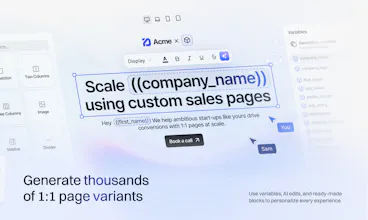
GenPage learns your brand, builds dedicated pages for every ad, keyword, or target account, then continuously A-Z tests them on Autopilot - turning more traffic into pipeline and revenue.
This is the 2nd launch from GenPage. View more

GenPage 3.0
Launching today
Your marketing campaigns are personalized. Your landing pages should be too.
GenPage learns your brand, builds dedicated pages for every ad, keyword, or target account, then continuously A-Z tests them on Autopilot - turning more traffic into pipeline and revenue.





Free Options
Launch Team / Built With


World model AI : Sharm SEKAISimulate your idea on a living world.
Promoted

Does it mainly use existing website content or can you give it specific messaging rules and restrictions?
@linpeng
Hey Lin! Both 🙂 You can give GenPage specific messaging rules and restrictions, and you have full control over the brand it works with.
The quickest way to start is to give it your website. Connect your domain and GenPage picks up your design guidelines and context about your products, services, competitors, and target market. It can crawl relevant pages: pricing, case studies, use cases - and bring in assets like images and videos.
You control what it crawls. This is simply a shortcut to give the AI useful context.
You can also create a brand from scratch in GenPage’s Brand Portal, adding your own logo, colors, and creative direction.
Either way, your Brand Knowledge Base is where you build out that context. You can add docs, decks, sales materials, and other resources, alongside persistent messaging guidelines like “keep the tone conversational,” “focus on this value proposition,” or “avoid these phrases and claims.”
GenPage keeps that context available so you don’t have to repeat it for every page.
And when chatting with the agent, you can give it fresh direction for each campaign - for example, “this one is for enterprise buyers; lead with security and use a demo CTA.”
So your website can be the starting point, but it doesn’t define the limits of what you create :)
Can you see which ad or audience specific page actually contributed to conversions and pipeline?
@jasonwu
Hey Jason! Yes - creating dedicated pages for each campaign, ad, or audience means you can see how those specific experiences perform.
Inside GenPage, you can track analytics at multiple levels: your entire workspace, individual campaigns, ads, keywords, prospects, and individual landing pages. So you can start with the overall picture, then drill into what elements are driving engagement and conversions.
You can also see how individual leads engage: what they click, how far they scroll, and whether they submit a form. Heatmaps and session replays add context, and you can get engagement alerts through email, Slack, or Microsoft Teams.
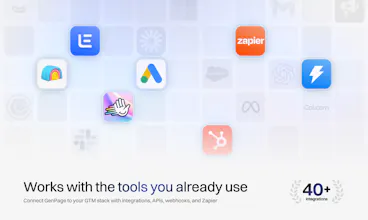
To connect that activity to pipeline, you can feed data back into your CRM or reporting tools through our API and webhooks, or build custom workflows with our MCP integration.
We also support custom scripts and tracking, so you can add GA4, Google Tag Manager, Meta Pixel, HubSpot tracking, and other tools directly to your GenPages - keeping the pages connected to your existing conversion and attribution setup.
Cheers and thanks for checking out our launch!
Where do the pages reside: is it being hosted on GenPage through a custom domain, or can the pages be pushed to our own CMS, like Webflow and WordPress?
Btw, Congratulations @samy_barbier & @ceyhun_cakir 🎊
@aymi_malik
Thanks Muhammad! 🙂 You basically have three options:
1. Use your free GenPage domain. Every user gets their own domain on GenPage by default, and we handle the hosting. You can publish straight away.
2. Connect your own subdomain, like try.yourcompany.com. Your GenPages live there while your main Webflow or WordPress website stays untouched. This works well for 99% of our users.
3. Use our SDK to serve GenPage landing pages on your primary domain. That just requires you pasting a script in your website's code today.
We’re planning plugins for the major platforms, including Webflow and WordPress, to make it easier in the future.
So you can keep your existing website and choose how closely you want to integrate GenPage with it! :)
Thanks for supporting our launch!
Looks interesting. I see you already integrate with LinkedIn and Google Ads. Any plans for Meta Ads as well?
@crystal32378 Hi Crystal - Yes!
Meta Ads is on our roadmap 🙂 We’re also planning a creative suite so you can create the ad creative alongside its landing page, using the same brand and campaign context.
The idea is to keep the visuals and messaging consistent across the whole advertising funnel, from the ad that catches someone’s attention to the page they land on.
Thanks for being here for our launch day 😁
Congrats on 3.0! The ad-to-page connection is the bit I like most. If an ad caught my attention, I'd want the page to pick up that same thought.
@oleksii_sekundant
Thanks Oleksii! Exactly - you clicked because something in that ad spoke to you. The page should carry that forward, rather than make you start again and figure out where you fit.
That’s a big part of why we built this 🙂
Appreciate you being here for our launch!
Congrats on 3.0! Spinning up a dedicated page for every ad or target account without needing a designer is exactly the kind of thing a solo maker like me never has time for, so the autopilot testing is a big win.
@dawedeveloper Thanks for the kind words, David! Give GenPage a spin, it's free - I guarantee you'll be impressed 😁
Great solution -it looks simple and quick.
I don't have a use for it myself, but I know someone I can recommend you to.
Good luck
@maria_anosova
Thanks Maria! Really appreciate you checking out our launch and thinking of someone else to refer us to :)
Feel free to send them our way - or email team@genpage.ai
I’d be happy to personally help them get their first page up and running.
Thanks for the support!
@samy_barbier Thank you for your candidness. I'll forward your email.
@maria_anosova you got it!