
DevCleaner
Free the gigabytes your dev tools and AI apps hoard
215 followers
Free the gigabytes your dev tools and AI apps hoard
215 followers
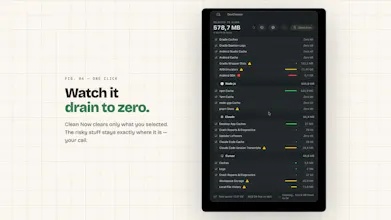
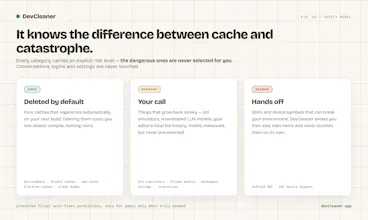
DevCleaner lives in your Mac's menu bar and frees the gigabytes that 22 dev ecosystems quietly hoard — Xcode, Gradle, npm, plus AI apps like Cursor, Claude & Ollama. Every item is risk-rated, so you always know what's safe to delete. Free, no account, 4 MB.




Free
Launch Team / Built With


Framer AI AgentsDesign and publish professional sites with AI
Promoted


@dawedeveloper Looks interesting. Will definitely check it out.
@austin_buhl Thank you so much :-)
Ran this on my 512GB MacBook and it dug up 110GB of dev junk. Android Studio alone was hoarding 52GB. On a machine that small with a dozen projects open, that's basically the gap between shipping and a "disk full" popup at the worst moment.
And with what SSD upgrades cost these days, clawing back 30-100GB whenever I need it beats paying Apple for the next storage tier. Good tool.
One bit of feedback: I'd love more granularity inside the categories. Ollama's the obvious one — it shows 22GB total, but I don't want to wipe all my models at once. Let me open it up, see each model that's installed, and drop just the ones I've stopped using. Per-model control instead of all-or-nothing would make me a lot more comfortable hitting Clean Now.
@dardaelliande
110 GB — and Android Studio taking 52 of those is very on-brand. That tool's Gradle cache + SDK components + emulator images is a monster. Glad it could help.
And the storage tier math is exactly right. Apple's $200 jump from 512 GB → 1 TB is basically a multi-year DevCleaner subscription at a fraction of the cost. That framing is more useful than any benchmark I could show.
The Ollama granularity feedback is 100% valid and noted. You're right that all-or-nothing isn't good enough for models — they're not caches, they're assets you chose to download. The right UI is exactly what you described: expand the category, see each model with its real size, check off the ones you don't use anymore. That's a different interaction than "nuke the DerivedData folder" and it deserves its own flow.
It's on my list. No ETA I'd commit to publicly, but this comment is the kind of specific, reasoned feedback that moves things up the queue. Thanks.
This is genuinely one of those problems everyone has but nobody thinks to solve. How much space does the average user recover?
@mohamed_hussein25 It varies a lot by stack - but here's what the data shows: Xcode developers are typically sitting on 15–50 GB in DerivedData + simulators alone, sometimes over 100 GB if they've been building for a year or more without cleaning. AI tool users (Ollama especially) often have another 20–80 GB in model weights they've forgotten about. npm/node_modules graveyards add another 5–15 GB if you have a lot of old projects.
We actually have a live counter on the homepage showing the total freed by everyone who's used DevCleaner - it's ticking up in real time today. The number that surprises most people isn't the total, it's how much comes from categories they'd never think to check (looking at you, iOS Simulator runtimes - a single old runtime is 7 GB).
Short answer: the median first-time clean is probably somewhere in the 20-40 GB range for an active developer. But I've seen screenshots from users clearing 200+ GB in one sitting. 😅
@dawedeveloper 200GB in one sitting is mad. The iOS simulator one genuinely surprised me, never would have thought to look there. Good luck with the launch today 🚀
@mohamed_hussein25 Thank you :-)
Haha that's great. I actually just ran into this problem some weeks ago wondering why all my disk space was gone just to find out xcode was eating it all with old unused os images. Thanks for building this
@christian_heiduschke That’s literally the story behind DevCleaner - I kept losing tens of GB to DerivedData and old simulator runtimes and wanted something that shows what is safe to delete before you touch it.
Glad it helped you find the culprit. If anything still feels unclear in the app, I’m around - and honest feedback always welcome.
@harini_mukesh Thank you so much for support. And answer to your question...I don't know, because I have no info about what my users clean. The only thing what I can tell you is taht users save more then 1T of storage in 100 runs on their devices
- info from 17.6.2026
I just bought a new computer because of this. Could have saved a few grand. Oh well this is awesome. Keep going!
@huxley_peckham Thank you so much Huxley! I love to hear some honest feedback if you have some time after usage of DevCleaner ;-)
@dawedeveloper Will do!
Wow, what a ride! 🚀
A huge thank you to everyone in the Product Hunt community who supported the launch of DevCleaner yesterday! Finishing at #12 Product of the Day in such a massive, worldwide competition is an incredible milestone for a solo indie builder.
Your upvotes, amazing feedback, and insightful comments mean the world to me. It shows that cluttering our Macs with heavy IDE caches is a pain point we all share, and I’m thrilled that DevCleaner is helping you reclaim that precious disk space.
The launch day might be over, but I’m just getting started. I'm carefully reading through all your feature requests and suggestions.
Thank you once again for making this launch unforgettable! 🙌