Hey everyone, I'm launching Dotient on Product Hunt this week and wanted to share what I've been building before the big day.
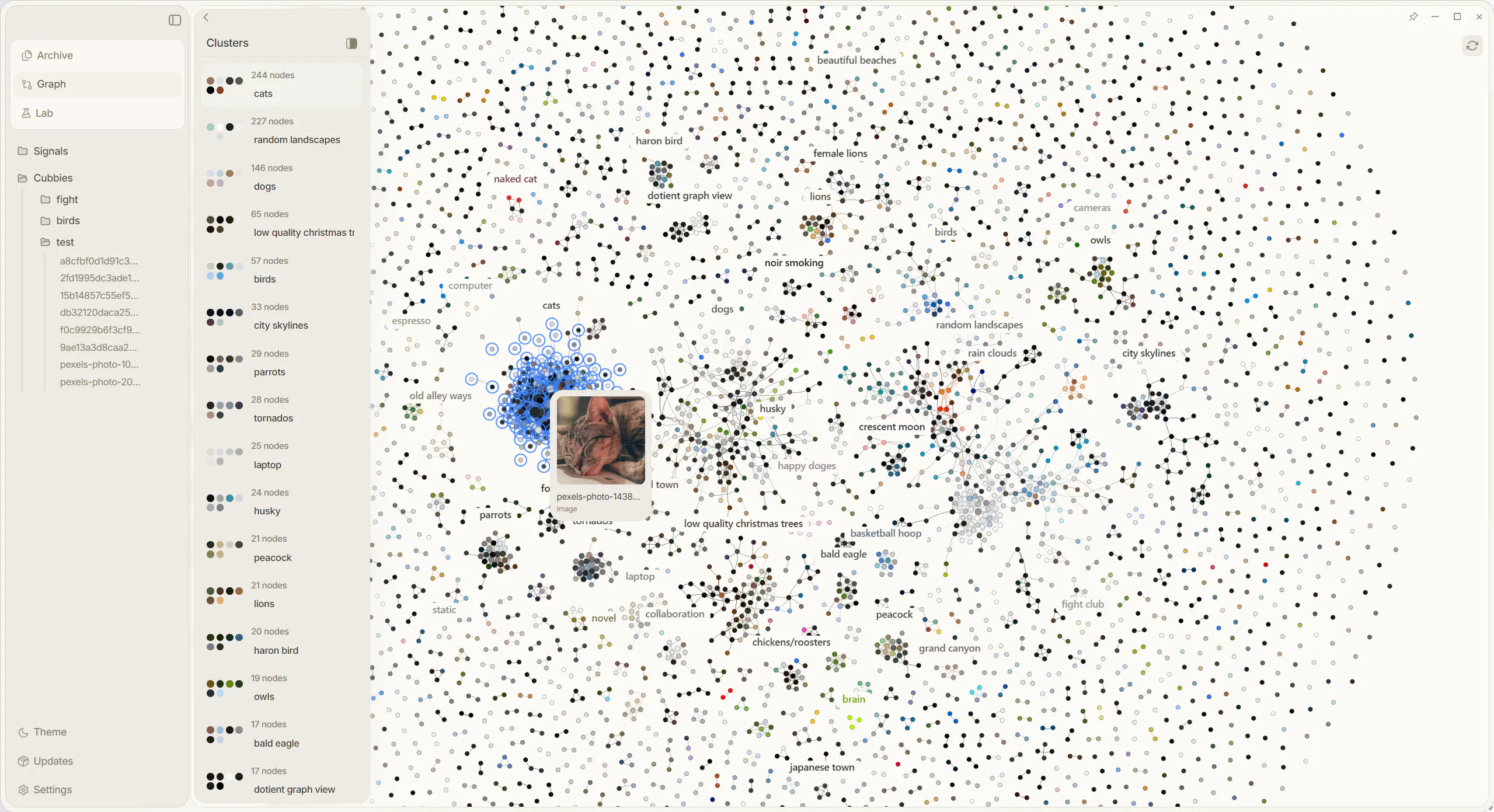
Dotient is a desktop app that lets you search your files by what they look like, not what you happened to name them two years ago. Everything runs completely offline, nothing leaves your machine. It also has a live graph view of your files, deep PDF search, and canvas workspaces for organizing everything.
I built it solo out of pure frustration with Windows File Explorer and the lack of any tool that actually understands your files without making you do all the work manually.
Would love to hear any questions or feedback before launch. Happy to talk through anything.


Dotient
Dotient
@picspace Thank you very much!
Local-first + offline visual search is the part I actually care about - most semantic file search tools quietly ship your content to an API, so doing the embeddings on-device is the real differentiator here. Two implementation things: is the index updated incrementally via a file watcher as files change, or is it a manual re-scan, and where does the embedding DB actually live on disk? And for the deep PDF search, are you running OCR on scanned/image-only PDFs, or only indexing PDFs that already have a text layer?
Dotient
@hi_i_am_mimo Hey Valeria, thank's for the comment! To answer a few of your questions, there is a file watcher put in place for a certain set of basic directories like Downloads, Documents, Pictures and all folders within those directories. However if it is in other hard to find places, the file will be moved to a missing column in the SQLite DB. Users can easily just click on the file (which still does show the image, just a missing path), and update the path of where the file was moved to if it is one of these rare cases. The SQLite DB which holds almost all your data lives in 'C:\Users\[username]\AppData\Roaming\com.dotient.app' and whatever the macOS equivalent of that path is. The webp thumbnails and embedding models also live in that path. Regarding PDF search, we are indexing the text layer and also scanning for images. There is no OCR indexing at the moment, but that may be planned for the future. Obviously you could just highlight a region of the PDF that has text with the rectangle selection tool and probably get a similar search result if you tried searching for that text. The model does understand text to some extent so you are able to search for big words that are in images. Hope this was helpful!
Makes sense — defaulting the watcher to Downloads/Documents/Pictures covers most people, and the missing-path fallback is a clean way to handle moves. The thing I'd hit immediately is that my real files live in a ~/projects folder and an external drive outside those defaults: can I add custom watch roots, and when one watched file changes does it re-embed just that file incrementally or re-scan the whole folder? Curious too whether the embedding runs on a background thread so a big initial index doesn't peg CPU.
Dotient
@hi_i_am_mimo It is certainly in the roadmap to add custom watch roots after your concern. This would definitely be a smart feature to add especially since the app basically lives off knowing the paths of your files. When a watched file changes, it doesn't re-embed anything at all, it simply adjusts the path of the file, or if you changed the file name then it adjusts the name of the file. Does not have to re-scan or re-embed a whole folder. Embedding and search both run on Rust background threads so you shouldn't notice any UI lag when the models are being loaded. The only time you will notice UI lag during file processing is when your computer is computing file dimensions and dominant color metadata.
Local-first semantic search is the right call, the data leaving your machine is what kills these for real work. The thing I'd want as a user though: how do I trust it found everything? Keyword search fails loudly (zero results), but semantic search fails quietly, it returns something plausible and you never know what it missed. Do you surface a confidence or a "why this matched" so I can tell a real hit from a near-miss? That's what decides whether I rely on it or still fall back to ctrl-F.
Dotient
@david_marko You are indeed right to question that. Dotient runs a hybrid search system, BM25 + semantic in parallel, so anything keyword-findable won't silently fail. But you're right that the deeper "why this matched" question isn't fully solved yet. That's why we introduced this 'Signals System' within the lab page of the app. You can basically shift the entire embedding to what you believe is correct. Relevance is at least grounded in something you define. Proper confidence surfacing and match explanations are definitely on the roadmap, partly due to your concern. Appreciate this comment!
Local embeddings are the right call, but the part that bit me building this kind of thing is model versioning. The day you ship a better embedding model, every vector on disk is from the old one, so you either re-embed the whole drive, which is hours of background CPU, or run mixed old and new vectors where the query model and stored model disagree and recall quietly drops. How are you handling an embedding-model upgrade across an already-indexed machine, re-embed in place or version the index and migrate lazily?
Dotient
@dipankar_sarkar This does keep me up at night. Models are only getting better, and yes between different model versions or entirely different model makers, the dimensions that each embedding has to be is almost never consistent. So I'm not too concerned with upgrading the model at the moment since I have spent so long optimizing this one to it's absolute core. However, if it were to happen I would do some sort of lazy migration. Keep old index queryable, slowly re-embed all the files with the new model, run a dual-query between both models and merge the results layer until the old index fully drains. Thanks for the comment!
Great job! We've been doing the file explorer type files and folders since 1995 with almost no change. But I do have a few questions. Which models do you use in the backend? Can you switch models and use different ones? The demo only shows visual search and you mentioned in one of your replies that it also understands text, so how does the text search work in comparison to visual search? If I type in "dog training" will I get both images that relate to the query as well as text-only documents that talk about it?
Dotient
@jn263 Correct, its a hybrid search method combining both BM25 and semantic search so if you search for dog training you will find images of dog training, files that are called dog training, or text documents with dog training in them. The models I used: https://huggingface.co/Xenova/siglip-base-patch16-384/tree/main/onnx. Currently you cannot switch models, but this is planned for the future if I find more good models. I tried a super tiny model like a month ago, it was fast as hell but the results weren't where I needed them to be. I will keep looking!
local + semantic search is a nice combo, feels like most semantic search tools assume you're fine sending everything to the cloud. how's the search quality holding up running fully local vs what you'd get from a cloud-based embedding model.
Dotient
@martin_mo Search quality is good when you are specific with your queries. One word queries usually aren't too strong but that's what my Signal system is for. Users can shift the embedding space to fit their queries, almost like a super advanced tagging system. The difference really isn't that far if you properly know how to use the software, and in some cases, the local model excels. Especially with super specific queries such as "Bird with yellow beak outside on bird feeder."
@localdeclan the embedding shift thing is clever, basically giving users a way to nudge the model toward what they actually mean instead of hoping the default embedding space gets it. and yeah makes sense specific queries would do better locally, less ambiguity for the model to guess around. is the signal system something users figure out intuitively or does it take a bit of a learning curve before it clicks
Dotient
@martin_mo It really is as simple as clicking a few images that you are looking for and shifting a slider to find more or less of of a specific type of image. Perhaps maybe it would be smart to put a little demo inside the website that users can play around with
Congrats on the launch! Did I feel correctly that the Signals system is the part that truly separates this from off-the-shelf CLIP search with a nice UI? Letting users push the embedding space toward what they mean is a sharp call!
Dotient
@artstavenka1 Absolutely, signals are sort of the 'dark horse' of the app. They are absolutely necessary to fill in the gaps of unique/personal files so you are still able to search for them. They are also a great way to differentiate images. You can easily differentiate a blue jay from a cardinal, or a rope tornado from a wedge tornado.