
DevboardAI
A local-first command center for AI coding agents on Mac
7 followers
A local-first command center for AI coding agents on Mac
7 followers
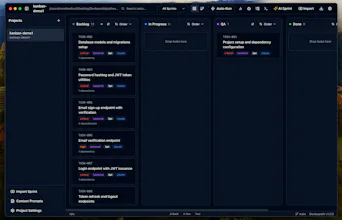
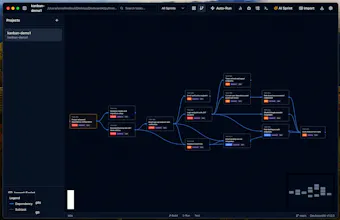
DevboardAI is a native Apple app that helps founders, PMs, and developers turn ideas into working software by orchestrating AI coding agents from a visual Kanban board. Generate sprints from plain English, assign tasks to tools like Claude Code, Codex, or Kimi, run them with live logs, and keep your source code local on your machine.


Payment Required
Launch Team / Built With

Hey Product Hunt 👋
I’m the maker of DevboardAI.
DevBoardAI started from a frustration I kept running into with my side projects.
I already had access to powerful coding models through expensive monthly plans, but I noticed I was rarely even using all of what I was paying for. It wasn’t because I lacked ideas, it was because turning those ideas into real MVPs still required too much back-and-forth.
I tried using existing coding agents by giving them broad MVP requirements and letting them run. But in practice, they would stop after a task or two, lose context, ask for constant confirmation, or just break things after a few iterations. Instead of truly building for me, they still needed me to sit there and babysit the process.
That became the core insight behind DevBoardAI: I didn’t want an AI that helped a little. I wanted an AI that could keep going until the MVP was actually done.
So I built a desktop app designed for side projects, something that can connect to models like Claude or Codex, work with your codebase and terminal, and keep running agentically without constantly stopping after every small step.
The moment it really clicked for me was when I used it overnight and woke up to an MVP that had actually moved forward in a meaningful way. That’s when I knew this shouldn’t stay just a personal tool.
I made DevBoardAI for developers who have too many ideas and not enough time to execute them all. The goal is simple: help you ship faster, especially on nights and weekends when side projects usually compete with everything else in life.
That’s also why I wanted pricing to stay accessible: $74 lifetime normally, and currently $24 for early adopters.
Happy to answer anything , why I built it this way, how it compares to other tools, or what kinds of projects it works best for.
I like that this is focused on orchestration instead of just being another AI chat interface. That distinction matters.