
Databox is an agentic analytics platform that brings performance data from across your business together with consistent metrics and business context. Ask its AI Analyst questions about your business, use Routines to surface important changes automatically, and turn insights into reports that explain what happened and why it matters. Databox does more of the recurring reporting and analysis, so you can understand performance faster and take better-informed action.
This is the 10th launch from Databox. View more

MCP Connectors by Databox
Launching today
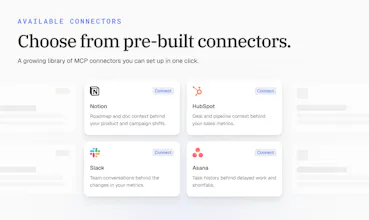
Connect your AI Analyst to the tools your business runs on. It pulls context from your CRM or support desk, so every answer reflects what's happening in your business, and it can act on what it finds. Choose from 10+ connectors or add any MCP server.






Free Options
Launch Team / Built With


Congratulations to the team, this one is well deserved! As one of the engineers that have been working on the MCP connectors I am most proud of the permission setup for every tool. This is a split point between trusting the ai with your crm and never actualy adopting ai at all and skipping the opportunities it brings.
I love using Databox for analysis by asking it questions and this feature allows it to actually look at numbers from other tools, not just metrics (there is a difference). It also understands things like which deals are open in your CRM or what's on your project roadmap, so I really encourage marketers to try it out and see how much of a difference that context makes for them.
Databox
@carmenstrelec Thanks, Carmen! You nailed the difference. Metrics tell you what happened. The open deals and the roadmap tell you why, and what's coming next. For marketers that's huge: when Genie, our AI Analyst, knows a campaign is tied to a launch that just slipped, the drop in signups suddenly makes sense.
Databox
I want to point out a small but super useful detail: permission settings are super detailed for each tool (toggle for allow/needs approval/blocked). This sounds like a small thing, but it's super useful cause nothing is locked in place and you can change the settings as you go depending on which data you want to bring in there.
Databox
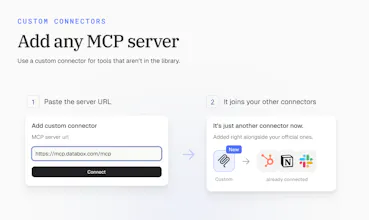
Its strange how the setup itself is boring, but in a good way. Just pick a connector, click connect, authenticate and you are done...no config screen, no deep dives into the docs and spending time googling on how to make it work. Even for a custom MCP server there is just one extra step, paste the URL and the rest of the form shows up once it validates, if you have connected it anywhere else, it will be just as simple to get it working in Genie.
Big congrats to the team for building this! Unlocks insane amount of possibilities with Genie now 🚀
Congratulations on the launch!
Databox
@aashisengar Thanks so much, Aashi! Appreciate the support today.
But when it “acts on what it finds,” what are the limits? Can teams mandate that they get approval before it responds to the CRM or to the customer?
Additionally, Congratulations @zigapotocnik @pc4media and @rohanrecommends 🚀✌️
Databox
It's worth pointing out that compared to a normal integration, this isnt just data coming in, its tools genie can actually call. It's basically the foundation for agents later, not a standalone feature on its own.