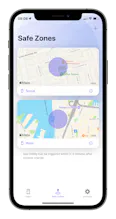
Cloak allows you to hide selected from your iPhone & iPad, including the home screen, app library, notifications, and more. With Safe Zones, apps can automatically be hidden when you leave your home or work place.
Cloak is now available on App Store: https://apps.apple.com/app/id644...
Upgrade to Pro version with one-time purchase, no subscription. Now 50% off until 2023.
Report
@bin_zhang3 Congratulations on the launch.
Super excited on your success.
Report
@bin_zhang3 Congratulations on your new venture and best wishes! May your company thrive in the years ahead!
Report
@bin_zhang3 Hey there. I’m having troubles with the app. Upon setting two apps to hide for testing, I am able to hide them from the Home Screen but they don’t hide from the App Library. Clicking on the app in the App Library prevents launching though.
If I unhide the apps, they no longer appear on the Home Screen and if I go to select apps to add to the App Group, and say I select the section “Other” where one of the chosen apps resided in the choose activities screen, I’m presented with a blank screen.
Deleted the app and went through the same process and able to replicate the issue.
@ibanks3 Thanks for the feedback. How many apps were involved during your testing? If the number is large (say, >= 50), iOS Screen Time API may have some trouble.
Regarding the "Others" white screen issue, this app selection view is provided by Screen Time API, Cloak cannot do anything about it (I really want to add a search box). I will report this bug to Apple.
Report
@bin_zhang3 Testing was done with 2 apps and I also received the blank screen inside of the productivity section. A search box would be great. Thanks for taking the time in responding.
@ibanks3 Could you share which 2 apps you were hiding? And which iOS version you are using?
Report
@bin_zhang3 Outlook and AppStore. Outlook was under Productivity and AppStore was under Other. Tried on two devices, first attempt was on 16.3 Beta 1 and other on 16.2 but same result.
Report
@bin_zhang3 When hidden, restarting the device allows the icon to disappear from App Library. Unhide the app, I can search for the app in App Library but the device needs to be restarted to make the icon appear again. This was Outlook on the 16.3 Beta.
Report
The app seems really good, and useful for me. But when I uncloak, the icons are not returned to the Home Screen, only to the App Library. Hope you can fix this!
@sarah_wright7@chrismessina there's an app for that!
But seriously: I can see how Cloak would be useful for blocking certain apps (e.g. social media) when in the office or specific locations where its users want to avoid distractions.
@sarah_wright7 And also, if your kid wants to borrow your phone for a while, or you want to temporary remove games on your kid's iPad (as a punishment for being naughty), this app may be useful.
Report
All the best on the Launch. Congratulations! @bin_zhang3
Report
Great idea for hiding apps from kids! 😁 @bin_zhang3
Report
@bin_zhang3 congrats on the launch 🚀 this looks really nice ✌️
Cloak: Hide Apps
Cloak: Hide Apps
Cloak: Hide Apps
Product Hunt
Product Hunt
Osaurus
Product Hunt
Cloak: Hide Apps
Cloak: Hide Apps