
Browser Notes
Your ideas, organized - not uploaded
177 followers
Your ideas, organized - not uploaded
177 followers
Notes are often scattered across writing apps, sticky boards, and mind-mapping tools, while your private ideas are pushed to the cloud. Browser Notes brings notes, sticky notes, and mind maps into one local-first workspace. No account, no tracking, and no forced sync. It works offline, stores everything in your browser, and lets you back up your data anytime.
Interactive


Free
Launch Team

EneyProactive AI for Mac. Free test, 20,000 credits.
Promoted


Browser Notes
Hey Product Hunt 👋
Browser Notes started with a very normal problem: thoughts arrive faster than we can organize them.
A meeting idea lands in one app.
A quick reminder goes into a random sticky note.
A bigger concept needs a mind map.
Then later, you remember the idea… but not where you saved it. 😅
I wanted one simple place where I could open the browser and immediately capture whatever was in my head.
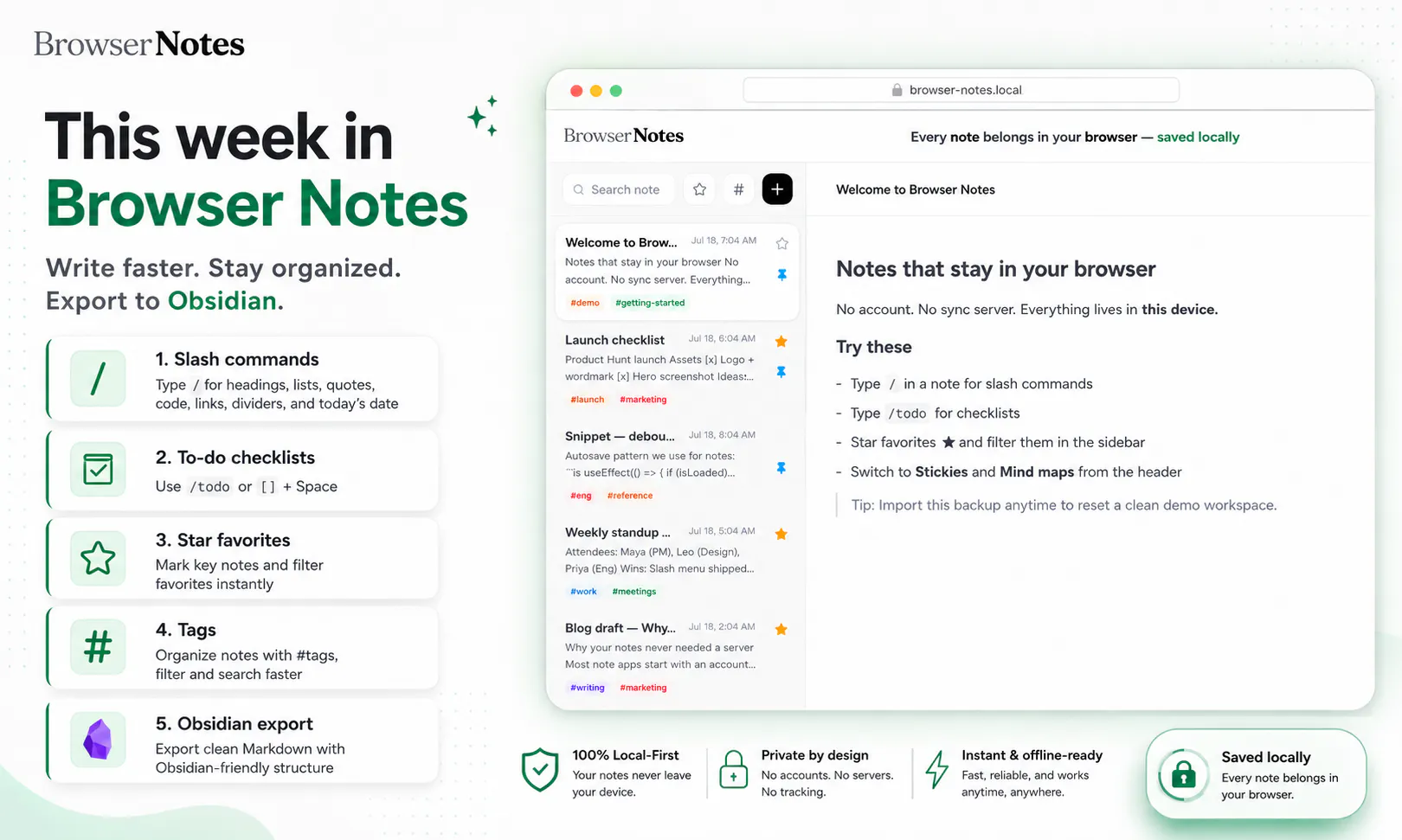
✍️ Write detailed notes
🟨 Drop quick ideas onto sticky boards
🧠 Connect thoughts with mind maps
🔎 Search everything with ⌘K
🎯 Switch to focus mode when it is time to think deeply
No signup. No setup. No “create your workspace” onboarding maze.
Just open it and write.
Everything is auto-saved locally in your browser, works offline, and can be backed up or exported anytime. Your ideas stay yours—without being locked into another cloud account.
Browser Notes is for those tiny moments when you think:
“Let me quickly note this down before I forget.”
I’d love to know which mode fits the way you think best: Notes, Sticky Boards, or Mind Maps? 🚀
Awesome work - one thing I noticed: when adding a new child node / deleting an existing child node, the positions of child nodes reset. I may be missing something, but I think that could get a little frustrating if you've already spent time arranging the layout.
Video for reference: https://createademo.com/v/cmr2oaekt0003lb04rn0u9vcq
Browser Notes
@john_marker3 Thanks for catching this, you were absolutely right. We’ve fixed the issue now, so adding or deleting a child node should no longer reset the positions of the nodes you’ve already arranged.
Really appreciate the specific feedback. It helped us improve the mind map experience quickly.
Voquill
Looks clean. How does it handle large note collections over time, and is there any way to sync across devices without giving up the local-first approach? Congrats on the launch!
Browser Notes
Hi :)
I like the local-first approach. Two questions:
1) Which browsers does it support at the moment - and is Firefox on the roadmap?
2) Since the notes live inside the browser, can the browser's own AI features or profile sync reach them? I am trying to understand whether "local" still holds once the browser itself has AI built in.
Thank you!
Browser Notes
@alieksia Browser Notes supoorts all major browsers including Firefox. You can use firefox and it will work.
Regarding AI, we are working on it. Its in the roadmap.
@daxeelsoni Thank you, that is good to know - I will give it a try on Firefox.
Browser Notes
@alieksia Feel free to share feedback. Our vision is to have free and private note taking application so you own your information 100%.
Great stuff! Later down the road, would support for NAS (Network Attached Storage) systems be considered? For folks/orgs with more local data infra, this could be helpful for keeping data on-prem and accessible.
Browser Notes
@jacob_galajda That’s a really interesting direction, and it fits well with the local-first philosophy.
NAS support isn’t available today, but we’d definitely consider it for users and teams that want their data to remain on-prem while still being accessible across devices.
We’d need to design it carefully so Browser Notes stays simple for individual users while offering an optional self-hosted storage layer for more advanced setups.
Thanks for suggesting it, adding this to our feature considerations.
Dial
love the no-account, no-sync-server approach for something this personal. small edge case I'm curious about - if I have the app open in two tabs at once and edit the same note in both, what happens when I switch back to the first tab, does it overwrite the other one or does it warn me first
Browser Notes
@galdayan Great edge case and definitely something a local-first app needs to handle carefully.
At the moment, both tabs access the same local IndexedDB data, and there isn’t a conflict-warning interface yet. If the same note is edited independently in two tabs, the most recently saved version may overwrite the earlier one.
We’re looking at real-time tab coordination and conflict detection so changes can be reflected across open tabs instead of silently overwriting each other. Thanks for raising this!
Very interesting idea.. I'm trying it this week. Will the extension be available for Firefox?