
BooBar is a local-first AI Dynamic Island for Mac that brings file organization, download progress, email codes, browser context, GitHub panels, and Codex/Claude tasks into one calm menu bar workspace.
Interactive





Free Options
Launch Team / Built With



 Alfred
BooBar
Love the local-first angle on keeping work context in one surface. How heavy is the menu bar watcher on resources, and how do you handle sensitive items like email codes / file contents (what never leaves the Mac)?
BooBar
@leventbuilds
Thanks! BooBar is designed to stay lightweight: the menu bar watcher uses local timers and macOS-native event hooks where possible, and most monitors only wake up when there is something relevant to check or show. The current build is still early, so we are continuing to tune polling intervals, idle behavior, and resource usage, but the goal is for it to feel like a quiet background utility rather than a constantly busy app.
On privacy: the default direction is local-first. File watching, local file metadata, screenshots/notes, reminders, and the desktop context surface are handled on the Mac. Sensitive items like email verification codes are extracted locally for quick access. BooBar does not need to upload raw email contents or local file contents just to show those desktop highlights.
There are a few optional features that may contact external services, such as subscription/license checks, web page monitoring, or user-enabled AI features. We are working on making those boundaries clearer in the UI and docs, including exactly what is processed locally, what may leave the Mac, and how to disable network-backed features. Privacy controls and more transparent resource reporting are near-term improvements.
Premarket Bell
Curious how the AI file organization works with sensitive files. Does BooBar automatically avoid processing certain folders or file types?
BooBar
@daniel_henry4
By default, BooBar does not scan your whole Mac. You choose the folders BooBar watches, and it only reacts to files in those configured locations.
For many files, BooBar can use local metadata, filenames, paths, extensions, and extracted text snippets to suggest an organization result. You can also run it in local-rules mode, where files are organized without sending content to any cloud AI provider.
For sensitive files, the current recommended setup is:
only add specific watch folders you are comfortable monitoring
exclude private folders and file extensions in settings
use local rules or local LLM analysis instead of cloud AI
manually confirm lower-confidence organization suggestions before files are moved
A future improvement we’re considering is a dedicated “Sensitive File Guard”: BooBar would automatically detect patterns like bank statements, IDs, contracts, private keys, medical files, payroll documents, and password-like content, then either skip AI processing entirely or force local-only/manual review mode. This would make privacy protection more automatic, while still keeping file organization useful.
Nice idea. Does BooBar support multiple Claude/Codex sessions at once or just one at a time?
BooBar
@dhiraj_patel5 Yes, BooBar is built to track multiple Claude/Codex sessions at the same time.
The idea is that it can surface several active coding sessions in the island/task panel, show which ones are running, completed, or waiting for approval, and let you jump back to the relevant session when needed. So it’s not limited to a single session.
SonOf
Turning the Mac notch into a live AI surface is a fun use of dead screen real estate — the Dynamic Island metaphor fits the desktop better than I expected. Does it surface app-specific actions or stay system-wide?
BooBar
@oleksii_sekundant Thanks! BooBar is mostly system-wide today
It does have some app-connected actions already, but they are tied to specific integrations rather than being a full per-app action layer. For example, it can open related GitHub items, jump back to monitored web pages, show coding session status, handle download/file review actions, and surface mail links or codes.
The direction is definitely to make this more app-aware over time: richer actions per integration, better deep links back into the source app or page, and clearer controls for what each app can contribute.
BetterClaw
Downloads folder quietly plotting against you is the most accurate description of my mac right now. the file card idea is smart... auto-extracting summaries and keywords from whatever lands in downloads instead of just dumping everything into a pile. the email code collection alone would save me so much tab switching
BooBar
@tina_chhabra Exactly. That chaos in Downloads is basically the problem BooBar is trying to fix.
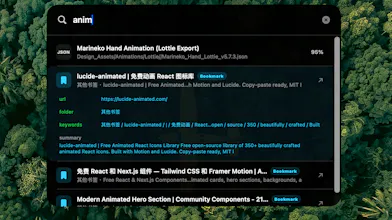
The File Card is meant to make every new file explain itself first: what it is, a short summary, useful keywords, suggested folder/name, and whether it needs manual confirmation. So instead of throwing everything into one pile, BooBar turns new files into small, reviewable decisions.
Foyer
Does it work with local llms?
BooBar
@fberrez1
Yes, partially. BooBar currently supports OpenAI-compatible AI endpoints, so if your local LLM server exposes an OpenAI-style API, such as Ollama, LM Studio, or another compatible gateway, you can usually point BooBar at that local base URL and use it that way.
That said, we still consider first-class local LLM support a work in progress. The current path depends on how complete the local server’s OpenAI compatibility is, and some model/tooling behaviors may differ from cloud providers. We’re planning to make this smoother with clearer presets, local provider docs, and better fallback handling soon.