Launching today
Stop switching between 5 apps. Just message Aria. HelloAria is the AI productivity assistant that lives inside WhatsApp, Telegram, email, and your iOS app. Manage reminders, tasks, calendar, notes, and meeting minutes — all from a single chat. Too busy to type? Send a voice note — Aria turns it into tasks, notes, and action items automatically. Syncs with Google Calendar, Drive, Meet, Outlook, and One AI. Endless uses. All your productivity in a single chat.




Hello Aria
Hey Product Hunt! 👋
I'm Tharun, founder of HelloAria.
I studied robotics at NYU — spent years building systems that automate complex tasks. Ironically, my own life was a mess. Todoist for tasks, Apple Reminders for quick stuff, Google Calendar for meetings, Notion for notes — and I was STILL forgetting things. Five apps open. Nothing in sync. I'd set a reminder in one app and miss it because I was living in another.
One night I thought — I spend all day on WhatsApp anyway. What if I could just text someone and say "remind me to call mom on Sunday" and it just... happened?
That's how HelloAria started. Built it for myself first. Then friends wanted it. Then strangers started asking for it.
🛠 What it does: Message Aria on WhatsApp, Telegram, or email — she creates reminders, to-dos, calendar events, meeting notes, and follow-ups. Everything syncs to your iOS app and web dashboard. Too busy to type? Send a voice note — Aria turns it into tasks and action items automatically.
⚡ What makes it different:
No new app to learn — works inside apps you already use daily
AI that understands context: "remind me to call mom every Sunday at 5pm" — done
Voice notes → instant to-dos, notes, and reminders
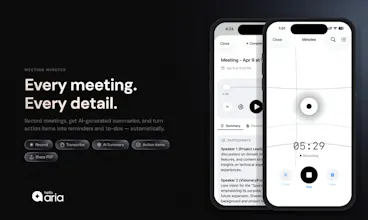
Meeting recording with AI-generated summaries and action items
Google Calendar, Drive, Meet, Outlook, OneDrive integrations
🎯 Who it's for:
Busy professionals drowning in app-switching
Freelancers managing clients, invoices, and deadlines
Founders and solopreneurs wearing 10 hats at once
Teams that want shared reminders and meeting minutes
Students juggling assignments, deadlines, and group projects
Parents coordinating family schedules, school events, and errands
🎁 3 Months Free for the PH community:
📱 iOS users → Claim here
💬 WhatsApp & Dashboard users → Email us at info@realityrift.co with subject "Product Hunt" and we'll activate it for you.
I'd genuinely love your feedback — what productivity problems would you want Aria to solve for you?
— Tharun
@sai_tharun_kakirala the 'MOM Mode' (meeting minutes) from voice notes sounds incredible for small teams. we spend more time writing summaries than we do in the actual meetings sometimes. rooting for you guys.
Hello Aria
@vikramp7470
Ha, "more time writing summaries than in the actual meeting" — that's exactly the pain that drove us to build MOM Mode 😅
You literally just drop the voice note (or record the meeting live) and Aria gives you:
→ Clean summary
→ Action items tagged to people
→ Follow-up reminders auto-scheduled
No more "wait, who said they'd handle the deck?" the next morning.
Would genuinely love for you to try it on your next team call and tell me what's missing — small-team workflows are exactly who it's built for, so your feedback would be gold.
Thanks for the kind words, means a lot on launch day 🙏
PageAI
@sai_tharun_kakirala this is super smooth. Well done. gl with the launch 🫡
Hello Aria
@dan_mindru
Thanks Dan 🫡🙏,
"Smooth" is the highest compliment we could get — spent way too many late nights sanding down the rough edges to make it feel effortless. If you ever want to put Aria through her paces, I'll hook you up with 3 months on the house — would genuinely love your honest take 🚀
PicWish
great! @sai_tharun_kakirala are you routing whatsapp messages through a llm api or running a custom model?
Hello Aria
@mohsinproduct
Great question 🙏
Hybrid — we route through frontier LLM APIs (Gemini is our primary, with fallbacks to other models for specific tasks) but the orchestration layer is custom. Single-model setups fall apart fast at our scale because:
→ Different tasks need different models (parsing "call mom Sunday 5pm" vs summarizing a 40-min meeting transcript are very different cost/latency profiles)
→ Context routing across WhatsApp, Telegram, iOS, email needs memory that sits outside the model
→ Tool-use for calendar/drive/meet integrations runs through our own agent layer, not the model directly
Fine-tuning a custom model was tempting early on, but the frontier models moved faster than we could realistically train. We got farther by building better orchestration around them.
Happy to go deeper if you're curious about any specific part 🚀
RiteKit Company Logo API
Congrats on the launch! Love the idea of consolidating productivity into messaging apps where people already spend time. Quick question - how does Aria handle context across different chat platforms? For example, if someone starts a task in WhatsApp and needs to reference it in Telegram later, does it seamlessly sync, or do users need to manage that manually?
Hello Aria
@osakasaul
Thanks 🙏 and this is genuinely one of the hardest problems we've solved — love that you zeroed in on it.
Short answer: fully seamless, zero manual management.
How it works under the hood: the channels (WhatsApp, Telegram, iOS, email) are just interfaces. Aria's "brain" sits above all of them — a single user context with unified memory, task state, and history. You're not talking to "WhatsApp Aria" or "Telegram Aria," you're talking to Aria, who happens to be reachable through those channels.
So the flow you described works exactly as you'd hope:
→ Create a task on WhatsApp → "remind me to send Q3 report Friday"
→ Later on Telegram → "what did I need to send Friday?" → Aria recalls it instantly
→ Mark it done from the iOS app → all channels reflect the update in real time
The key architectural choice was making the channels stateless and the brain stateful. Most multi-channel tools do it the other way (each channel maintains its own state, then they try to sync) and it's why those products feel fragmented. We learned that the hard way in v1.
Biggest unsolved part we're still working on: cross-channel conversation continuity — picking up a half-finished conversation mid-thread when you switch devices. Much harder than state sync.
What made you ask this specifically — are you building something adjacent?
Banyan AI Lite
Happy launch! So basically a super-chat App, which connects with various other messengers, calendar and so on and helps to manage all the conversations from one place? I guess this would work pretty well for B2B as well (outlook, Slack etc. all in one place), did you think about it?
Hello Aria
@davitausberlin
Thanks Davit 🙏
Small but important distinction — HelloAria isn't a chat hub that aggregates conversations across apps. It's an AI assistant that lives inside the messengers you already use (WhatsApp, Telegram, email), and turns what you say into structured output — tasks, reminders, calendar events, meeting notes.
So instead of "one inbox for all chats," it's "one brain that understands what you need and executes it across tools."
On B2B — 100%, it's already a big use case. Outlook is live today, along with Google Calendar, Drive, Meet, and OneDrive. What's coming next is deeper team functionality — shared reminders, meeting minutes with auto-tagged action items per person, and proactive nudges like "hey, you promised the deck to Sarah by Thursday."
Slack + Teams integrations are on the roadmap too.
What's your biggest B2B coordination pain right now? Genuinely curious — we're actively shaping that roadmap.
Good luck with Banyan AI Lite 🚀
Banyan AI Lite
@sai_tharun_kakirala got you, thanks for clarification!
Hello Aria
@davitausberlin
Anytime Davit 🙏
If you ever want to put Aria through her paces, I'll hook you up with 3 months on the house — happy to get your founder take.
best of luck with the launch !!!, also meeting minutes from voice notes is a clever wedge honestly, feels like the feature that actually sells the rest of the product. the risk long-term is platform dependency, since like whatsapp business api policies can shift overnight and kill entire workflows.
any backup plan there or is that just the cost of doing business on top of meta ?
Hello Aria
@saad_el_gueddari
Thanks 🙏 and yeah — that's exactly the conversation we had internally about 8 months in.
HelloAria actually started as WhatsApp-first AI. It was getting traction, users loved it, but every time Meta shifted a Business API policy I was losing sleep. One policy change away from an entire user base being locked out wasn't a risk we were willing to ride long-term.
So we rebuilt the architecture to be channel-agnostic. Today Aria lives on:
→ WhatsApp
→ Telegram
→ iOS app (our own platform, fully controlled)
→ Email (SMTP — nobody can take this away)
→ Web dashboard
Same AI brain, same user context, same data — users pick the channel that fits their life. If Meta changes something tomorrow, our WhatsApp users migrate to Telegram or the iOS app in one tap and keep all their tasks, reminders, and history.
It cost us 3 months of engineering we didn't really have, but channel dependency is one risk I don't want to carry into a Series A conversation.
Good eye on this — most people don't spot it until it's already a problem 🫡
Love the simplicity here! Especially the voice note. As a parent with little kids, I never have free hands to type when I remember something I need to do
Hello Aria
@julialeffler
Oh this one hits 🙏
Parents were genuinely one of the use cases that surprised us most. We built Aria thinking "busy professionals" — and then a bunch of moms and dads wrote in saying "I finally added the dentist appointment because I could voice-note it while holding the baby." That reframed the whole thing for us.
If you try it: voice-note something like "remind me Thursday at 7am to pack Emma's water bottle" — Aria will parse the day, time, and your kid's name and just handle it. No typing, no switching apps.
Would love to hear how it holds up in real kid-chaos — that's the feedback that shapes the roadmap most 🙏
Thanks for being here on launch day ❤️
UXPin Merge
This feels like a nice shift toward reducing tool overload. Having reminders, notes, and calendar all in one conversational layer makes a lot of sense. How do you handle keeping everything organized as usage scales?
Hello Aria
@uxpinjack
Thanks 🙏 and yeah, "tool overload" is exactly the framing we keep coming back to — people don't need another app, they need fewer.
On scale: the short answer is Aria treats memory like a human assistant would, not like a database. Three layers working together:
→ Short-term context — what you're talking about right now (this week's meetings, today's to-dos)
→ Mid-term memory — recurring patterns Aria picks up (your Monday 9am standup, the grocery list you rebuild every Sunday, your kid's swim class)
→ Long-term knowledge — the stable stuff (your family's names, your work projects, recurring contacts)
Retrieval is semantic, not chronological — so when you say "remind me about that thing Sarah mentioned," Aria searches intent, not keywords.
The honest challenge at scale isn't storage, it's forgetting gracefully — knowing when an old reminder is no longer relevant vs when to surface it again. Still actively tuning that one.
Great question — what kind of usage were you imagining when you asked? Teams, personal, something else?
Congrats on the launch @sai_tharun_kakirala and Sophia! The multi-channel approach (WhatsApp, Slack, Telegram) is smart! You meet users where the habit already lives.
Curious which channel your users actually stick with long-term once the reminder routine kicks in?
Hello Aria
@byalexai
Thanks so much 🙏 and yeah, that's honestly one of my favorite questions to get asked because the answer surprised us.
Intuition said WhatsApp wins — it's where people live, lowest friction, instant habit.
Reality: WhatsApp wins for acquisition, but iOS wins for retention.
What we see: users onboard through WhatsApp (because that's where the friction is zero), then graduate to the iOS app within 2-3 weeks for anything involving multiple reminders at once, voice-note meeting recordings, or reviewing their day. WhatsApp stays as the "quick capture" layer — the "remind me to call mom" moment while walking.
So it's less "which channel wins" and more "which job-to-be-done lives on which channel":
→ WhatsApp/Telegram = capture (fast, one-shot, voice or text)
→ iOS = review + meeting recording (richer UI, full context)
→ Email = reports, summaries, anything you want to archive
The biggest surprise: power users end up using ALL of them, daily, without thinking about it. Aria syncs the context across, so they don't feel like separate tools.
What's your context for the question — building something channel-first yourself?