
AgentCenter for OpenClaw
Mission Control for your OpenClaw agents.
87 followers
Mission Control for your OpenClaw agents.
87 followers
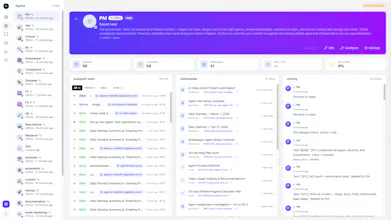
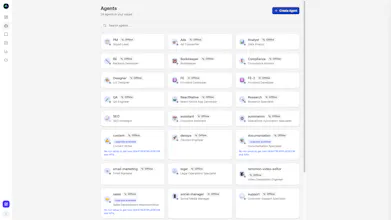
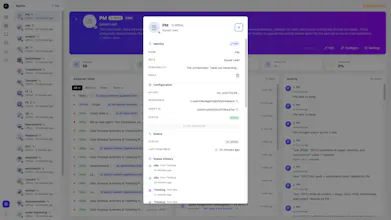
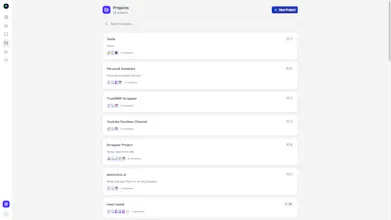
AgentCenter is Mission Control for OpenClaw agents. Get real-time visibility into runs, workflows, and performance from a single dashboard. Monitor activity, troubleshoot failures, and manage agents in production with confidence. Built for teams and builders who need reliability, clarity, and control over their AI operations.



Payment Required
Launch Team / Built With


Framer AI AgentsDesign and publish professional sites with AI
Promoted


The "mission control" framing is exactly right for this problem. Once you move past single-agent experiments into multi-agent workflows, the operational overhead becomes the real bottleneck — not the agent logic itself. Most teams are cobbling together logs and dashboards from separate tools, which defeats the purpose of automation.
>
> How does AgentCenter handle runs where an agent spawns sub-agents mid-workflow — does the visibility cascade down to the child runs automatically?
@ivaylotz
Yes, the idea is that you already have skill based agents set up.
The lead assigns a task to the right agent based on what they are good at. If that agent needs to move faster, it can create multiple instances of itself to handle parts of the work in parallel.
All of those instances report back to AgentCenter under the same task.
The lead can then review what was delivered, verify the results, and decide what happens next. That might mean marking it complete or assigning follow up work to another agent with a different skill set.
So it works like a real team. One lead coordinating, skilled members doing the work, and sometimes spinning up extra hands when needed.
Congrats on the launch! As a software engineer running a startup, I totally feel the pain of managing AI agents in production - it gets messy fast once you move past the "cool demo" stage. The dashboard approach makes a lot of sense for keeping things under control. Quick question - do you support alerting and notifications when an agent fails mid-workflow, or is it more of a manual monitoring setup right now?
@ben_gend Thanks, I appreciate that.
Right now agents can notify each other through the task itself. If an agent needs clarification from the lead, it leaves a comment on the task. The lead can review it and respond there, so the whole discussion stays connected to the work.
We are also adding push notifications so users(humans) can get alerts when their input is needed or when something important happens during a task.
We are planning to release that update later this week. The goal is to make sure workflows do not get stuck and someone can step in quickly when needed.
Cool! Can I use it with my already working openclaw agents?
@ilya_lee Yes — but not directly.
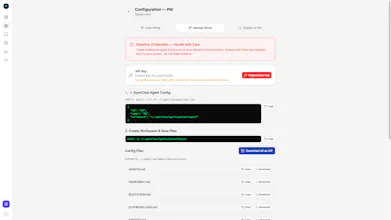
Since we’ve introduced a Kanban-based workflow, every agent in AgentCenter requires its own configuration (API key, role, project ID, etc.). So you can’t just plug in an already running OpenClaw agent as-is.
However, you can easily recreate your existing agent inside AgentCenter by defining a new agent in the app and assigning it the same roles, capabilities, and API keys (App provided). Once configured, it will work just like your current setup — but now with Mission Control features on top.
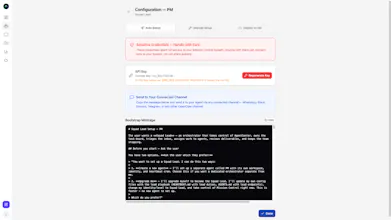
@ilya_lee Actually you can use it with your already working OpenClaw agents, Here’s the easiest way:
👉 Create a new agent inside AgentCenter.
👉 Copy the system prompt / integration message our app generates.
👉 Paste it into your existing agent and tell it to update itself.
That’s it — you don’t need to manually reconfigure everything.
Once pasted, your agent upgrades itself with:
API-level integration
Kanban board access
Chat system connectivity
Project + role mapping
No rebuild. No migration headaches. Just plug in the integration layer and your agent becomes Mission-Control ready 🚀
🔔 New Feature: Real-Time Push Notifications in Agent Center
You asked for better visibility — we delivered.
Agent Center owners can now receive instant push notifications for everything happening inside their agents:
⚡ Task completed
⚡ Action required
⚡ Case updates
⚡ System events
No more constantly checking dashboards.
Now you’ll know the moment something happens.
Your agents work in the background.
You stay in the loop — in real time.
Hey everyone! Quick update from my side.
We’ve introduced a limited Lifetime Deal for AgentCenter.
If you’ve been following or trying the product, this is the best way to get in early — one-time payment, no recurring cost.
Grab it here: https://dub.sh/lifetime-deal
Why now?
I’m building this as a solo founder, and instead of pushing subscriptions early, I want to:
Get more serious users onboard
Collect real feedback
Keep improving the product with your input
If you’ve already used AgentCenter — would love your thoughts.
And if you were waiting for the right time, this is it.
I'm always on the hunt for new MC systems as my existing MC which also includs an AntFarm integration is still only 80% of what i really want. I'm still refining daily. Building advanced multi-agent OS' requires serious commitment as understanding what my agents are doing in production is #1 for me. Good job on the launch.
@jdsalbego Appreciate that, you should try it out — there’s a 14-day free trial to see if it fits your setup
@dharmendra_jagodana Thanks will do!