

SiteRows example #4
Hello everyone. Welcome back to my siterows.com series.
🔹 Quick reminder of what this app does: Allows you to scrape web content with SQL, like you would query a DB. Creating a FREE account unlocks automation features and higher usage limits.
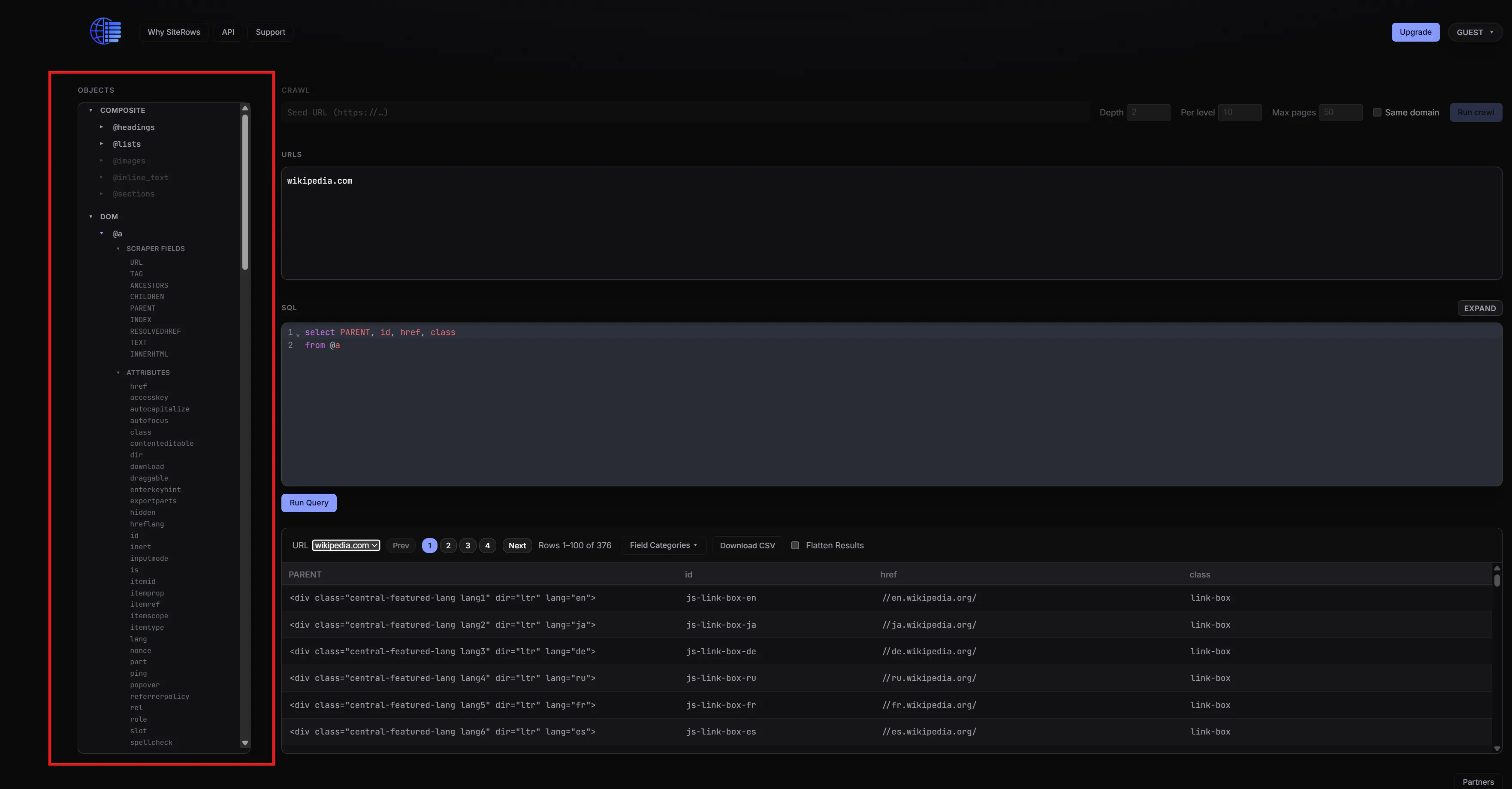
🔹 Today's question: "On the site, what is the whole deal with this Objects box?"
The purpose of the objects box is to give it a SQL-like look and feel, and here is how it's structured:
🔹 When you expand "DOM" and further expand any element like @a or @div, you get two items: "Scraper Fields" and "Attributes".
🔹 Under "Attributes", you'll find all the standard HTML attributes for that element
🔹 Under "Scraper Fields", you'll find a couple of extra synthetic attributes I thought would be useful like Index, Parent, Children, etc...
🔹 Scrolling back to the top, you'll see a couple of "Composite" elements I also thought would be useful. For example, the @headings element represent @h1, @h2, @h3, @h4, @h5, @h6 elements combined.
🔹 Think of any element like @a, @div, or @headings as your "tables", and their attributes like href, id, class as your "fields".
Thanks, everyone. Please don't hesitate to reach out with any questions or feedback.
Replies