
Links
Badges

Forums
 •
•3mo ago
SiteRows example #6
Hello everyone. Welcome back to my siterows.com series.
Quick reminder of what this app does: Allows you to scrape web content with SQL, like you would query a DB. Creating a FREE account unlocks automation features and higher usage limits.
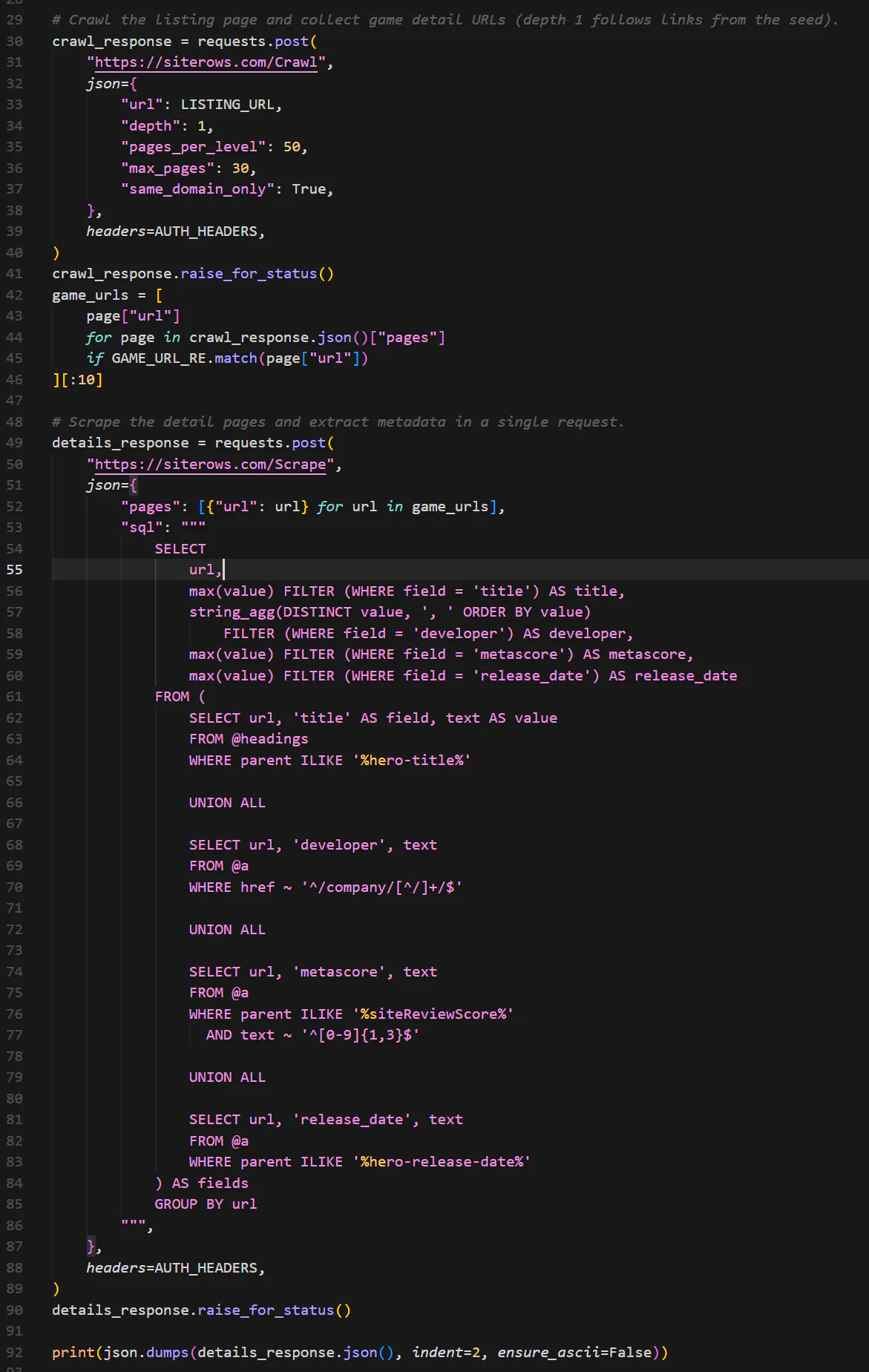
Today's example is a repeat of the previous example, except this time using the /Crawl API endpoint which is only available as part of the PRO tier. Please visit https://www.siterows.com/upgrade to see what cool features and extensions you would get in the PRO tier.
Below is a Python example/response, and I'm also saving all examples in this GitHub repo: github.com/sgt-oz/SiteRows.
What I'm doing here is first calling the /Crawl endpoint to get Metacritic's best games this year to discover game URLs, then fetch each game's data with /Scrape endpoint.
Thanks, everyone. Please don't hesitate to reach out with any questions or feedback.
 •
•4mo ago
SiteRows example #4
Hello everyone. Welcome back to my siterows.com series.
Quick reminder of what this app does: Allows you to scrape web content with SQL, like you would query a DB. Creating a FREE account unlocks automation features and higher usage limits.
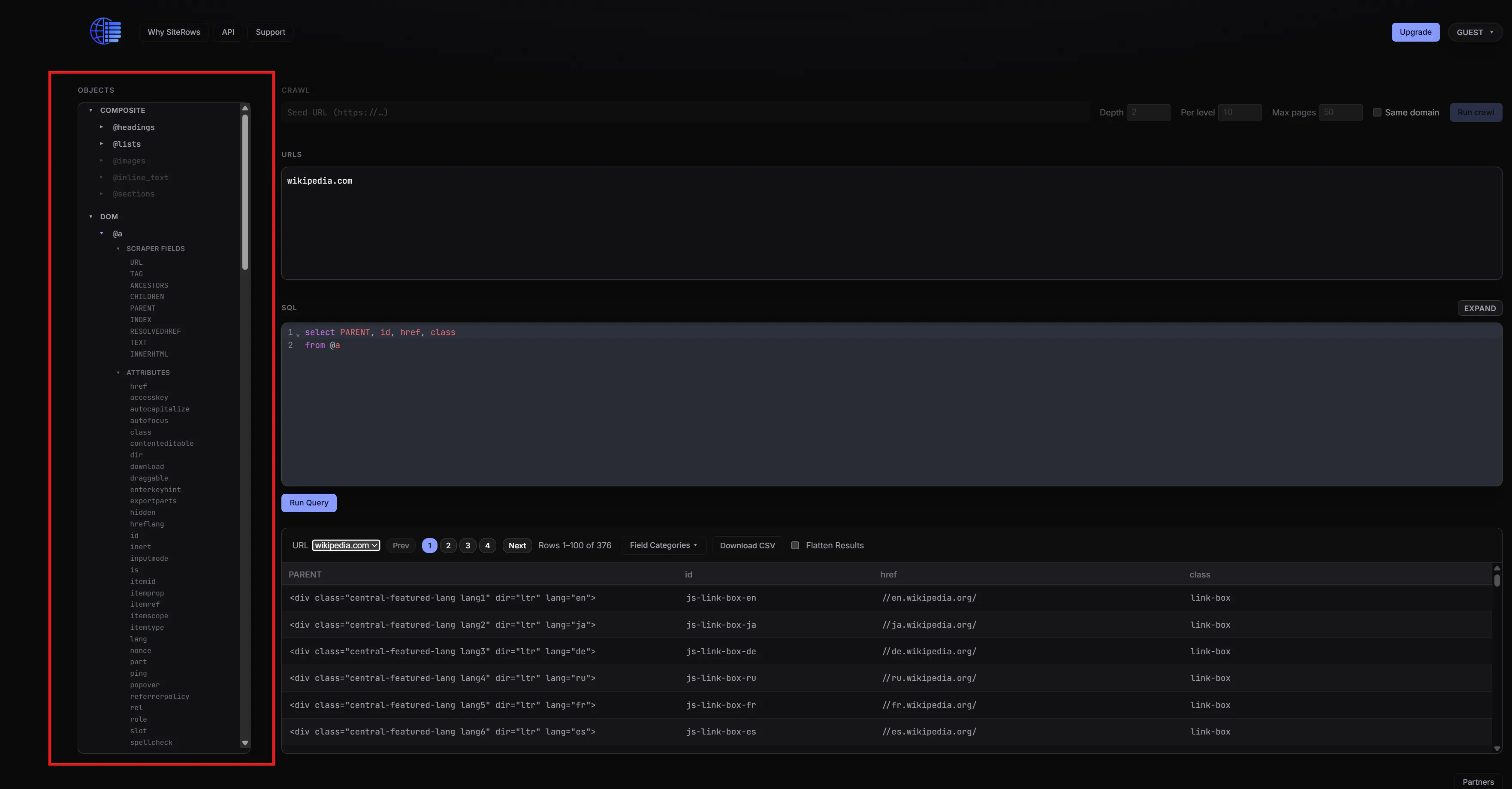
Today's question: "On the site, what is the whole deal with this Objects box?"
The purpose of the objects box is to give it a SQL-like look and feel, and here is how it's structured:
When you expand "DOM" and further expand any element like @a or @div, you get two items: "Scraper Fields" and "Attributes".
Under "Attributes", you'll find all the standard HTML attributes for that element
Under "Scraper Fields", you'll find a couple of extra synthetic attributes I thought would be useful like Index, Parent, Children, etc...
Scrolling back to the top, you'll see a couple of "Composite" elements I also thought would be useful. For example, the @headings element represent @h1, @h2, @h3, @h4, @h5, @h6 elements combined.
Think of any element like @a, @div, or @headings as your "tables", and their attributes like href, id, class as your "fields".
Thanks, everyone. Please don't hesitate to reach out with any questions or feedback.
•4mo ago
SiteRows example #3
Hello everyone. Welcome back to my siterows.com series.
Quick reminder of what this app does: Allows you to scrape web content with SQL, like you would query a DB. Creating a FREE account unlocks automation features and higher usage limits.
Today's question: "What if I'm using something like Selenium to navigate somewhere (perhaps logging into a site), and then I want to query the page?"
In order to accommodate this, I just added the ability to pass a raw HTML string to the /Scrape API endpoint, instead of a URL. Below is a Python example/response that demonstrates this new feature, and I'm also saving all examples in this GitHub repo: github.com/sgt-oz/SiteRows.
Basically here is what's happening:
* Function fetch_logged_in_html() uses Selenium to log into a site and return the home page's HTML string
* That string is passed to the /Scrape API endpoint. Instead of the payload being: {"url": "mywebpage.com"}, you just pass:
{"html": "<body><a href=...>.....</body>"}
....and that's pretty much it. SiteRows queries your HTML and gets results as if you passed a page URL to it.
Thanks, everyone. Please don't hesitate to reach out with any questions or feedback.
