

PastePasteSpace 3.0 - big update - a secure clipboard manager for macOS
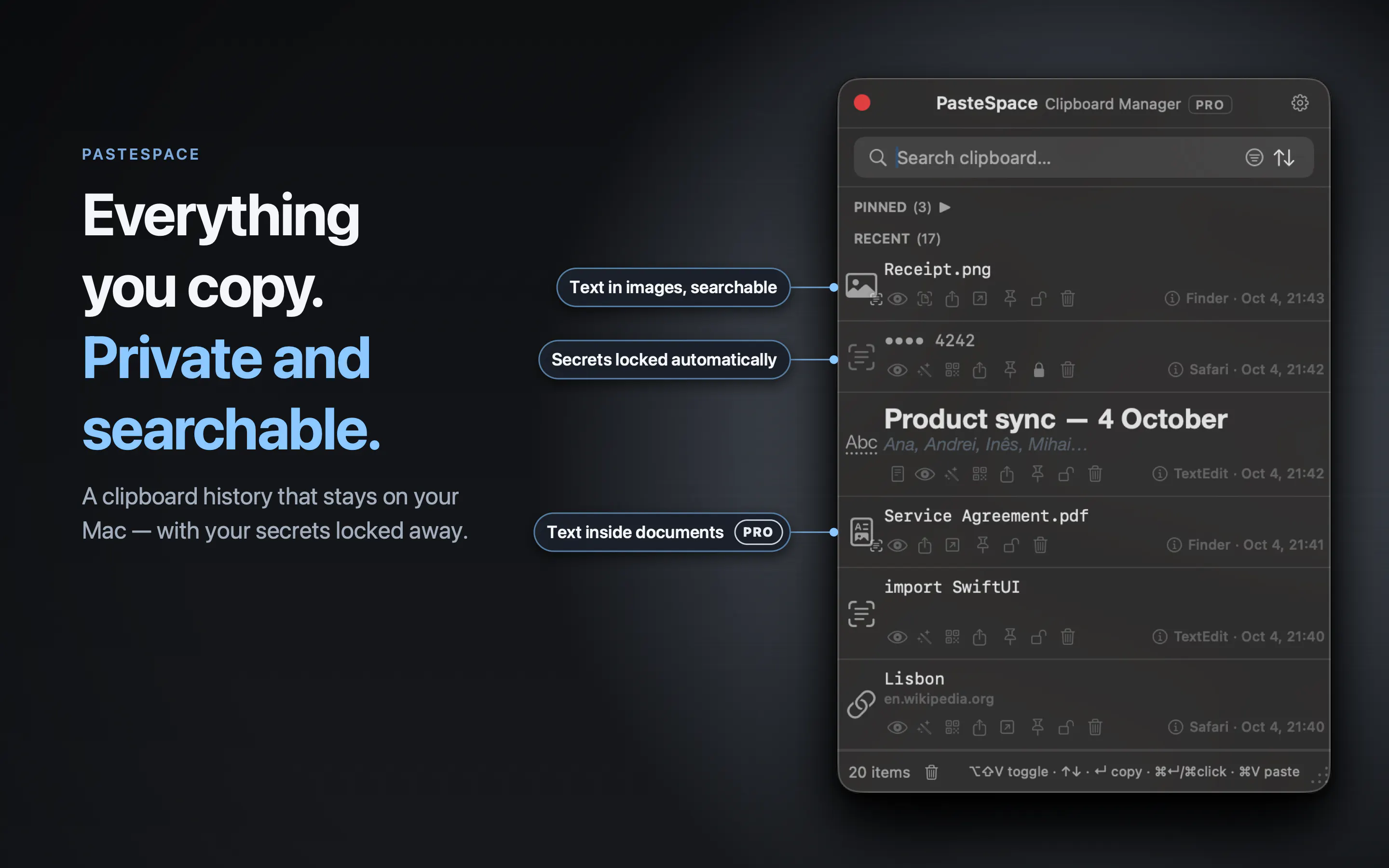
Everything you copy, found in seconds, even the words inside your screenshots. Passwords and card numbers lock themselves behind Touch ID. Nothing leaves your Mac.
Copy the way you always do. PasteSpace remembers it all, and hands any of it back in seconds.
Text, links, images and files: everything you copy lands in a history you can search instantly, stored only on your Mac. Passwords and card numbers are locked behind Touch ID the moment you copy them. And you can find a screenshot just by a word that was in it.
An hour ago, a client emailed you their address. Now you need it. Press ⌥⇧V and PasteSpace opens right under your pointer. Type a word you remember, press Return, then ⌘V. Done, without leaving what you were writing.
FIND ANYTHING YOU COPIED
• Search the text of every item, file names and the app each copy came from. Accents don't matter: “cafe” finds “café”.
• Find a screenshot by the words inside it. Text in images is recognized on your Mac, in up to 30 languages.
• Search inside documents (Pro): PDFs, scanned PDFs, Word, Excel, RTF, OpenDocument, web pages and text files are found by the words they contain.
• Filter by 16 kinds of content and sort nine ways; in Pro, add date, state and source app.
SECRETS LOCK THEMSELVES
Card numbers, IBANs, passwords, API keys, SSH keys and seed phrases are recognized as you copy them and encrypted with AES-256 in the Vault. A locked item shows only a mask (a card reads “•••• 4242”), never appears in search, and opens only with Touch ID or your Mac's password. Copies from password managers go straight into the Vault, and anything else locks with one click.
NOTHING LEAVES YOUR MAC
No account. No cloud. No analytics, no ads, no tracking. Your history lives only on this Mac, inside the macOS App Sandbox, and every feature works offline. The only connection is Apple's App Store, for purchases and the occasional rating request.
PasteSpace never asks for the Accessibility permission, which would let an app watch and control your Mac. It puts your item on the clipboard, brings back your app, and the ⌘V stays yours.
EDIT BEFORE YOU PASTE
Quick Look opens any item in a floating panel with a full rich-text editor: fonts, colors, highlights, lists, undo and redo, and ⌘F to find. Saving never overwrites: every edit becomes a new version next to the original. Fix a word misread in a scanned receipt, then copy just the part you need, formatted or plain.
DATA MAGIC
57 one-click transformations, offered only when they fit what you copied. Pretty-print JSON or turn it into a Swift struct, convert colors, strip tracking from links, turn spreadsheet cells into a Markdown table, add up numbers.
BUILT FOR THE WAY YOU WORK
• Pin what you paste every day: your address, IBAN, signature, templates.
• Select several items and copy, pin, lock or drag them all at once.
• Drag text, images and files straight into other apps, as real files.
• Share through Messages, Mail, AirDrop and more, or turn any text into a QR code.
• Paste with formatting, or as plain text whenever you want.
• Always on top: keep the window open while you work.
• App Blocklist: apps whose copies are never recorded.
• Ephemeral Mode (Pro): erase your history every time PasteSpace quits. Vault items are always kept.
Made for people who copy and paste all day, and for anyone handling client data, credentials or confidential documents.
FREE, WITH PRO WHEN YOU NEED MORE
Free: 10 history items, 3 pins, 2 Vault items and 1 blocked app, with Quick Look, text recognition, Data Magic and QR codes for your latest text and image. Search, sorting, filtering by kind, Share and drag and drop are always free.
PasteSpace Pro is one purchase, with no subscription: unlimited history, pins, Vault items and blocked apps; Quick Look, text recognition, Data Magic and QR codes for every item; search inside documents; advanced filters; and Ephemeral Mode. Yours for life, future updates included.
Requires macOS 14 Sonoma or later. Touch ID recommended for the Vault; your Mac's password works too.
Questions or ideas? mariuscpopescu@icloud.com. I read every email.
Replies
Be the first to reply
Have a question or a thought to share? Add a comment above to start the conversation.