
 •
12d ago
rhun 0.19.1: agent session fixes and faster language-server coloring
rhun 0.19.1 is out. This is a small bug-fix release.
Claude Code and Codex sessions now appear when you use a custom configuration directory. Switching agent profiles also clears up the brief display of sessions cached from the previous profile. Existing worktree history is preserved.
Hover cards now use one background, including behind fenced code.
I also released LSP 0.3.5. Semantic coloring no longer rescans a long line for every token. In a benchmark with 8,000 tokens on one 40 KB line, conversion fell from roughly a second to 0.38 ms on an M1 Max. This measures token conversion on that machine.
•1mo ago
What’s missing from rhun for your AI coding workflow?
Hey everyone, following up on our launch with a question about where rhun should go next.
The idea behind rhun is a small, fast editor for working alongside coding agents. You can already run agents in the terminal, follow Claude Code and Codex sessions in the agents panel, and review changes with built-in Git tools.
I'm especially interested in two things:
AI integrations: Which tools do you use, and what would you want rhun to do with them? Send selected code to an agent, manage sessions, make reviewing agent changes easier, or something else?
Missing features: If you ve tried rhun, what made you switch back to your usual editor? What s the one feature you couldn t comfortably work without?
•24d ago
What extension have you always wanted in your editor?
rhun is a small, open-source code editor. It has extensions now, and I d love to see what people make with them.
We ve added Claude Code and Codex skills for building and testing your own extension, plus a skill for porting open-source VS Code extensions. Describe the tool you want, then work on it with your agent. Rust/Go templates, examples and CLI commands give you a place to start and a way to share it.
What s the oddly specific extension you ve always wanted?
Try rhun: https://rhun.app
•1mo ago
rhun 0.17.9: your code, your agents, one small editor
My favourite milestone this week: my son made rhun his default editor on Omarchy. Seeing someone choose it for everyday use felt pretty great
And 0.17.9 is now out!
If you re new here, rhun is a small, fast code editor written in assembly. Code, a terminal, Git diffs and coding-agent sessions, all in one window.
The recent 0.17.8 update brought Grok Build sessions alongside Claude Code and Codex, file type icons, and separate light/dark themes that switch with your system. On Omarchy, rhun can follow your desktop theme.
•1mo ago
rhun 0.17.14: OpenCode sessions, searchable settings, and smoother editing
The last release update I posted here was 0.17.9. We're now at 0.17.14, with a few additions and a lot of work on the small things you feel while editing.
Here's what's changed since then:
•1mo ago
rhun is 74x faster than just installed VS Code
Just wanted to sahre some startup time stats from my almost 10 years old laptop:
VS Code 1.141.0 clean profile, no extensions
- Median: 997.89 ms
- Average: 1,015.33 ms
- Range: 978.23 1,163.31 ms
Neovim 0.12.5 Omarchy LazyVim configuration
- Median: 276.53 ms
- Average: 273.96 ms
- Range: 255.92 287.73 ms
Rhun - v0.17.7
- Median: 13.55 ms
- Average: 13.43 ms
- Range: 8.17 16.19 ms
https://rhun.app (Linux/macOS/Windows)
•1mo ago
rhun 0.17.7: our largest minor release yet
rhun 0.17.7 is out. It s the largest minor release I ve put together so far, and the one that received the most help from the community.
For anyone new to rhun: it s a small, fast code editor written in Assembly, with a built-in terminal, Git tools, and a panel for Claude Code and Codex sessions. It runs on Linux, macOS, and Windows.
A few highlights:
Agent sessions across Git worktrees now show up in the Agents panel, with more reliable discovery and refreshes.
Click file paths in the terminal to open them in the editor, including line and column references. Use Cmd+click on macOS or Ctrl+click on Linux and Windows.
Smoother touchpad scrolling, adjustable scroll sensitivity, and horizontal scrollbars for long lines when word wrap is off.
Better panel resizing, scrollbar auto-hide, and a scrollbar in Settings.
Shift+Enter now works as expected in terminal tools that use the kitty keyboard protocol, including Pi.
•1mo ago
0.17.5-0.17.6
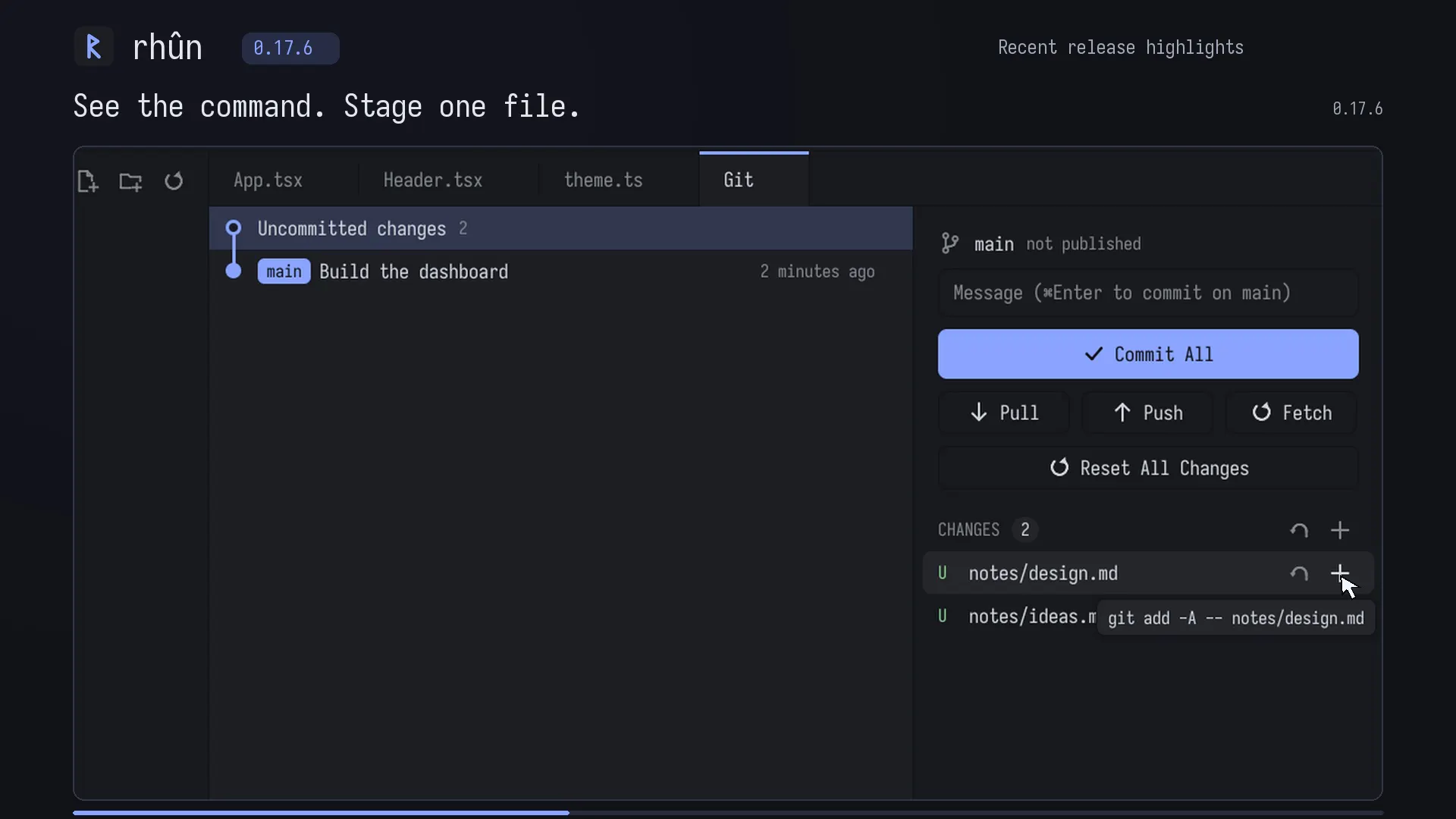
rhun 0.17.6 is out!
Find in files now opens instantly.
Git command tooltips, per-file actions in untracked folders, and live updates.
Open projects in separate windows, with cleaner active tabs.
Plus terminal and Windows installer fixes.
Multiple UI/UX fixes from the community input (v.0.17.5)
•2mo ago