

Devs: before you pay Apple for a bigger SSD, look at what's actually filling the disk

I'm Yuriy, CTO at Nektony. We've been building Mac storage utilities for 15 years, so I've watched what actually fills real developers' drives, file by file. Posting this because the standard advice “storage is cheap, just buy more” quietly skips the most useful 20 minutes you'll spend on your machine all year.
Here's what a full disk is actually telling you. When the drive fills, the system hands you the most honest inventory it has all year: every cache, every node_modules, every Docker layer and DerivedData folder you forgot existed, all on one ledger. A bigger disk raises the ceiling, clears the banner, and hides the map, but does not fix the original issue. The behavior underneath keeps running, now out of sight.
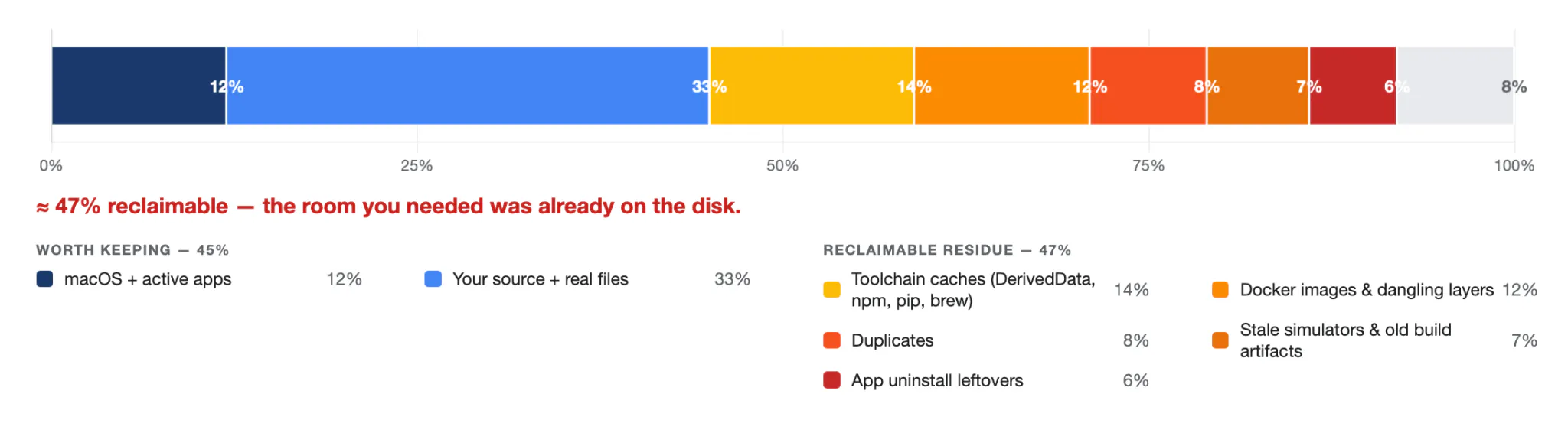
On a working dev Mac, the pattern is boringly consistent. Most of the drive is toolchain exhaust:
node_modules duplicated across every project you've touched this year, a few hundred MB each
Docker images and dangling layers nobody pruned (quietly tens of GB)
Xcode's DerivedData, regenerated on every build (double-digit GB on an active project)
iOS simulator runtimes for OS versions you dropped two years ago
Homebrew, pip, and npm caches
Old .app builds parked in Downloads
Each arrived a kilobyte at a time, below the threshold where a single write is noticeable. On a dev machine, enough of it is reclaimable that “I need a bigger disk” usually just means “I haven't deleted anything in months.”
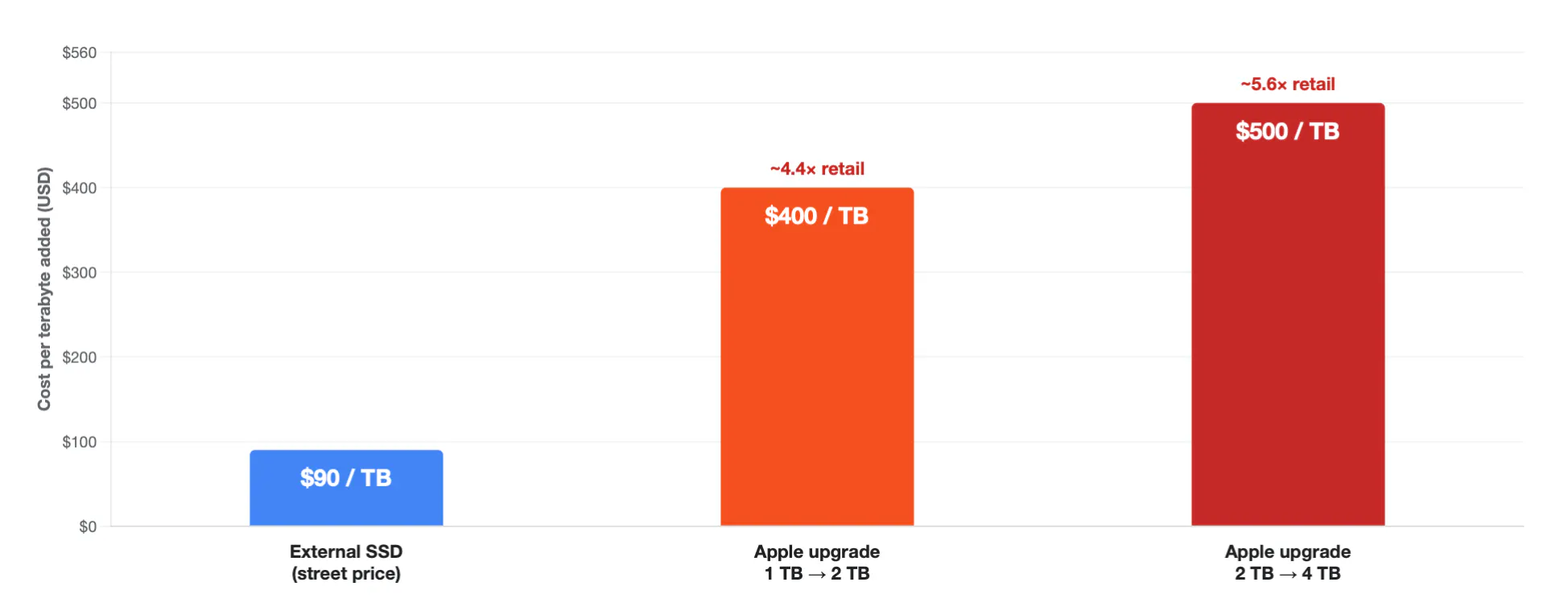
And the upgrade isn't free. The SSD is soldered to the logic board, so it's a once-at-purchase decision at Apple's price: on the M5 MacBook Pro, 1 TB → 2 TB is $400 and 4 TB is $1,000. The same capacity as an external SSD runs about $70–110 per terabyte, roughly 4–7× retail. “Storage is cheap” leans on you not doing that division.
I'm not anti-upgrade. Sometimes 8 TB of video really is 8 TB of video. The point is to make it an earned decision instead of the configurator's highest-margin default. We refactor and delete to keep a codebase legible because a disk is a state you own too.
(Yes, my team makes a tool for the cleanup path — MacCleaner Pro — but I'd honestly rather you understand the problem than buy anything; the understanding is what saves you money, on this machine and the next one.)
Two questions for the thread:
What's the single biggest space-hog you've ever found on your own machine once you actually looked?
Where do you land — monthly discipline, or just buy the 4 TB and never think about it again?
Replies