

Oasis Browser: Destructive Actions Confirmations

Agentic browsers are exciting until the assistant closes the wrong tabs. We built a hard stop for irreversible actions.
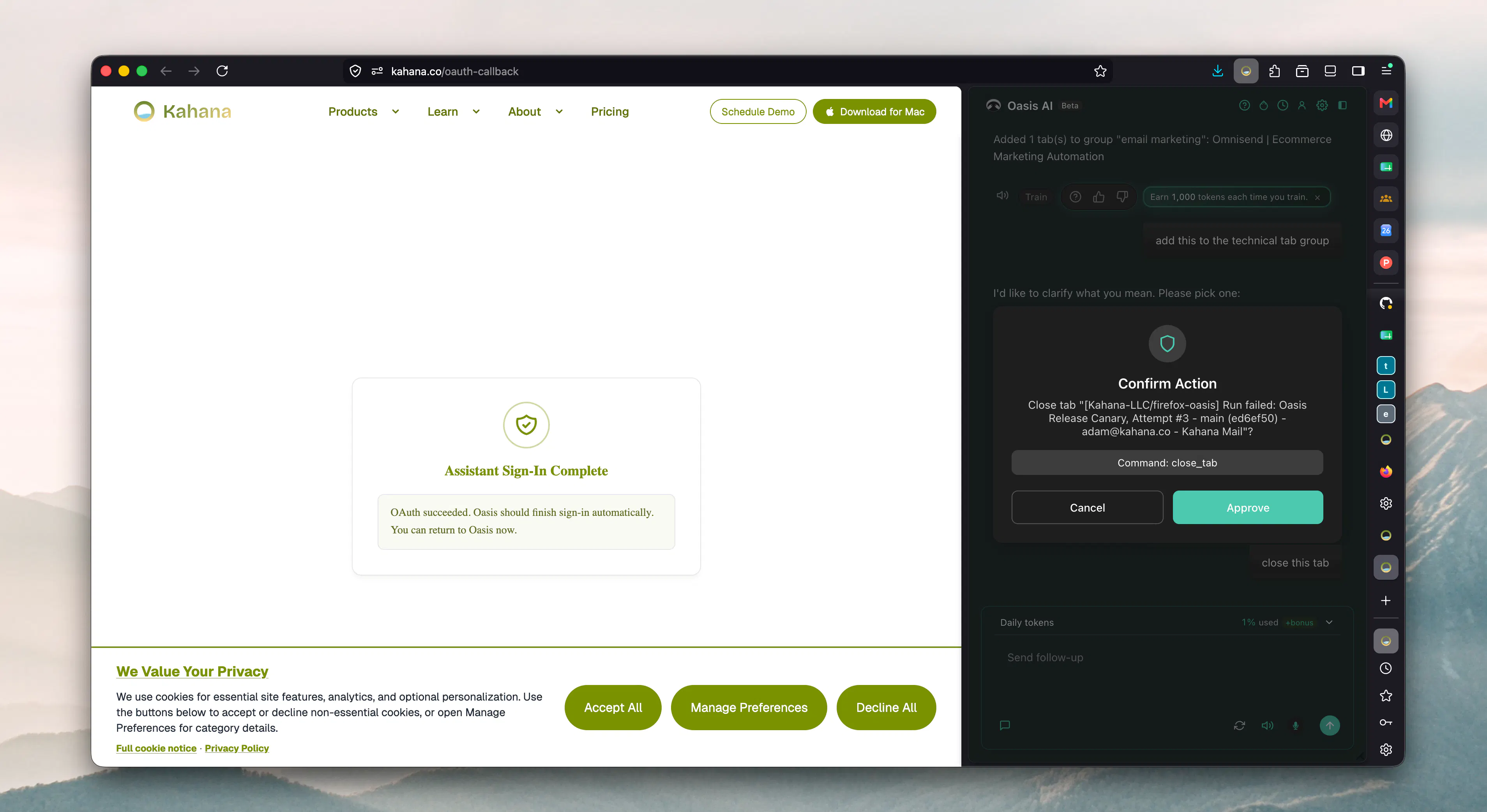
Insight for other users: When Oasis plans something destructive (for example closing many tabs or deleting data), a confirmation modal blocks the browser until you approve or cancel. Nothing runs until you make an explicit choice.
What usually does not trigger this: Non-destructive reads like listing tabs, summarizing a page, or searching your history. Those can proceed without the same gate.
How to stay safe:
Read the summary in the modal carefully. Cancel is always safe.
Hit Confirm only if the listed scope matches what you meant.
If you are unsure, narrow the request in chat (for example: “close only the tab titled …”).
This pairs with plain-English browser control: you describe goals in natural language, Oasis picks browser tools, and destructive steps get an extra confirmation layer.
Doc: https://kahana.io/docs/destructive-action-confirmations
Related: https://kahana.io/docs/plain-english-browser-control | https://kahana.io/docs/split-view-for-assistant-actions | https://kahana.io/docs/busy-streaming-state
Questions we would love your take on:
What deserves a modal
Should “close all tabs except pinned” always confirm? What else belongs on the destructive list?Friction vs safety
Is one modal enough, or do you want a second step for high-impact actions (type DELETE, show tab count)?Clarity of scope
What should the modal show so you trust it: tab titles, counts, window name, undo window?Recovery
After you confirm, do you want undo for tab closes? How long should that last?For the Oasis team
Have you seen a confirmation when you did not expect one, or the opposite (something risky with no prompt)?
Tell us where you want the line between fast agentic help and guardrails.
Replies
Be the first to reply
Have a question or a thought to share? Add a comment above to start the conversation.